 NexSHOPX-官方新闻
In 2026, Telegram's global monthly active users have surpassed the 1 billion mark, with daily active users reaching 500 million. For cross-border e-commerce sellers, Web3 project teams, overseas community operators, and ad-buying teams, Telegram has long evolved from a simple instant messaging tool into a core business battleground that combines channel broadcasting (Channels), community building (Groups), and customer service conversion.
As the platform's commercialization ecosystem matures, subscribing to Telegram Premium is no longer just about getting a fancy star badge or animated avatar. Many operations teams have found that without upgrading, they face restrictions everywhere in daily management of hundreds of groups and several GB of video assets—and they can't even enable core customer reception features. Yet with overseas bank card declines, high app store commissions, and a chaotic market of top-up services, how do you choose a Telegram Premium top-up that is hassle-free without endangering account security? Based on the latest 2026 platform mechanisms, this article breaks down the core value of Premium, the password-free top-up process, and configuration plans for matrix Telegram accounts.
Why Are Global Teams Subscribing to Telegram Premium in 2026?
In earlier use cases, a regular free account was enough for basic group creation and chatting. But in high-intensity cross-border business communication and community operations, the four substantive benefits unlocked by Telegram Premium directly determine team efficiency:
- Directly unlock the core Telegram Business suite
Telegram currently includes the vast majority of Business features directly in the Premium subscription. Once an account activates Premium, you can enable a dedicated business profile in settings: configure business hours and location, set up automatic greeting messages for first inquiries, away messages outside working hours, quick reply templates for frequently asked questions, and use colored chat tags to categorize and archive customer conversations at different follow-up stages. For teams taking orders via personal accounts or providing 1-on-1 customer support, this is the prerequisite for building a standardized customer service desk at low cost. - Double the account capacity and operation limits
Operations staff doing overseas promotion and industry intelligence gathering often follow hundreds of industry channels and peer groups. After upgrading, the limit on joined channels and groups doubles from 500 to 1,000, the limit on chat folders increases to 20–30, pinned chats expand to 10, the single-file upload limit rises from 2GB to 4GB with unlimited download speed. When delivering uncompressed 4K promotional videos to overseas influencers or agencies, 4GB file transfers and full-speed downloads save a lot of transfer time. - Real-time translation across all conversations and voice-to-text
When dealing with customer groups in Southeast Asia, Russian-speaking regions, Latin America, and other language areas, Premium supports enabling real-time automatic translation for the entire chat window and channels without tapping each message individually; it also supports converting customer voice and video messages directly into text (Voice-to-text), which is extremely useful in noisy environments or when reviewing long voice records. - Channel boosts and ad-free experience
Premium users have boost slots that can be used to boost the team's main channels, helping channels unlock advanced interaction permissions such as posting Stories, custom emoji reactions, and custom backgrounds; it also completely removes official sponsor ads at the bottom of public channels, keeping the work interface clean.
Operational pitfall to avoid: Note that Telegram Premium is essentially about raising an account's feature limits and business presentation capabilities. It does not change the account's underlying risk control logic (flood control). If a newly registered account sends high-frequency bulk unsolicited DMs or aggressively adds people in a short time, it will still trigger platform restrictions even with a Premium star badge.
Self Top-Up vs. Using a Top-Up Service: Why Is "Password-Free Remote Recharge" the First Choice?
When a team decides to subscribe to Premium for a business account, they usually first try subscribing directly on mobile, but quickly encounter two barriers:
First is the payment channel and the "Apple tax/Google tax" markup. Common domestic UnionPay cards cannot be bound directly for payment; if you use iOS App Store or Android Google Play in-app purchases, Apple and Google add roughly a 30% platform channel fee, making the in-app monthly or annual subscription price noticeably higher than the official base price. Although buying multi-region overseas Apple IDs such as US, Japan, and Turkey can solve app downloads and gift card purchases in some regions, going through the trouble of foreign store billing and exchange rates just to top up a few Telegram Premium accounts is still cumbersome for multi-account teams.
Second are the "hand over your account" and "black card" risks of unregulated top-up services. Some low-priced top-up channels ask buyers to provide their phone number, login verification code, or even two-step verification (2FA) password, so the seller can log in from another location and pay on their behalf. For a main Telegram account that has accumulated a large amount of customer resources and chat history, letting a stranger's device log in not only easily triggers platform security blocks due to cross-region IP jumps, but also carries the hidden risk of sessions being maliciously retained (if you have ever let someone else log in to your account, we recommend referring to how to confirm the three channels and revoke permissions after buying an account to check online devices promptly). In addition, if a shady seller uses a stolen credit card (black card) for the purchase, and a chargeback occurs later, your Telegram account may face having Premium revoked or even the account being implicated.
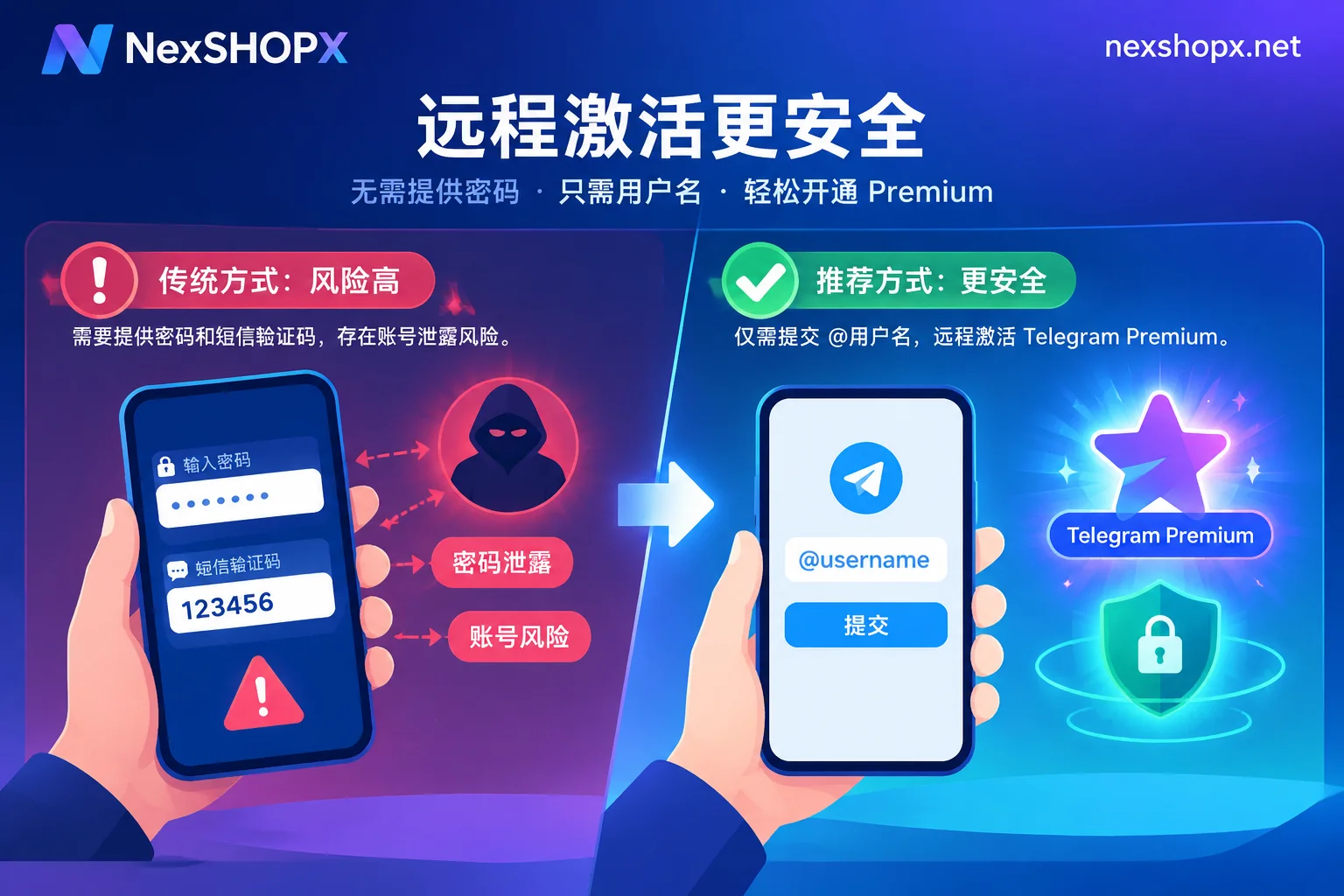
In contrast, going through the Telegram Premium top-up username-based remote direct recharge channel is currently the mainstream solution that balances efficiency and privacy security:
- Zero privacy exposure, no account login required: The entire activation process only requires your Telegram username (@username); you do not need to provide a phone number, login password, or SMS/client verification code at all. Your account stays online on your own device the whole time, eliminating any risk of remote login or session leakage.
- Multiple durations available, with localized settlement: Whether you need a monthly/quarterly plan for short-term business testing or an annual plan for long-term community building, you can contact customer service to confirm real-time pricing and duration. The platform supports Alipay and USDT (CNY settlement), saving the fixed costs of exchanging cryptocurrency yourself or maintaining an overseas credit card.
Telegram Premium Top-Up Process and Precautions
At NexSHOPX, Telegram Premium top-ups are handled manually. The process is very straightforward, but there are a few details to check in advance before submitting to avoid recharge delays:
Step 1: Verify and copy the correct @用户名
Open your Telegram Settings interface and check whether you have set a public username (Username).
- Be careful to distinguish "display name" from "username": Display names (First/Last Name) can be duplicated and contain special characters, so they cannot be used as the unique identifier for remote recharge; it must be a unique username starting with
@and composed of English letters, numbers, and underscores. - Note case sensitivity and spelling: Since remote gifting/direct recharge takes effect immediately once delivered by username, please copy the username directly from your profile page before submitting to avoid extra spaces or spelling errors from typing it manually.
Step 2: Contact customer service to confirm duration and pricing
Visit the Telegram Premium top-up page for basic instructions, or contact us directly through the store and Telegram online customer service to discuss the duration you need (e.g., 3 months, 6 months, or 12 months) and the number of accounts. If an enterprise team is purchasing in bulk for multiple customer service accounts, you can also ask customer service about bulk order discounts.
Step 3: Complete payment and wait for remote activation
After confirming the order and completing payment via Alipay or USDT, the customer service agent will initiate the remote recharge using the username you provided. Once activation is complete, your Telegram client will receive an official system notification, a Premium badge will automatically appear next to your name, and features such as Telegram Business will be unlocked simultaneously.
Additional Configuration: No Existing Telegram Account? How to Buy Ready-Made Telegram Accounts and Cross-Platform Premium
In actual business operations, many teams not only need Premium for the manager's main account but also need to purchase a batch of independent Telegram accounts for building channel matrices, maintaining community atmosphere, or triaging customer reception.
1. Buying Ready-Made and Aged Telegram Accounts
If you are in a business expansion phase and short on usable accounts, you can source ready-made resources through the Telegram accounts section:
- Multiple country codes and registration years: Covers registered and aged accounts from Russia, the United States, the United Kingdom, Southeast Asia, and other country codes. Aged accounts, having built up history over time, are generally more stable in normal business communication than newly registered accounts.
- Delivery formats compatible with desktop and automation: Most specifications include
tdatadesktop login files (which can be imported directly into Telegram Desktop on a computer for login without verification), and there are also API-format accounts that support developer integration. - Inventory and pre-order notes: Since demand for Telegram accounts varies greatly by region, aside from the in-stock country code specifications already listed in the store's Telegram category, specific regions, specific registration years, or large-volume requirements are mainly supplied by pre-order. We recommend contacting customer service to confirm region, specifications, and real-time stock before placing an order.
- First-login and warranty rules: After receiving a ready-made account, be sure to complete the first-login check within the time limit specified on the product page. If you encounter first-login environment or verification issues, you can first read reasons why re-verification is required when logging in on a new device and first-login precautions. Do not arbitrarily modify restricted profile information or conduct high-frequency bulk messaging during the warranty period. For the specific scope of coverage, please refer to the terms of service and warranty rules.
2. One-Stop Premium and Account Coordination for Global Teams
Many teams deeply invested in Telegram often simultaneously operate X (Twitter) for public traffic acquisition and use AI tools to batch-generate multilingual channel copy and customer service scripts. To avoid binding cards on multiple platforms separately:
- Social media matrix linkage: If you need a blue check on Twitter to post long-form content that drives traffic to Telegram groups, you can also set up X / Twitter Premium top-up (supporting activation of Basic, Premium, Premium+ on your existing account), or directly buy aged Twitter accounts that already have a blue check.
- AI productivity boost: For daily multilingual community operations and script writing, teams can also securely renew monthly on their own work accounts via ChatGPT Plus / Pro top-up, Claude Premium top-up, or Grok Premium top-up (for details on avoiding bans with AI subscriptions and choosing accounts, you can also read our previous ChatGPT Plus top-up and ready-made account buying guide).
Frequently Asked Questions (FAQ)
Q1: Does a Telegram Premium top-up really not require me to provide a verification code?
No. A legitimate remote top-up only needs your public @用户名 to deliver the benefits. Any behavior that asks you for SMS verification codes, client login codes, or two-step verification passwords under the pretext of "Premium top-up" carries extremely high security risks—please be vigilant.
Q2: If my Telegram account is a newly purchased ready-made account, can I top up Premium right away?
Yes. As long as the account can log in normally and has a public @用户名 set, whether it's a personal account you registered yourself or an tdata ready-made account or multi-region aged account purchased from the store, you can recharge Premium remotely via username.
Q3: How do I check my order status after placing a guest order? Can I cancel after payment?
In the store, you can register an account to purchase, and guest checkout is also supported; after payment, you can retrieve your order or check delivery progress anytime using your order number on the order lookup page. Please note that due to the special nature of virtual digital goods and manual top-up services, unless otherwise stated, orders cannot be canceled after successful payment. Please carefully verify your requirements before submitting the username and paying.
Whether you need to unlock Telegram Business features for your existing core customer service account, or need to supplement multi-region Telegram accounts and Premium benefits in bulk for a multinational community matrix, you are welcome to visit the NexSHOPX all services page for details, or contact Telegram customer service (@nextipkf) directly for real-time pricing and dedicated purchasing support.



Comments(0)