 NexSHOPX-官方新闻
A purchased Telegram account can be switched to your own phone number, and the switching process does not require the original phone number to receive a verification code (the system will only send an SMS verification to the new phone number). However, to switch smoothly without losing access or triggering risk control, three conditions must be met simultaneously: first log in on the official mobile app (iOS/Android), because desktop and web versions do not support number changes; keep that mobile session stable online for more than 24 hours before submitting the change; prepare a clean new number that has never been registered with Telegram, and confirm that you are not currently within the product warranty period's window that restricts profile modifications.
Why do many buyers rush to switch? Setting only 2FA and email is not enough
Many newcomers, after taking over a ready-made account, habitually change the two-step verification password (Cloud Password) and login email and think they are safe. But in Telegram's underlying account system, "one phone number equals one independent account", and email and password are only auxiliary protection layers; the phone number still determines the most fundamental reset permission:
- Once the original number is recycled or controlled, an "account reset" can still be initiated
For bulk-registered or SMS-received numbers on the market, the original phone number is often not in the buyer's hands. If the original owner retains the physical SIM card, or the number is reassigned by the carrier to a new owner after being suspended, the other party can enter the original number on the login screen and click "Forgot password?" to initiate an account reset to the server. - There is a "blind spot" in the 7-day reset delay
According to Telegram's anti-takeover protection rules, only when the account has activity records within the last 7 days and the two-step verification password was set or changed more than 7 days ago will the system force a 7-day delay on account deletion/reset requests and push notifications to logged-in devices—at this point, directly changing the phone number on the logged-in online device is the key action under the official mechanism to cancel the reset process and preserve chat history and group permissions. Conversely, if you have just changed the 2FA password less than 7 days ago, or the account has not been logged in for a long time, the reset request may take effect directly without the 7-day wait. - After an abnormal kick-off, the login email may automatically become invalid
Once certain sensitive risk controls are triggered, the system will kick the account off all active devices and unbind the original auxiliary login email. At this point, if you do not have the original SIM card that can receive SMS, you will be completely stuck at the SMS verification code step. Therefore, for accounts intended for long-term customer communication or channel accumulation, transitioning to a phone number you control as early as possible after verifying stability is more thorough than simply changing the password; the order of checking other security positions can also be referenced in "How to Set Up Telegram Account Security: 6 Must-Check Positions and the Correct Order" and "Telegram Officially Launches Passkey, New Standards for Verifying Control of Purchased Accounts".
3 hard rules you must understand before switching
Before taking action, avoid the three mechanism limitations that buyers most easily stumble upon:
- Rule 1: Desktop
tdataand web versions cannot change the phone number
Telegram Desktop and Telegram Web do not provide an entry to change the phone number. Whether you bought atdatafolder direct-login account or aAPIspecification with an SMS link, you must first transition the login state to the official iOS or Android client before operating. - Rule 2: The 24-hour cooldown is calculated based on the "current mobile session"
Many buyers wonder: "I bought an old account registered two or three years ago, why am I still told I just logged in and cannot change the number?" Because Telegram checks whether the mobile session from which you initiate the number change request has been online for 24 hours, not the account's registration age. If you click change number before the session reaches 24 hours, the server will directly block it. - Rule 3: First check the product page's first-login time limit and "warranty period profile modification restrictions"
Legitimate platforms usually have agreements for in-stock and pre-order accounts regarding "limited-time first login after order" and "whether profile modification/number switching is allowed during the warranty period". If you forcibly switch numbers prematurely during the warranty period in violation of the product page rules, once platform risk control is triggered, you will often directly lose warranty eligibility (for specific boundaries, refer to "What Does It Mean That Profile Modification Is Not Allowed During the Warranty Period? Which Changes Will Void the Warranty").
Practical process: How to safely change the phone number of a purchased tdata / API account?
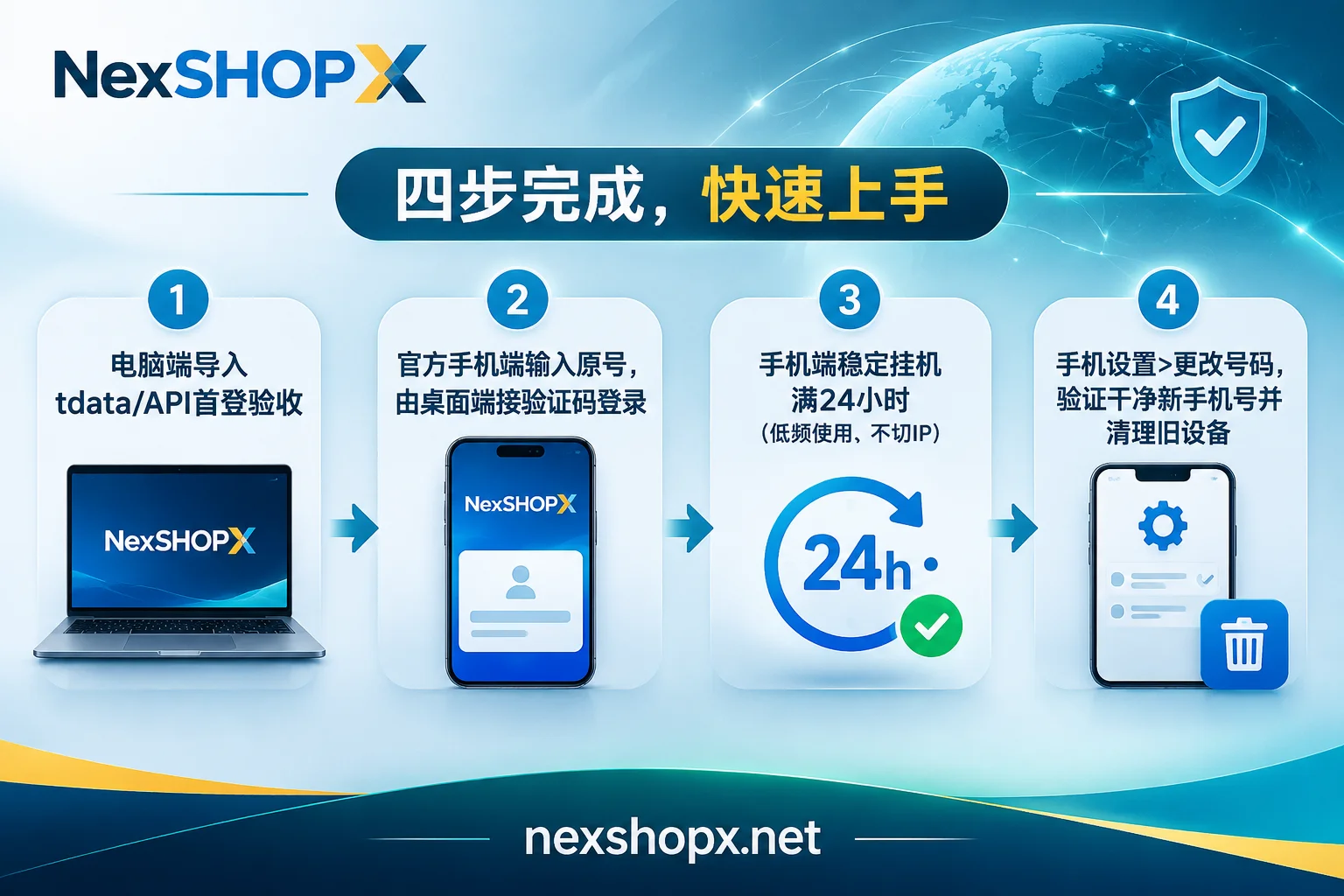
Step 1: Complete first login and basic acceptance in the corresponding environment
- If you bought the
tdataspecification: Go to the Telegram official website to download the latest portable client (Telegram Desktop Portable), replace thetdatafolder delivered by the seller into the same-level directory asTelegram.exe, and then launch and log in. - If you bought the
APIspecification: Enter the delivered phone number in the client and obtain a one-time login verification code through the API link provided by the seller. - After logging in, check two things first: whether the account currently has sending restrictions or abnormal prompts, and whether there are any unknown active devices in
设置 > 设备besides your current device. If there are abnormal states, keep screenshots first, contact after-sales for verification according to the rules within the first-login time limit, and do not rush to modify any information.
Step 2: Connect the account to the official mobile app and keep it online stably for 24 hours
- Install the official genuine Telegram on your phone (App Store, Google Play, or the official website installer, do not use third-party modified clients of unknown origin).
- Enter the account's current full international area code and phone number on the mobile app and click Next. At this point, the verification code will be sent preferentially to your already-online Telegram session window on the computer, rather than via SMS to the original SIM card.
- After logging in on the mobile app, maintain low-frequency normal online activity for the next 24 to 48 hours: you can browse channels and view messages, but do not frequently switch network nodes, do not batch-join groups or send messages to strangers in a short time, and do not change your avatar/nickname/username all at once.
Step 3: Prepare in advance a "clean new number" for binding
- The quality of the new number directly determines stability after switching. When choosing a number, note three points:
- It must not already be bound to another Telegram account: If the new number has already had a Telegram account, the system will report an error and refuse the switch. If the number truly belongs to you, you need to first log in to the old account and delete the original account on the official website's logout page.
- Avoid public free numbers and high-abuse VoIP number ranges: Free SMS-receiving numbers or virtual number ranges that have been mass-registered may directly report
Phone number invalidwhen entered, or quickly trigger account bans after switching. - Understand the practical limitations of +86 numbers: If you plan to switch to a domestic +86 physical number, be aware that in some regions, requesting an SMS verification code may pop up a message about an SMS fee of approximately $1.19 (subscribing to Telegram Premium usually waives this fee), and new logins or low-weight environments on +86 are more likely to encounter default restrictions preventing proactive private messaging to non-mutual contacts; you also need to watch out for carrier filtering and blocking of international SMS. If the account is used for cross-border external communication, a long-term overseas real carrier SIM / eSIM you own will be more worry-free.
Step 4: Execute the switch and close permissions
After the mobile session has been online for more than 24 hours:
- Open the mobile app Settings > tap the current phone number > Change Number.
- After confirming the prompt, select the country code and enter your new phone number.
- Enter the SMS (or voice) verification code received on the new phone into the page. After completion, all your chat history, contacts, joined groups and channels, and
@usernamewill be transferred intact to the new number, and the original phone number will be completely unbound from the account. - After the switch is stable, go to Settings > Devices to clean up unused desktop
tdatasessions, and in Privacy and Security reset your own exclusive two-step verification password, bind a recovery email you control, and enable the Passkey security key as needed.
What if you encounter restrictions before or after buying or switching? How to distinguish and rescue?
Many users lump all unusable situations under "banned" and end up using the wrong appeal entry. Currently, Telegram's handling of abnormal accounts mainly falls into three states, with completely different solutions:
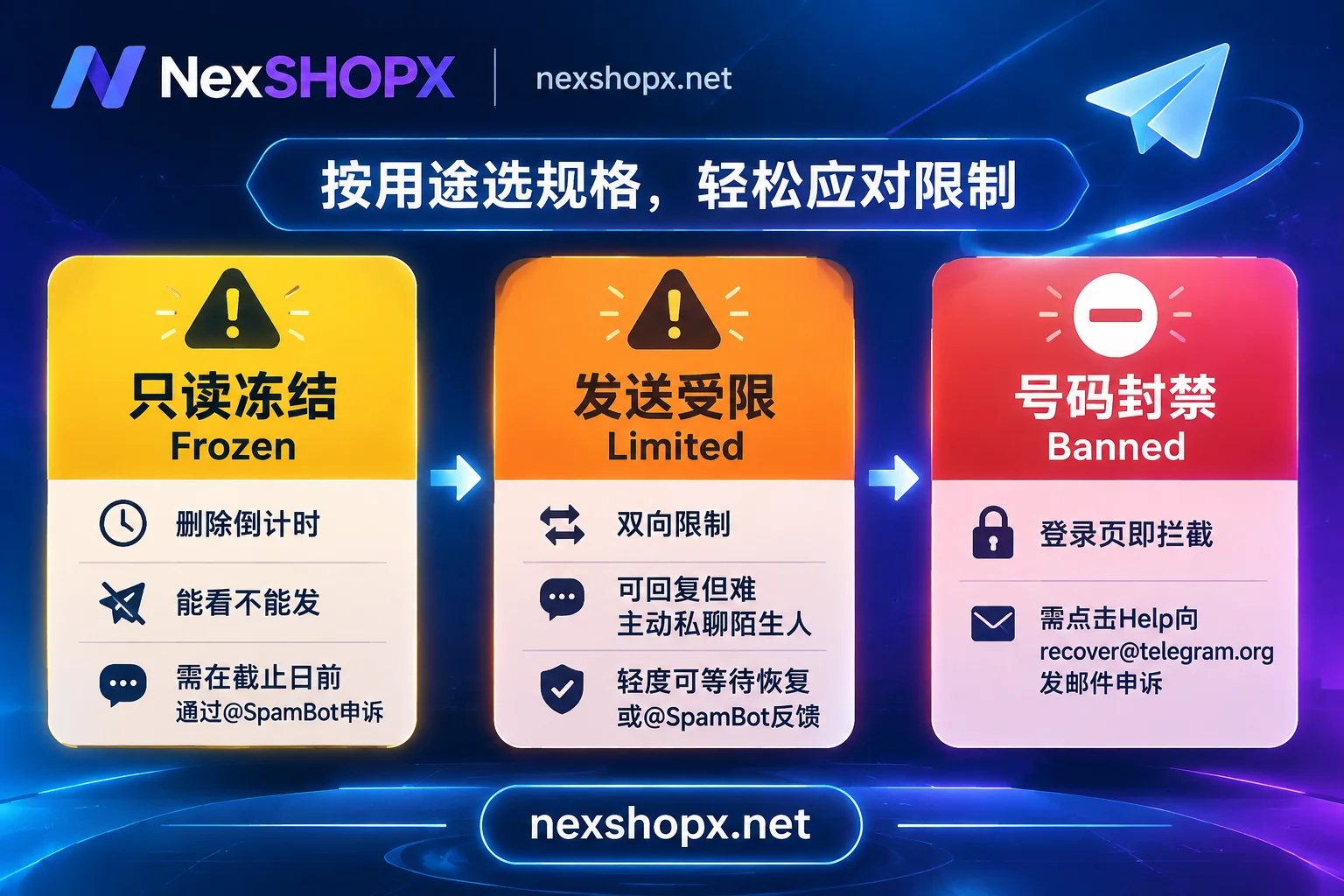
| Prompt or phenomenon you see | Which state it is | What you can still do | Correct handling |
|---|---|---|---|
| A banner appears at the top of the chat list saying "Your account is frozen" with a date attached | Read-only Frozen (an intermediate punitive state introduced in 2025) | You can open the app and view chat history, but cannot send messages, join groups, create channels, or modify profile | It will not unfreeze automatically. Be sure to click "Submit an Appeal" before the deadline stated in the banner, or open the official @SpamBot from the current number and submit a genuine, specific English appeal once; if you miss the deadline or the appeal is rejected, the account will be deleted after expiration |
Unable to send messages to strangers, @SpamBot shows restricted | Two-way/spam message restriction (Limited) | You can reply to people who contacted you first, or send messages to contacts who have each other's numbers saved | The first minor restriction usually lifts automatically after a few days; if it is indeed a misjudgment, you can explain the usage scenario as prompted in @SpamBot, and stop mass messaging and frequent inviting during this period |
| A pop-up appears immediately after entering the phone number at login: "This phone number is banned" | Number-level ban (Banned) | Cannot enter the account, and the verification code will not be sent | Click "Help" at the official client pop-up to generate an email to [email protected], or go to telegram.org/support to submit an explanation; send only once and wait patiently |
Special reminder: Official account freezing or banning has no paid "unfreeze agent" channel; any third-party service that asks for your login verification code, 2FA password, or session files poses an extremely high risk of account theft.
How to choose before buying to avoid pitfalls in switching and risk control?
Not all businesses need to switch immediately after purchase. If your purpose is only short-term testing or running a single business process, and you do not have an extra clean overseas physical number, frequently "buy account → transfer device → switch to new number" may actually increase the probability of misjudgment due to the long chain of short-term changes; conversely, if you are handling customer private chats, community management, or long-term brand operations, it is recommended to plan the region, account age, and subsequent configuration at the procurement stage.
If you are comparing reliable Telegram account purchase channels, you can first compare NexSHOPX's supply specifications according to business needs: the platform provides registered and aged accounts covering Russia, the US, UK, Southeast Asia, and other regions, and distinguishes tdata specifications suitable for quick import on PC and API format accounts suitable for specific tool integration. The mall's Telegram category has launched corresponding specifications by country code, and the business page mainly focuses on pre-order supply—before ordering, it is recommended to contact customer service (t.me/nextipkf) to confirm the target region, year specification, and real-time stock. For selection ideas, you can also refer to our earlier article "How to Choose Telegram Account Purchase? A Guide to tdata Direct-Login Accounts, API Accounts, and Multi-Region Aged Account Configuration under 2026 SMS Verification Fees and Risk Control Upgrades".
In addition, if you have completed first login and switching and want to improve the account's fault tolerance in daily communication (for example, reducing some cross-region login SMS verification blocks, relaxing group and sending limits, or enabling Telegram Business business profile and quick reply features), you can also remotely upgrade to Premium through NexSHOPX's Telegram membership proxy channel—when manually processed, you only need to provide @username for password-free direct recharge, without handing over the account password or verification code.
Before ordering, please note the platform's general rules: NexSHOPX supports mall self-service or guest ordering (Alipay / USDT, CNY settlement, bulk purchases negotiable), in-stock items are automatically delivered after payment, and pre-orders and manual services are delivered after confirmation by customer service; after receipt, be sure to complete first login within the time limit specified on the product page and comply with the warranty period's profile modification agreement (the complete boundaries are subject to the Terms of Service and Warranty Rules and the real-time instructions on the corresponding product page). At the same time, accounts are limited to personal or corporate legal business purposes, and proxy networks, browser environments, and SMS-receiving tools must be configured compliantly by the team themselves.