 NexSHOPX-官方新闻
Account verification involves three stages: ID authenticity and consistency, real-time live face matching, and per-ID binding quotas. If any stage fails, you can't access commerce features. Many people think that if an account can log in and browse videos, the profile is fine—until they get blocked from opening shopping features or withdrawing funds. In the Creator Eligibility Policy updated on July 31, 2026, TikTok Shop requires creators to submit a valid government-issued ID and complete a 3-turn real-time selfie live comparison before accessing the product selection marketplace or withdrawing commissions. This new rule is the main reason many accounts are stuck in review.
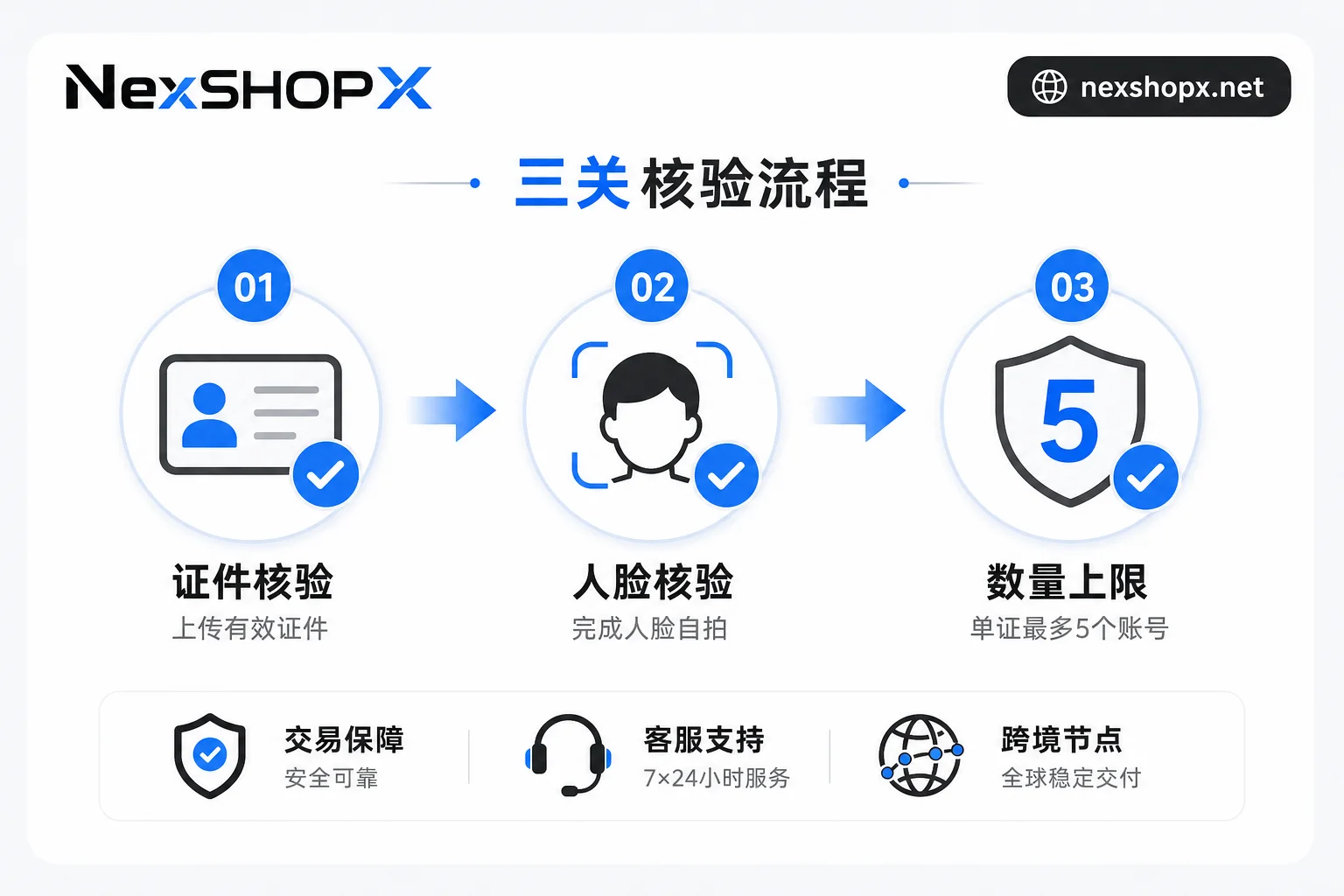
Stage 1: ID Verification—Government ID Must Match Account Holder
This stage checks two things: whether the ID is genuine and valid, and whether the ID holder conflicts with the existing real-name information on the account. The platform accepts valid government-issued IDs such as US driver's licenses, state IDs, and passports, but the name and photo on the ID must match the real-name info provided during account registration.
If you see "ID already used by another account" during verification, you're likely stuck here. This can happen for two reasons: either this ID has already been bound to another account, or the current account was previously bound to someone else's real-name info. The former leaves room to switch IDs, but the latter is more problematic—the real-name info on the account is historical and cannot be changed just by the seller changing the password.
Stage 2: Real-Time Face Comparison—Why the 3-Turn Selfie Can't Be Outsourced
This stage requires completing a 3-turn real-time selfie. The platform uses third-party biometric technology to compare the ID photo with the real-time selfie. It verifies whether the face in front of the camera is the person on the ID, not whether you're the account owner.
This explains why face verification keeps failing: if you're not the same person as on the ID, or if the ID photo is blurry or expired, the system will keep failing the comparison. Poor lighting, low-resolution front cameras, or insufficient head turns during the selfie can also cause liveness detection failure—but these are fixable by changing lighting, device, or retrying. The truly irreversible issue is when the face on the ID and the face in front of the camera are not the same person—no third party can help you pass in that case.
Stage 3: ID Binding Quota—Max 5 Creator Accounts per ID
Each valid government-issued ID can be used to verify a maximum of 5 creator accounts. This is a hard cap that TikTok Shop has officially clarified since July 2026. In other words, the same real-name subject can support up to 5 accounts with commerce permissions. The 6th account will be blocked at this stage even if it passes the previous two.
Matrix teams often hit this wall. If you've stocked up on accounts and plan to use the same ID for batch activation, you might pass on the first 5 accounts but fail on the 6th for no apparent reason. Another case: if a subject has been penalized for violations, all related accounts will be restricted, not just the penalized one. Matrices often span platforms, and Facebook account purchases have their own verification rules, so don't blindly apply TikTok's experience.
Why "Can Log In" and "Can Pass Verification" Are Two Different Bars
Account login permissions (username/password, email, 2FA) and business real-name verification are two completely independent risk control layers within the platform. Having full account credentials and being able to log in and view the backend does not mean you can pass verification—login checks whether you have the key, while verification checks whether you are the person on the ID.
Many purchased accounts get stuck because the seller delivered login credentials, but the account was already bound to someone else's real-name info. Account verification won't automatically pass because of login device, IP, or password—it only recognizes the face and ID submitted to the platform.
What to Ask Before Purchasing
Before buying an account, go through the checklist below to avoid discovering there's no solution after delivery.
| Question | Purpose | Affected Stage |
|---|---|---|
| Has the account already completed real-name verification? | Know if there's still a chance to verify | All stages |
| Whose ID is bound? | Determine if you can switch to your own ID | ID stage |
| Were there any verification failures or restrictions in history? | Assess risk | All stages |
| Is this part of a matrix with multiple accounts per ID? | Determine if quota will be exhausted | Binding quota stage |
| Can the seller provide permission status screenshots? | Verify information authenticity | All stages |
The most critical items are "Whose ID is bound?" and "Is this part of a matrix with multiple accounts per ID?"—these directly determine whether there's room to pass account verification.
On Receipt: Check Permission Status First, Then Decide on Verification
When you receive the account, don't rush to enable commerce features or apply as a creator. The order should be: complete login and credential setup, then go to the creator center to check permissions and verification status, and only then decide whether to initiate identity verification. Submitting prematurely might leave a failed verification record. The public policy doesn't specify how failed attempts affect future reviews, but submitting without knowing the status is risky—check first, then submit.
For specific steps, refer to the login checks in the overseas account delivery process; if you bought an account that can log in but isn't verified, check the TikTok account purchase page parameters to confirm which real-name subject the account is bound to before deciding next steps.
Three Stages: Solvable, Partially Solvable, or Irreversible
When blocked by account verification, stay calm and identify which stage you're stuck at, then decide whether to invest further or cut losses. Here's a comparison:
| Stage | Reason for Stuck | Solvability |
|---|---|---|
| ID | ID expired or blurry | Solvable (resubmit with a valid ID) |
| ID | ID already used by another account | Partially solvable (use an unbound ID under your name) |
| Face | Lighting, device, head turn | Solvable (adjust and retry) |
| Face | Face on ID doesn't match live | Irreversible (no third party can pass) |
| Binding quota | Already 5 accounts per ID / subject penalized causing related accounts restricted | Switch subject to solve; bypassing is impossible |
Beyond these three stages, historical violations of the subject affect all stages. Knowing which stage is irreversible can save you time and money.
How NexSHOPX Can Help, and Its Limitations
Marketplaces like NexSHOPX can address credential delivery and information symmetry—such as category search, self-service ordering, delivery verification, and limited-time login after-sales—helping you ask the right questions before buying and avoid pitfalls after buying. You can confirm delivery contents and after-sales scope in the category descriptions, but real-name status info requires asking customer service item by item before ordering, using the checklist above. For more, see the category descriptions on the enterprise overseas account procurement page.
To be clear: ID consistency, live face matching, and binding quotas are all platform-side identity determinations. No seller has the authority to pass or bypass them. So don't fall for promises like "guaranteed real-name verification"—they're unrealistic.
Compliance Reminder
When using overseas accounts for e-commerce, you must comply with the target platform's terms, local laws, and real-name/KYC requirements.
FAQ
How many selfies does TikTok creator verification require?
You need to take 3 real-time selfies with head turns. The system uses third-party biometric technology to compare your ID photo with the real-time selfie. Ensure good lighting and follow the prompts for head turns; angle and speed affect recognition.
How many TikTok creator accounts can I bind to one ID?
Each valid government-issued ID can verify up to 5 creator accounts. The 6th account cannot be bound or get permissions. To run multiple accounts, you'll need to use another person's identity.
Why can I log in but can't open commerce features?
Likely cause: account verification hasn't passed. It could be that the bound ID doesn't match you, the per-ID quota is exhausted, or the account is linked to a penalized subject.
Why does face verification keep failing?
Most common reason is that the face on the ID doesn't match the live video. Other causes include poor lighting, device issues, or insufficient head turns. The former is irreversible; the latter can be fixed by adjusting environment or devices.
Can a purchased account pass real-name verification?
If the seller delivered an account that was never bound to someone else's real name, you can submit your own ID and face, and theoretically it can pass. If it's already bound to someone else's ID, or the per-ID quota is maxed out, you generally can't change the subject, so it won't pass.
What should I do if the ID is already used by another account?
First, confirm whether this ID is already bound to another of your accounts. If so, you can unbind it from the previous account. If the ID belongs to someone else, you'll have to use your own ID to verify again—the platform doesn't allow cross-subject ID usage.



Comments(0)