 NexSHOPX-官方新闻
From Apple ID to Apple Account: How the Barrier to Account Recovery Has Shifted
Starting with iOS 18 and macOS 15, Apple has officially renamed the long-standing Apple ID to Apple Account. This is not just a brand change but a consolidation of security mechanisms: Apple has unified the account security console, trusted device binding, and multiple identity recovery channels under the new management system[cite: src_macguys_apple_account]. For small teams and individual operators who frequently purchase overseas accounts, this rewrites a critical buying logic—previously, the focus was on "whether the password is correct," but now it must be "who holds the recovery rights." This also shifts the emphasis of Apple ID purchase considerations from password verification to recovery rights ownership.
In the past, the conventional approach to buying an Apple ID was to confirm whether the seller provided the original email, whether a phone number was bound, and whether two-step verification was disabled. Under the new Apple Account system, these traditional checks still matter but are no longer decisive. The real dividing line is this: when you need to reset the password, change devices, or log in from a different location, Apple's default verification logic centers on "trusted devices" and "recovery keys." If these elements are not transferred along with the account, what you have is merely an account that "appears to log in," while true ownership remains with the seller.
Trusted Devices, 28-Character Recovery Key, and Recovery Channels: What Truly Determines Account Ownership
In the Apple Account system, the 28-character Recovery Key is the highest-level security credential. According to Apple's official support documentation, once generated and enabled, Apple's standard automated account recovery process is completely disabled[cite: src_apple_recovery_key]. This means that the recovery key and trusted devices together constitute the final recovery credential for the account; if both are lost, Apple customer service cannot assist in resetting, and the account will be permanently locked[cite: src_apple_recovery_key].
This is a double-edged sword: holding the key grants ultimate recovery rights, while losing the key without trusted devices results in total loss of access. For buyers, the key question is not whether the seller has enabled two-step verification, but "has this account generated a recovery key, and who currently holds it?" If the seller never generated a recovery key, recovery rights still reside with the "trusted device(s)"; if those devices are still with the seller, the buyer cannot achieve final ownership. Therefore, the first action when purchasing an Apple Account is to verify the status of the recovery channels.
Why the Account Recovery Waiting Period Occurs: Triggers and the Real Time Cost for Cross-Border Operations
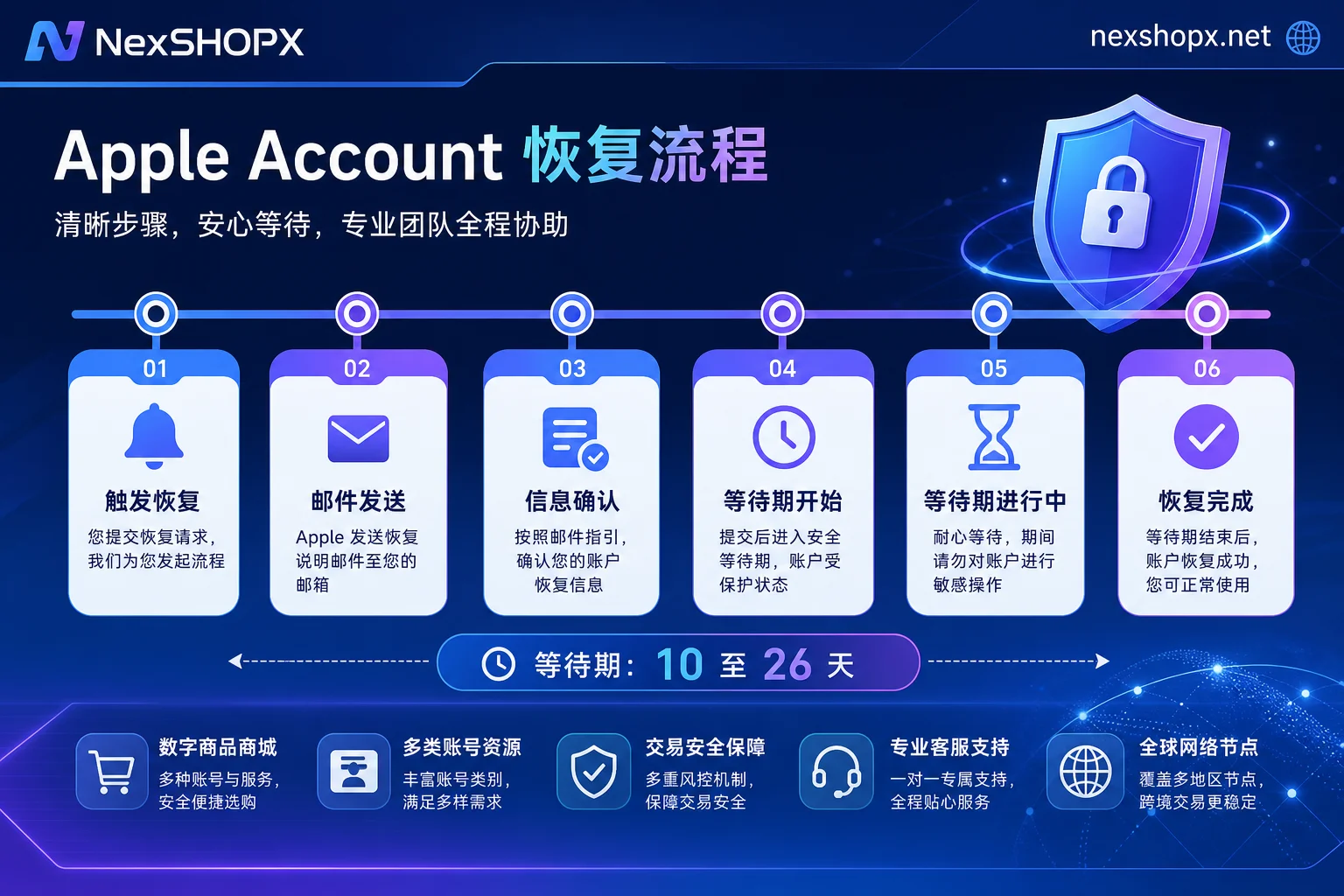
In the absence of a recovery key or trusted devices, if the password cannot be reset directly, the Apple Account enters the Account Recovery process. This process includes a system evaluation period and a cooling-off waiting period, which can range from several days to 28 days, commonly 10 to 26 days, and Apple support personnel have no means to shorten or intervene[cite: src_apple_recovery_procedure].
For teams that rely on overseas Apple Accounts for app download testing, device activation, or regional access, this means that a single unexpected login failure from a different location could halt business for weeks. Worse, the waiting period cannot be expedited, nor can it be prioritized by customer service. According to Apple's official explanation, this is an automated process designed to prevent malicious account takeover, but objectively imposes a high time cost on cross-border account purchasers.
Therefore, within the golden window after receiving the account, whether you can verify and transfer the recovery channels directly determines whether you face "self-service reset in minutes" or "an unattended wait of 10 to 26 days" when issues arise.
Delivery Format Tiers: Password-Only / Password+Email / Transferred Trusted Devices and Recovery Channels
The first thing to consider in Apple ID purchase considerations is the delivery format.
| Delivery Format | Typical Configuration | Outcome on Reset or Offsite Login |
|---|---|---|
| Password only | No email, no trusted device | If recovery is triggered, wait from days to 28 days (commonly 10–26 days); Apple support cannot manually shorten |
| Password + email | Original email or takeover-capable email provided | Can reset via email, but may still enter recovery if no trusted device |
| Password + email + trusted device/recovery key | Trusted device bound or 28-character recovery key delivered | Self-service reset; recovery channels in buyer's hands; full transfer |
From a risk control perspective, the third tier truly constitutes "complete delivery." However, for buyers, the challenge is that they can hardly determine from the product description alone whether recovery rights are transferred with the account; this information gap can only be closed through post-delivery verification actions.
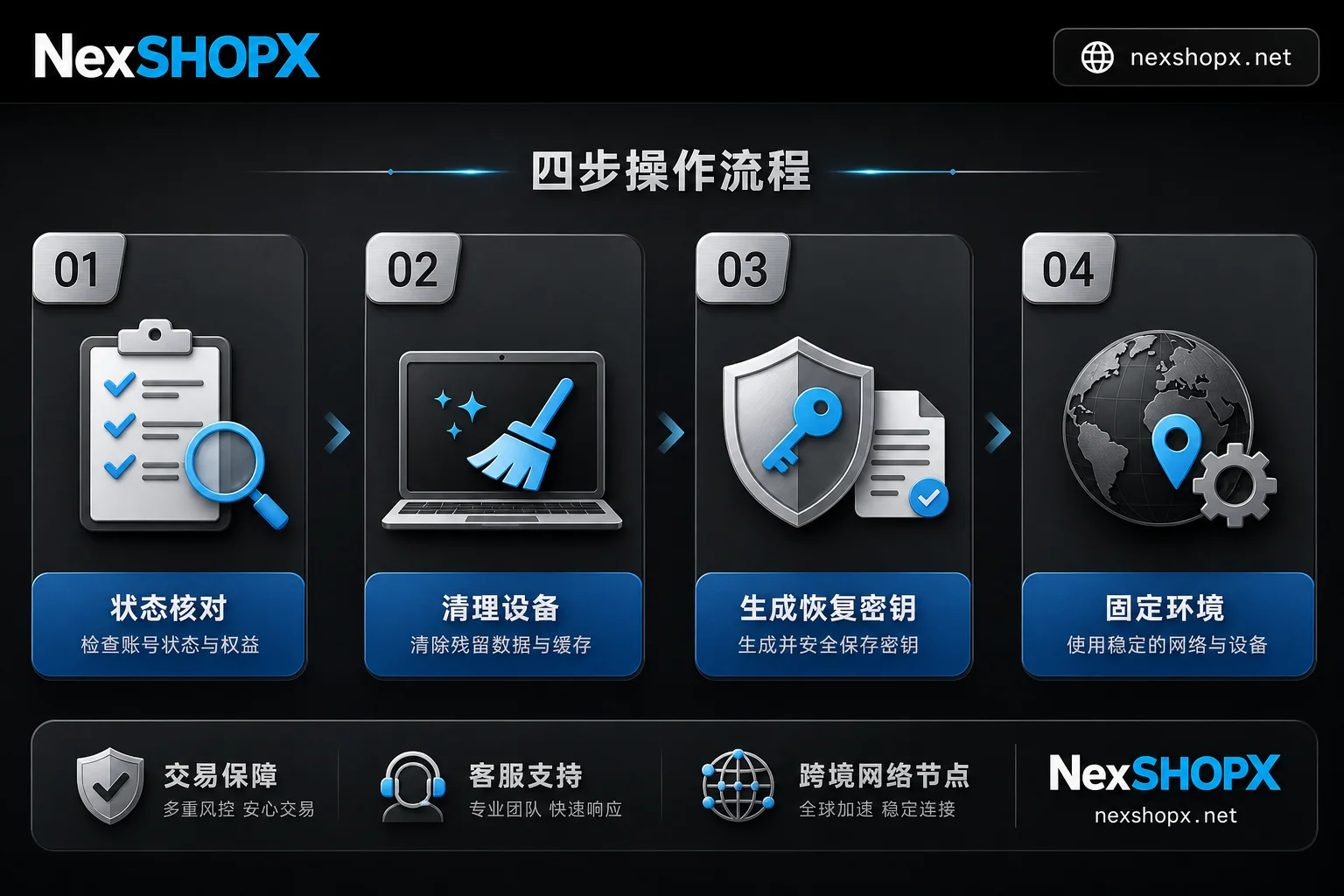
Apple ID Purchase Considerations in Four Practical Steps: Status Check → Remove Previous Trusted Devices → Establish Your Own Recovery Channels → Isolate Login Environment
Within the golden window after delivery, completing the following verification and setup steps in order can significantly reduce subsequent risks. The following steps are based on Apple Account official mechanisms, with interface paths provided as directional references only.
1. Status Check: Review Account Security Settings After Login
Immediately after the first successful login, go to account security settings and check the current trusted device list, contact information, and enabled security features. Confirm whether there are unrecognized devices, unfamiliar emails, or phone numbers. If there are, it indicates that the previous user added recovery methods that must be removed immediately; otherwise, they still hold recovery rights.
2. Remove Previous Trusted Devices
In account settings, remove each trusted device that does not belong to you. This step is crucial for "recovery rights transfer": as long as the previous device remains trusted, the other party can still trigger account recovery or password reset, rendering your account a "temporary rental." It is recommended to unbind all suspicious devices until the list contains only your own device. The action for "how to unbind a trusted device for Apple ID" is completed here: go to settings and remove the device.
3. Establish Your Own Recovery Channel
When discussing "how to set up an Apple ID recovery key," many hesitate about whether to enable the 28-character recovery key. It is important to understand its double-edged nature: once enabled, the account recovery process is disabled, and the recovery key and trusted devices together form the final recovery credential, with no Apple customer service intervention; however, as long as the key is securely backed up offline, your account ownership is firmly in your hands. The answer to "how to transfer recovery channels after purchasing an Apple ID" is: after completing device cleanup, immediately generate your own 28-character recovery key, and write it down in two or three copies stored in safe places. Never store it only in phone memos or cloud storage; otherwise, if the device is lost, the key is lost along with it, leading to permanent lockout.
4. Isolate Login Environment: Fix Common Devices and Networks
Finally, stabilize the login environment for your own device, avoiding frequent changes in network, devices, or frequent logout. Frequent offsite login anomalies are one of the common triggers for the account recovery process. Maintaining a stable login state helps reduce the likelihood of triggering automated security reviews.
First Login Failure or Extra Verification Requests: Three-Level Troubleshooting: Environment, Credentials, Account Status
When encountering "Apple ID login failed after purchase," do not blindly retry; instead, troubleshoot layer by layer.
Environment Layer
First, rule out external factors such as network proxies, virtual locations, and device system versions. When network environments differ significantly from the usual login location, extra verification is more likely to be requested (operational experience; Apple has not published specific decision rules).
Credentials Layer
Verify that the account and password are correct, and that the two-factor authentication code is sent to the correct receiving end (e.g., bound phone number or email). If the verification code is sent to the previous user's email and you cannot receive it, it indicates that the account's contact information has not yet been transferred; this is the delivery party's responsibility.
Account Status Layer
If both of the above layers have no issues and you still get a prompt to wait or fail to log in, the account may already be in the recovery process. It is recommended to stop retrying to avoid worsening the account security status (operational advice, not an Apple-published criterion).
According to Apple's official mechanism, once in recovery, you can only wait for the system to automatically evaluate; no manual intervention is possible[cite: src_apple_recovery_procedure].
Already Stuck in the Recovery Waiting Period: What You Can and Cannot Do
If your account has entered the recovery waiting period, first stay calm. What you can do: ensure the original bound email and phone number are accessible to receive notifications, and wait for the system to complete evaluation. What you cannot do: expect any manual acceleration—Apple officially states that support personnel cannot shorten or intervene in the waiting period[cite: src_apple_recovery_procedure].
For the question "How long is the Apple Account recovery waiting period?", the answer is: from days to 28 days, commonly 10 to 26 days. Any claim of "internal channels" to speed up the process is not credible. This setting is designed by Apple to ensure account security, and there are no exceptions.
How to Use the After-Sales Window: Distinguish Between Delivery Issues and Recovery Reviews Triggered by Your Own Actions
The first week after delivery is the only window to verify delivery quality. It is recommended to complete the following actions within the golden time:
- Complete status check and device cleanup;
- Take screenshots of the current trusted device list, bound contact information, and recovery key status in account security settings;
- Record the time and result of the first login.
The significance is that if problems arise later, you can accurately differentiate between "unable to log in at delivery" and "recovery triggered after modifying settings yourself." The former is the delivery party's responsibility and should be handled through after-sales support; the latter falls under your own actions, and no after-sales service can bypass Apple's mechanisms. Clarifying responsibility boundaries protects you and ensures reasonable use of the delivery party's after-sales resources.
How NexSHOPX Can Help: Category Search, Self-Service Ordering, Fast Delivery, and the Boundary of Limited Login After-Sales
NexSHOPX, as a platform for overseas digital account resources, provides multi-category account resource search including Apple IDs, self-service ordering via its mall, round-the-clock Telegram customer service, and fast delivery, along with limited-time after-sales support for login failures.
However, the boundary must be clear: NexSHOPX can only reduce information asymmetry in delivery and after-sales; it cannot perform Apple's identity verification, affect account recovery review durations, or promise permanent availability or that verification will never be triggered. These fall under Apple's official mechanisms, which no platform can override.
Compliance Reminder and Quick FAQ
Apple ID purchase considerations also include compliance requirements. When using Apple Account resources, you must comply with Apple's terms of service, local laws and regulations, and real-name authentication requirements. Account purchases must not be used to bypass platform audits or identity verification.
It is recommended to complete the four-step verification on the day of delivery and keep records of the login results; if you need to compare different categories of account resources and delivery methods, you can search the NexSHOPX mall and review ordering and after-sales instructions before deciding based on your compliance needs.
How long is the Apple Account recovery waiting period?
From days to 28 days, commonly 10 to 26 days; Apple customer service cannot manually shorten it.
Should I enable the recovery key?
After enabling, you hold the highest recovery rights, but if you lose it and have no trusted device, the account is permanently locked; store it carefully.
What actually changed after the Apple ID rename?
The rename also strengthened management of trusted devices and recovery channels, and the account recovery logic is stricter.
What should I do first if login fails?
First check the network environment, then verify the recipient of the verification code, and finally assess whether the account is in recovery.
Sources
- Apple Support: Set up a recovery key for your Apple Account
- Apple Support: How to use account recovery when you can't reset your Apple Account password
- The Mac Guys: Apple ID is Now Apple Account: What You Need to Know



Comments(0)