 NexSHOPX-官方新闻
Judging abnormal login on overseas accounts only requires three conditions: whether there's a violation notice, whether there's a clear verification action, and whether you can resolve it on your own. These three points help you quickly distinguish between violation bans, policy blocks, and environment checks—rather than immediately suspecting a proxy IP issue or concluding the account is dead.
For example, on X, The Hacker News reported on October 27, 2025, that due to the full migration to x.com, X required users who previously registered FIDO2 security keys or Passkeys with the twitter.com domain to re-register them before the deadline, otherwise their accounts would be locked. These accounts had no violation history but suddenly couldn't log in—this is a classic policy block.
One-Minute Comparison: What Do the Three Signal Types Look Like for Overseas Account Abnormal Login?
When facing abnormal login on an overseas account, first look at the prompt interface itself, rather than rushing to change environments and retry. The interface characteristics for the three signal types are distinct:
| Signal Type | Interface Characteristics | Violation Notice? | Appeal Entrance? | Typical Action |
|---|---|---|---|---|
| Violation Ban | Clearly states violation of platform rules, often links to terms | Yes | Yes, but requires formal appeal process | Submit appeal materials, wait for manual review |
| Policy Block | Prompts credential expiry, need to re-verify, or countdown expires; no violation mentioned | No | Usually none, just follow the guidance to complete verification | Re-register security key / enable two-step verification / contact admin |
| Environment Check | Only requires a one-time verification code, email confirmation, or face comparison | No | Not needed; restores after passing | Complete one-time verification as prompted |
When comparing, focus on two details: whether an in-site message was received, and whether the platform gave a specific action. A violation notice indicates a ban; no violation history yet direct access cut-off likely means a policy block; only a one-time verification request suggests an environment check.
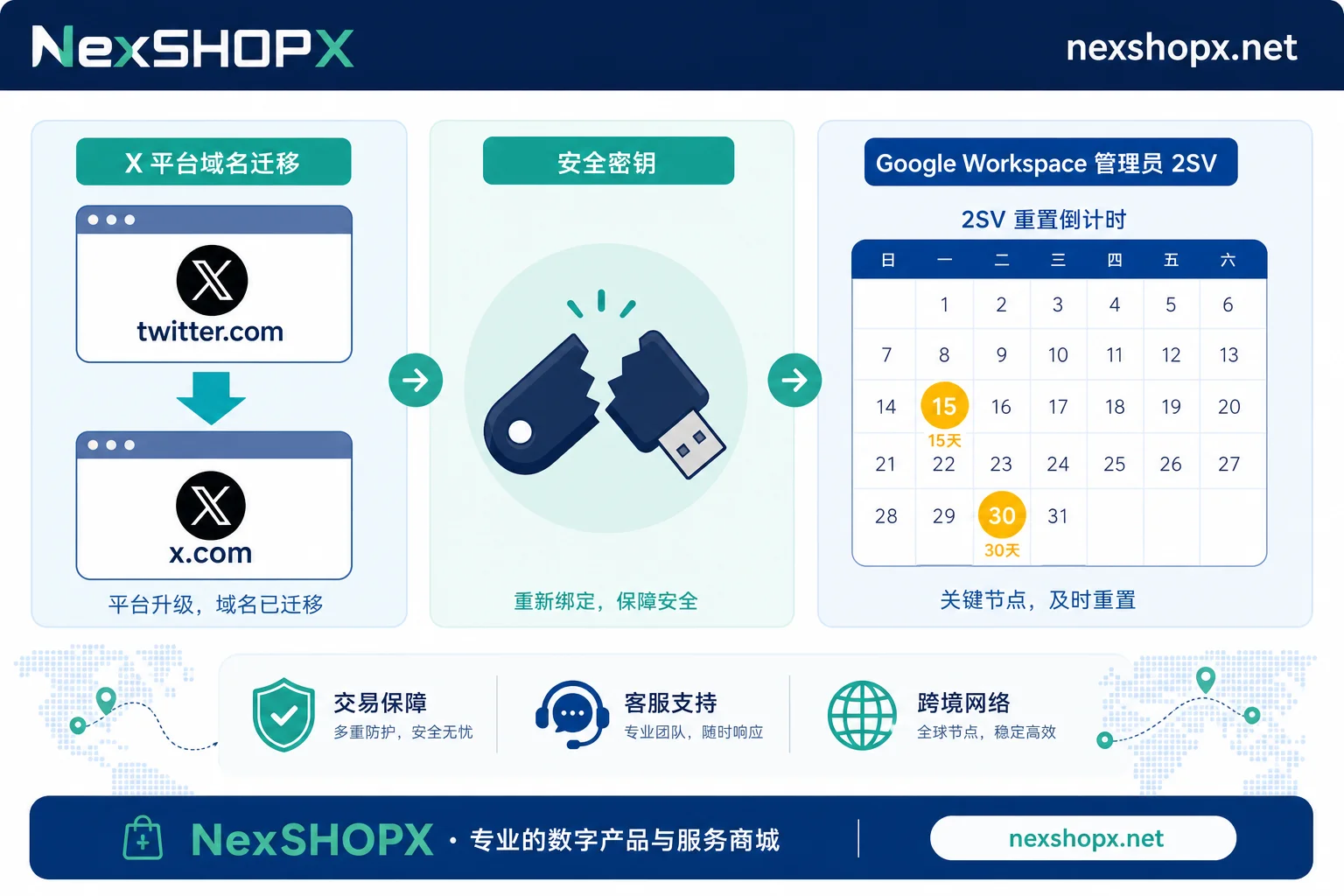
Policy Block Evidence 1: Credentials Bound to Domain—Why X Old Security Key Fails After Domain Change
WebAuthn/FIDO2 security keys and Passkeys have a fundamental characteristic: credentials are strongly bound to the relying party ID (RP ID). After X migrated from twitter.com to x.com, previously registered hardware keys and Passkeys no longer matched the new domain. If the platform didn't force re-registration, these credentials would become a security risk.
The Hacker News on October 27, 2025, noted that X provided a clear deadline: users who didn't complete re-registration by November 10, 2025, would have their accounts locked until re-registration or switching to other verification methods.
When taking over a historical X account, if the original holder had bound hardware keys like YubiKey, the buyer's credentials and primary email may not solve login issues—because the local private key resides in the original holder's hardware device. In such cases, changing proxies or clearing caches repeatedly won't help; you need to go through the re-registration process.
Policy Block Evidence 2: Stepdown Cut-off After Admin Two-Step Verification Countdown Expires
Google Workspace's mandatory 2SV for admin accounts is another typical case. An update on August 26, 2026, in Google's official help center shows that after the notice period, admin accounts without 2SV take a stepwise cut-off:
| Timeframe | Measure |
|---|---|
| Days 1-7 after notice period | Continued in-app reminders |
| Day 15 | Block mobile app access |
| Day 30 | Completely cut off web app access |
The above timeline is based on the official Google Workspace admin 2SV enforcement update (2026-08-26). Applicability and start date depend on notice periods for each tenant. This policy cannot be waived unilaterally by organizations. This means if you took over an admin account and the original admin didn't enable 2SV, “suddenly can't access web version” might not mean a ban, but rather a policy block triggered by the countdown expiration.
In such cases, you need the original holder to cooperate in setting up 2SV, or have the tenant super admin adjust permissions in the backend—relying solely on account credentials won't solve it.
Changed IP and Device but Still Can't Log In: Two Situations Most Misjudged as IP Issues
“Can't log in means the proxy IP was flagged causing a ban” is the most widespread misconception in account handover. Adjusting environment may help trigger extra verification for risk checks, but it's completely ineffective for the following two types of blocks:
- Domain Credential Mismatch: Security keys or Passkeys' RP ID doesn't match the current login domain, so the platform rejects the credential.
- Policy Countdown Expired: After the Google Workspace admin 2SV countdown ends, the platform cuts access as per policy.
No proxy, fingerprint browser, or environment spoofing can bypass security keys, two-step verification, or face recognition. Trying different IPs and devices will only repeatedly trigger the same block prompt.
To tell if it's an environment issue, look at one thing: if the platform prompt says “invalid credentials”, “needs re-verification”, or gives a clear countdown, rather than “abnormal traffic detected, try later”, then it's not related to network environment.
Solvability of the Three Signal Types: Self-Resolution, Requires Original Holder Cooperation, or Platform Process
Back to overseas account abnormal login—once you've identified the signal type, the next step is to determine who to approach for resolution:
| Resolution Path | Applicable Signals | Time Cost | Likelihood of Failure |
|---|---|---|---|
| Self-resolution | Environment checks (one-time code/face) | Minutes | Low |
| Requires original holder cooperation | Credential re-registration (needs local private key), admin 2SV enablement (needs backend permissions) | Hours to days | Medium, depends on original holder's cooperation |
| Platform process | Confirmed violation bans | Days to weeks | Higher, requires sufficient materials |
The boundary here is crucial: account credentials and primary email don't equate to full control. If the account has hardware security keys bound, the local private key is with the original holder; if it involves admin permissions, the backend policy also sits with the original tenant. These aren't things a buyer can resolve unilaterally.
As mentioned in our previous article on Correct password but login keeps failing, login issues often aren't about the password itself, but a mismatch in the credential layer's mechanics.
Evidence Checklist: What to Screenshot and What to Record
Regardless of which resolution path you take for overseas account abnormal login, evidence collection is the foundation for assigning responsibility. It's recommended to save the following materials:
| Evidence Item | Specific Content |
|---|---|
| Prompt screenshot/text | Full error page screenshot or copied text, including error code/clause reference |
| Timestamps | First login time, failure time, whether countdown reminders were received |
| In-site messages | Presence of violation notice, appeal entrance links |
| Verification method | Whether it was security key/Passkey, SMS code, authenticator, or face |
| Device and path | Device model, browser, login entry (web/mobile) |
These materials determine responsibility in after-sales: credential domain mismatch is the original holder's failure to hand over properly; admin policy countdown is the original tenant's failure to fulfill obligations; an explicit violation notice indicates an issue with the account itself. If the prompt explicitly references a violated clause, you can refer to Social media account ban reasons to decide whether to appeal.
If stuck at the verification code step, refer to the troubleshooting in Login prompts extra verification but you're not receiving the code to confirm if it's a channel delay or the number itself being unusable.
Purchase Scenarios: What to Ask Before Ordering and How NexSHOPX Helps
Bringing the conclusion to the purchasing stage can avoid most subsequent disputes. Before ordering, confirm item-by-item:
- Current verification method bound to the account (password / SMS / authenticator / hardware key / Passkey);
- Whether historical security keys or Passkeys exist, and if the local private keys are delivered with the account;
- Ownership of recovery email and admin permissions—whether the buyer can fully take over;
- The window for original holder cooperation on re-registration.
NexSHOPX can reduce information asymmetry between buyers and sellers in category search, self-serve ordering, delivery verification, and limited-time after-sales for login failures—buyers can see more complete verification method descriptions, and sellers have clear delivery standards. But it can't bypass platform-mandated verification for users, nor does it promise accounts will never be banned.
In essence, the complexity of overseas account two-step verification mechanisms means that “one-time purchase equals permanent control” no longer holds for most major platforms.
Compliance Reminder
Please comply with the target platform's terms of service, local laws, and identity/KYC requirements. Do not attempt to bypass the platform's review, ban, or identity verification mechanisms; account login and use must be within the platform's permitted scope. Platform mechanisms and timeframes mentioned in this article are subject to official notices; policies may change, so verify the latest official documentation before taking action.
Frequently Asked Questions
How to distinguish between account lockout and account ban?
Check for a violation notice and appeal entrance. A lockout typically has no violation notice; the interface shows “credential invalid”, “needs re-verification”, or a countdown prompt. A ban explicitly cites the violated clause and includes an appeal channel. The former can be resolved by completing verification; the latter requires a formal appeal process.
Login prompt says security key required, but I don't have the key. What to do?
Sources only indicate the account will be locked until re-registration or switching verification methods (The Hacker News, 2025-10-27). Whether SMS, authenticator, or backup recovery codes are offered as alternatives depends on the options shown at login and the official help center.
Admin account suddenly can't open web version—is it banned?
Likely not a ban, but a Google Workspace admin 2SV countdown expiration. Official mechanism: 15 days after notice period blocks mobile, 30 days cuts web. At this point, the original admin or tenant super admin must handle the admin account's permissions and 2SV status in the backend per official process; the official policy cannot be waived by the organization, and recovery depends on backend results.
Changed IP and device but overseas account still can't log in—what does that mean?
It means the reason for abnormal login isn't the network environment. If it still says invalid credentials, needs re-verification, or directly cuts access after changing IP and device, it's almost certainly domain credential mismatch or platform policy block, not environment-triggered risk control. Continuing to change environments will only trigger the same block; instead, troubleshoot the verification method itself.
Account with no violation record but restricted access—why?
Usually two cases: one is that the security key or Passkey's bound domain doesn't match the current login domain (e.g., X's migration from twitter.com to x.com); the other is a platform policy countdown expiration (e.g., Google Workspace admin 2SV's 30-day deadline). Both have no violation record; re-registering or enabling 2SV lifts the restriction.



Comments(0)