 NexSHOPX-官方新闻
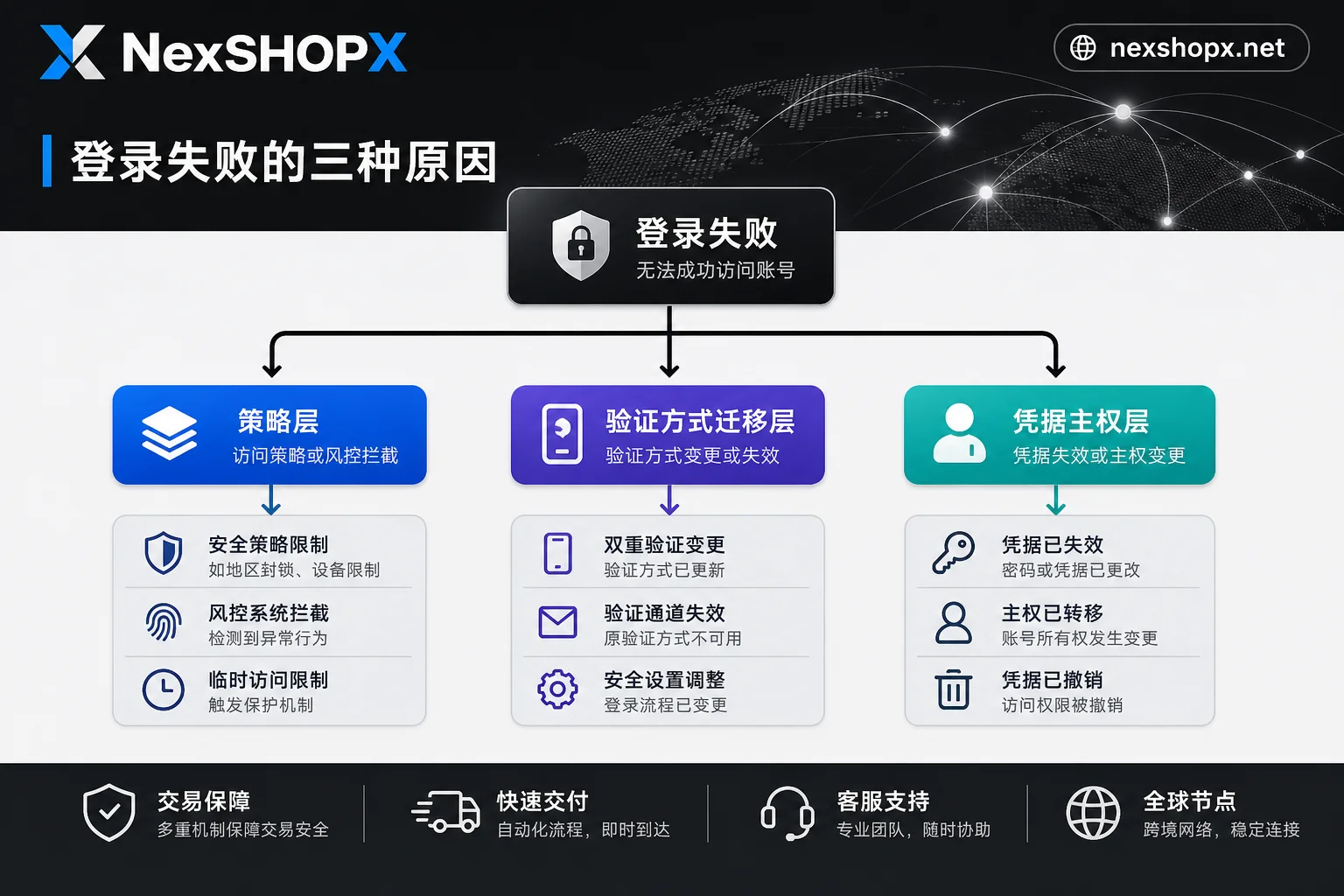
When a correct password still fails to log in, in most cases it has nothing to do with the password itself—it's one of three non-password blocks: policy layer, authentication method migration layer, or credential sovereignty layer. Below is a one-minute categorization, followed by self-check and evidence collection methods.
Conclusion First: Three Non-Password Blocks
A correct password that still fails to log in usually corresponds to one of three blocks unrelated to the password.
In August 2026, Google officially updated the staged enforcement details for mandatory two-step verification (2SV) for Workspace administrators: after the notification period, admin accounts that haven't enabled 2SV will have mobile app access cut off after 15 days, and web access completely cut off after 30 days (Source: Google Workspace Help Center, "About 2SV enforcement for admins", 2026-08-26). This is the direct cause of many recent cases where "admin accounts suddenly can't log in to the web version."
Additionally, Microsoft announced that starting September 1, 2026, Entra ID will make Passkey the default verification experience and automatically enable enrollment prompts for users still using SMS/voice MFA (Source: Microsoft Learn, "Passkeys by default and retirement of Microsoft-provided SMS and voice authentication", 2026-08-10). This means the login flow may be blocked by a setup page rather than a password error.
One-Minute Categorization: Symptom Comparison for Three Blocks
Don't rush to change your password; observe the following characteristics and match them.
| Block Type | Typical Symptoms | Clear Error Code | Redirect to Setup Page | Failure Only on One End | Extra Verification Required |
|---|---|---|---|---|---|
| Policy Layer | Sudden access loss weeks after notice; mobile or web fails sequentially | Usually none | No | May cut mobile first, then web | Requires enabling 2SV |
| Authentication Method Migration | Repeated redirect to "Set up passkey" page; cannot continue after switching devices | Possible "Need to set up verification method" | Yes | Common in Microsoft ecosystem | Requires registering passkey |
| Credential Sovereignty | Password correct but asks for recovery email code or binding other devices | No clear error code | Possible | Not necessarily | Continuous re-verification |
If you fall into the "login keeps saying cannot access but no error" or "account not banned but just can't log in" categories, it's likely one of the first two above.
Policy Layer: Staged Cutoff After Org-Enforced 2SV Deadline
Google Workspace's 2SV enforcement for admin accounts is gradual: after the notice period, mobile access is cut first (15 days), then web (30 days). This explains why "mobile still works, but web suddenly can't log in"—on day 15 after the notice period, mobile app access is cut off while web remains accessible; until day 30, web is also cut off.
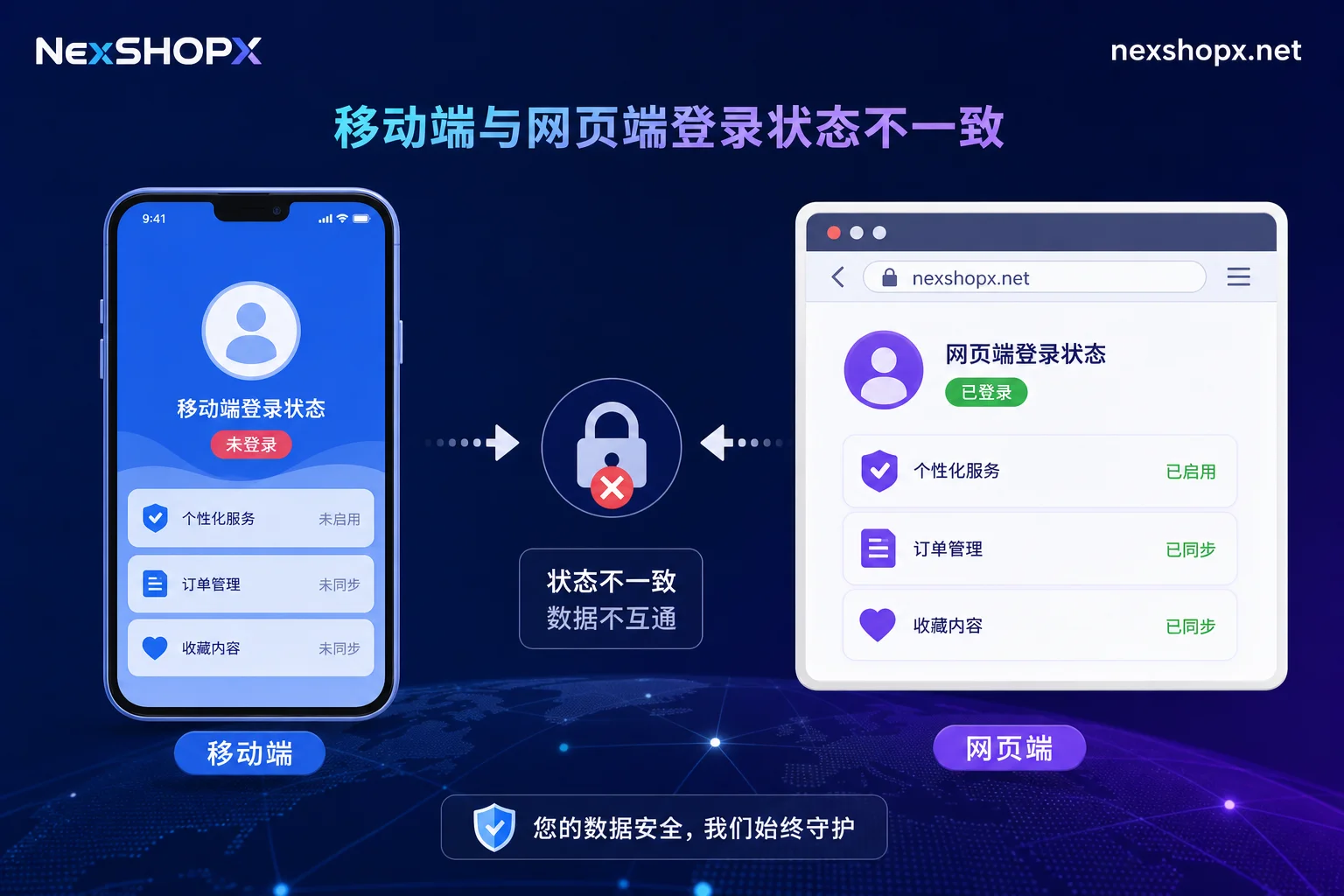
This block is on the organization policy side and cannot be resolved by a regular user. It requires someone with admin privileges to configure 2SV per Google's process to restore access. If your team procured Workspace accounts externally, ensure the admin 2SV is set up during handover; otherwise, it will cause endless trouble.
Authentication Method Migration: Login Obstruction After Passkey Default
Microsoft Entra ID makes Passkey the default verification experience from September 1, 2026, and automatically enables enrollment prompts for users still on SMS/voice MFA. By February 1, 2027, native SMS and voice channels will be fully retired.
This means if you rely on the old "account+password+phone number" model, the login may repeatedly redirect you to the "Set up passkey" page. If you don’t complete passkey registration, or the prompt is interrupted after device change, login effectively fails. This also explains "login keeps redirecting to set up passkey page." If the prompt is interrupted after device change, refer to Re-verification required when logging in on a new computer.
Under this new system, the old handover method of "account+password+SMS code" is rapidly becoming obsolete. When procuring or handing over accounts, confirm whether a passkey is registered and on which device.
Credential Sovereignty Layer: Recovery Entry Not in Your Hands, System Keeps Asking for Re-verification
If your recovery email, backup phone number, or bound authenticator app is still under someone else's name, the platform's risk assessment will continuously request re-verification, creating a loop where "the password is correct but you can't get through."
Note a contradiction: receiving an SMS code doesn't mean you control the account. SMS channels are being downgraded and cannot block independent passkeys already bound to the device. That is, even if you receive a code, you may still be denied due to mismatched device credentials. If you encounter Login prompts for extra verification but you can't receive the code, focus on credential ownership.
This situation usually requires contacting the original holder to hand over recovery entries and registered passkeys; otherwise, it's hard to fully resolve.
Comparative Determination: Which You Can Solve vs. Need Others' Help
After identifying the category, look at responsibility for handling each when password correct but login fails:
| Block Type | Solvable Alone | Needs Admin | Needs Original Holder | Essentially Irreversible |
|---|---|---|---|---|
| Policy Layer | No | Yes (configure 2SV) | No | No |
| Authentication Method Migration | Partially (complete passkey enrollment prompt) | No | Yes (if passkey registered elsewhere) | No |
| Credential Sovereignty | No | No | Yes (hand over recovery entries) | Possible (if device lost and no backup) |
Note: None of the above provides any way to bypass verification or risk controls; only official platform processes should be followed.
Evidence Checklist: What Screenshots to Take, What Timestamps to Record
To determine whether “password correct but login fails” is a delivery issue or your own environment problem, collect the following evidence:
- Full prompt text and error code screenshots (if any)
- Occurrence time and timezone (exact to minute)
- Device that failed (mobile / web)
- Account type (personal / organization-managed)
- List of bound verification methods (e.g., phone, authenticator, passkey)
- Whether a passkey registration prompt appeared
Having this evidence organized will make it more solid whether you contact platform support or pursue delivery responsibility. For further reading, see Overseas Account Two-Step Verification.
Procurement Scenarios: What to Ask Before Ordering, How NexSHOPX Can Help
If you're planning to procure overseas accounts, getting only credentials without confirming verification method ownership or whether recovery entries are in your hands makes it hard to determine responsibility after login failure. Ask these questions before ordering.
NexSHOPX, as a platform for trading overseas digital account resources, offers multi-category search, self-service ordering in the mall, 24/7 Telegram customer service, fast delivery, and limited-time after-sales handling for login failures, helping you verify on the day of receipt and reduce information asymmetry. However, note that NexSHOPX does not promise permanent account security or freedom from restrictions, nor does it remove platform-side policy blocks or risk-control status on your behalf.
Compliance Reminder
Be sure to comply with the target platform's terms of use, local laws, and identity verification/KYC requirements. In some regions, without local hardware security modules or specific IdP support, the downgrade compatibility details of Passkey are still being adjusted; follow official documentation.
FAQ
Why can I use the mobile app but not log in on the web?
This is likely a manifestation of Google Workspace's staged 2SV enforcement for admins: mobile access is cut 15 days after the notice period, while web is cut off on day 30. If the mobile app still works, you may not have reached day 15 yet, or you're using a personal account rather than an admin account. Contact your administrator to confirm your account type and 2SV status.
I keep getting redirected to the passkey setup page when logging in. What should I do?
This is the default Passkey experience prompt from Microsoft Entra ID. You need to complete passkey registration on the current device to continue. If you change devices, the prompt may be interrupted; confirm or re-register on the old device. If you truly cannot complete registration, contact your organization admin to confirm the tenant's verification method configuration according to Microsoft's official docs, and don't attempt to bypass the prompt flow.
My account isn't banned but I can't log in. What's the reason?
It's usually one of the three blocks: policy layer (org-mandated 2SV), authentication method migration (passkey prompt incomplete), or credential sovereignty (recovery entries or registered credentials not in your hands). First, categorize using the symptom table above, then decide the next step.
Password is correct but I don't receive the SMS verification code. What should I do?
Starting February 2027, Microsoft will retire native SMS verification; but users who still need SMS can purchase third-party services from the security store. Meanwhile, register a passkey or switch to an authenticator app as soon as possible. If you're an admin, assess whether to procure third-party SMS solutions for the enterprise.
Why did the admin account suddenly can't log in to the web version?
Most likely Google Workspace's mandatory 2SV staged block: 30 days after the notice period, admin accounts without 2SV enabled will have web access cut. You need to contact an authorized administrator to configure 2SV per the platform process, and access will be restored.



Comments(0)