 NexSHOPX-官方新闻
Cannot directly lend or copy to others is the core conclusion to 'can passkeys be transferred to others'. When sellers promise to 'send you the passkey', it's often a misunderstanding of the technical mechanism; according to the CXF format and CXP protocol developed by the FIDO Alliance, a passkey is essentially an asymmetric private key bound to the security module of a personal device, designed for the same person to migrate across tools, not for cross-subject transfer. When ordering on platforms like NexSHOPX, ask upfront about the credential form of the account, and verify the login status on the delivery day, turning the 'can you transfer a passkey' question into actionable acceptance steps.
Why Passkey Private Keys Can't Leave the Original Device
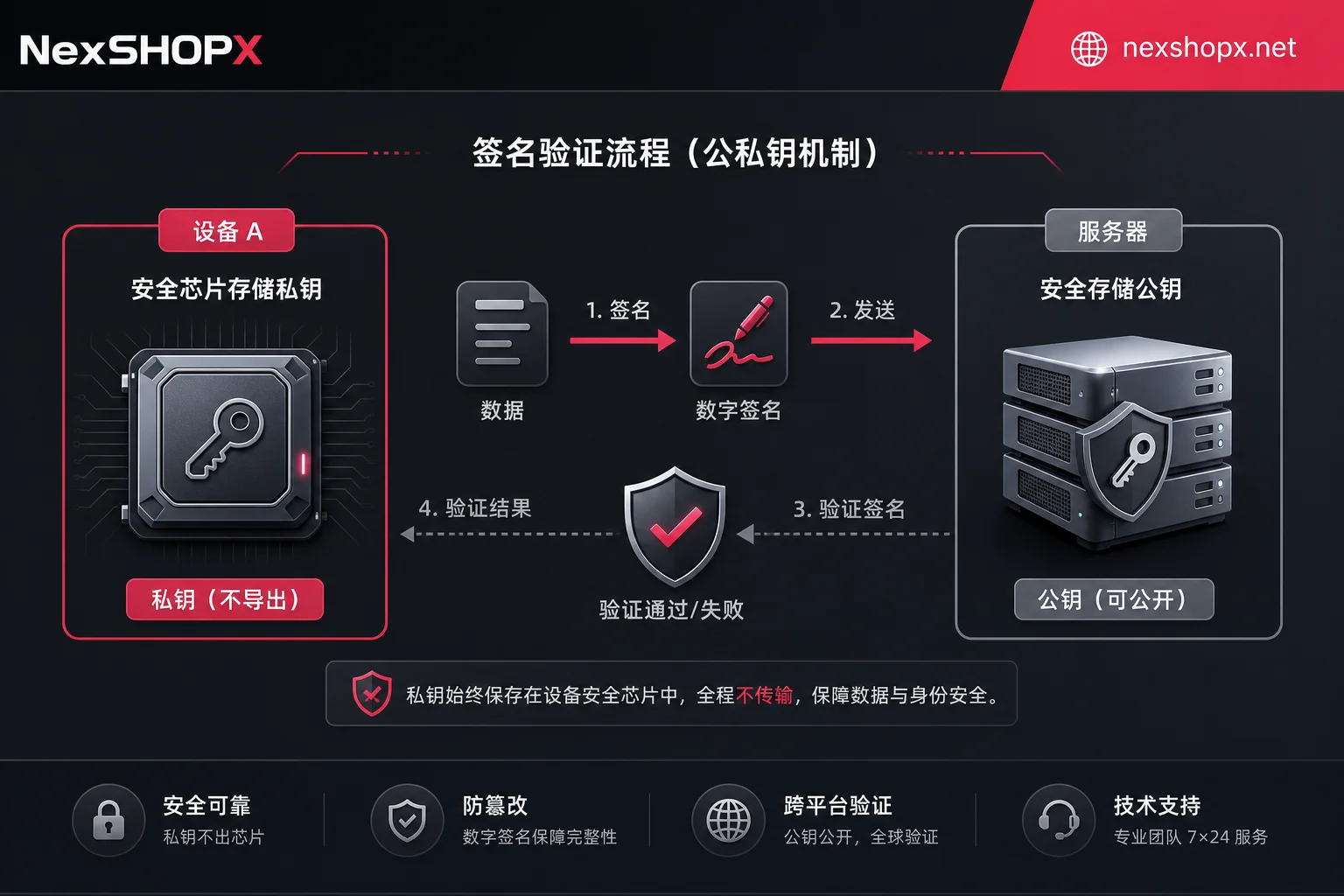
Passkeys use public-key cryptography: the public key stays on the platform server for identity verification, while the private key is strictly locked inside the hardware security chip or dedicated password vault of the user's device. The login process does not send the private key; instead, the device uses the private key to sign a challenge, and the platform only verifies the signature. This mechanism means that a seller's claim to 'send you a passkey' is technically impossible, as no official feature supports exporting the private key in plaintext and transferring it to a third party.
Credential Exchange Specs Are Only for Same-Person Migration
Many users confuse 'migration' with 'transfer'. The CXF format and CXP protocol from the FIDO Alliance are designed to help the same person securely migrate passkeys between different password managers—this is 'switching tools', not 'changing owners'. Current mainstream endpoints have not implemented peer-to-peer credential transfer across platforms and users. Therefore, the answer to 'can a passkey be exported for others to use' is no; any claim that a passkey can be directly exported for others to use violates technical specifications.
Passkeys on the Other Party's Device Remain After Changing Password
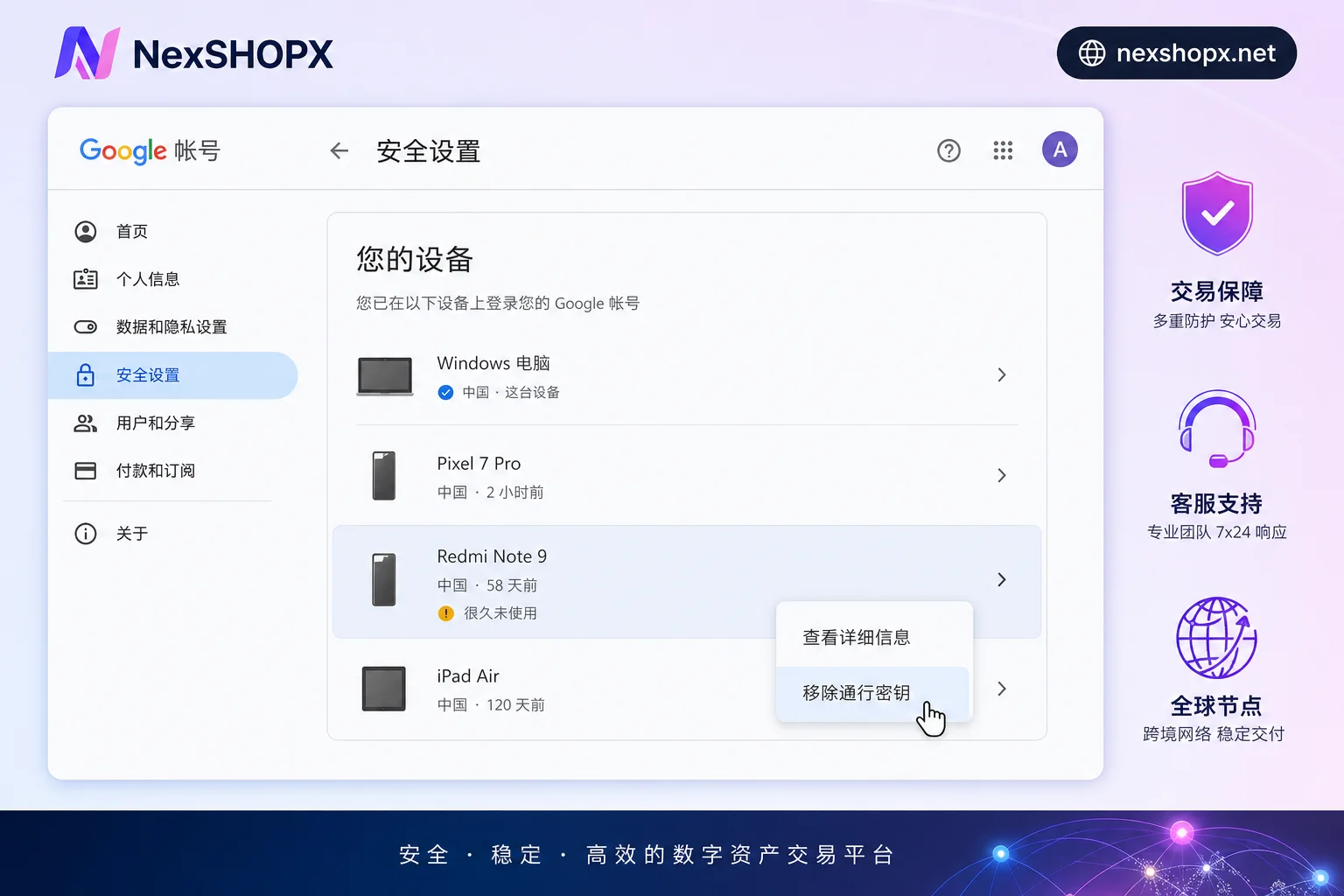
A common security blind spot is believing that changing your password cuts off all access paths. Google's official documentation states that changing your password does not revoke or remove passkeys already created on devices. As long as the previous holder's device is not manually removed in the security center, they can still log in passwordlessly via WebAuthn. This means if you don't perform thorough credential removal, the answer to 'does changing password still keep passkeys' is still yes—the original device retains access.
To completely cut off a specific device's passkey access to an account, the admin or user must manually log into the Google account security page (myaccount.google.com/security), go to the 'Your devices' management list, sign out of the specified device session, and delete the corresponding passkey entry. Simply changing the password for overseas accounts is not enough to block this path.
Key Differences Among Three Delivery Forms
The core criterion for assessing delivery effectiveness is whether the private key ownership truly transfers, whether the original holder still has a login path, and whether the original owner's cooperation is needed. The table below compares the technical feasibility and acceptance evidence of three common forms:
| Delivery Form | Technical Feasibility | Can Original Holder Log In | Original Owner Cooperation Needed | Acceptance Evidence |
|---|---|---|---|---|
| Seller sends passkey export file | No, private key cannot be transferred across subjects | Yes, original device credential still valid | Low (but ineffective) | None; file cannot independently authenticate on new device |
| Traditional account/password + SMS/email delivery | Yes | Yes, unless recovery methods unlinked | Medium | Successful login, but risk of account recovery |
| Original owner deletes old credential + recipient re-enrolls | Yes, compliant with specs | Only that passkey login path cut; need to check recovery entry and sessions | High | Old device entry disappears in security settings; new passkey generated on new device |
The correct delivery criterion is for the original owner to delete the old passkey and the recipient to re-enroll on their own device. This ensures full control transfer and aligns with best practices for overseas account login security.
New Hurdles from Default Verification Methods
As enterprise-grade identity verification standards evolve, handover scenarios face new time pressures. Microsoft Entra ID will make passkeys the default authentication experience starting September 1, 2026; users who enable SMS or voice verification will automatically see a system prompt to register a passkey during MFA. More critically, Microsoft will retire its native SMS and voice verification channels on February 1, 2027.
For accounts still relying on SMS without phishing-resistant credentials, this will cause login blockages. If you continue using SMS, you'll need to self-fund third-party telecom providers via the Security Store, but specific pricing and regional rules are not yet public. During handover, when the recipient logs in for the first time and is prompted to register a passkey, the new key binds to whoever's device it is, directly determining subsequent control. Follow the first login process for overseas accounts to ensure initial registration happens in a controlled environment.
Choose the Right Approach by Scenario: Handover and Team Transition
Different scenarios require tailored operational strategies:
| Scenario | Specific Steps | Action Ownership and Reversibility | Notes |
|---|---|---|---|
| Personal handover of purchased account | 1. Check registered passkeys and device list in account security page 2. Confirm no unknown entries 3. Register on your own device | Buyer self-check (reversible) Buyer registration (reversible) | Must require original owner to delete old credentials first, otherwise coexistence risk |
| Team internal handover | 1. Admin removes device credentials of departing member from console 2. New handler re-issues passkey | Admin removal (irreversible) Handler issuance (reversible) | Involves permission changes; follow overseas account permission handover process |
| Discover old key still present | 1. Contact original holder to remove it 2. Force sign out suspicious devices in security settings yourself | Original holder removal (irreversible, needs presence) Buyer sign out (reversible) | Some operations irreversible, proceed with caution; if original holder doesn't cooperate, terminate transaction and use after-sales |
Regardless of scenario, comply with target platform terms, local laws, and ID/KYC requirements. Purchasing accounts doesn't bypass platform review; compliance is always the top priority.
FAQ
Seller says they can send me the passkey; is that true?
This is false advertising. Under FIDO, passkey private keys are bound to device hardware and cannot be exported as files for others to use. Sellers may confuse 'migration' with 'transfer' or attempt to send invalid backup data. True delivery requires the original owner to delete the credential, and the buyer to re-register a new passkey on their own device. Any claim to directly send a usable passkey violates technical principles.
Former colleague left without returning the account; how to remove their passkey?
An admin or user with account permissions must log into the security settings page (e.g., Google's myaccount.google.com/security) and go to the device management list. Find the former holder's device, select remove, and delete the associated passkey entry. This operation usually requires secondary verification. Simply changing the password won't achieve this; you must manually clear device authorization records to cut access.
How to view registered passkeys on a Google account?
Two ways: on a desktop Chrome browser, go to Settings > Password Manager and check Passkeys; or directly visit the Google account security settings page and look under the relevant section for enabled passkeys and device info. Regularly checking helps spot unauthorized authorizations; specific UI layers may vary; refer to your current account security page.
Does changing password revoke passkeys?
No, they remain. Changing the password only affects password-based login; it does not revoke or delete passkey private keys already on physical devices. If the previous holder's device isn't removed from the account security list, they can still use the existing passkey for passwordless login. Therefore, after changing the password, you must additionally delete the old device's passkey and also reset backup email, phone number, and other recovery entries to fully cut off access.
When getting a purchased account, can I use the ZIP file the seller sends?
No. Receiving a file won't transfer control because migration specs apply to the same person switching tools; the original device credential isn't revoked by delivering the file, and platforms don't recognize third-party credential copies. Handling advice matches the delivery form table: require the original owner to remove old credentials first, then the recipient re-issues and verifies login on their own device—that's the effective acceptance action.
If you're about to purchase an overseas account, confirm upfront what credentials and recovery entries are included in delivery, and on the day of receipt, perform an independent login on your own device; NexSHOPX supports category search and self-service ordering. If login fails, contact customer service within the limited after-sales window for troubleshooting. No matter where you get the account, comply with target platform terms, local laws, and identity requirements.



Comments(0)