 NexSHOPX-官方新闻
On September 1, 2026, Microsoft Entra ID will officially make Passkey the default multi-factor authentication experience, signaling a countdown for account management that relies on traditional SMS verification codes. For teams preparing or operating cross-border businesses, understanding overseas platform account policies is no longer just about avoiding violations and bans—it's about clarifying the hard technical boundaries of account ownership and verification methods.
When choosing specifications in the Email & Platform Accounts category at NexSHOPX, the most important thing to confirm is whether the verification method and recovery entry can fall under your own name, not just checking for violation records. Because when the platform's underlying logic shifts from "password + SMS" to "device-bound private keys," traditional methods of changing passwords to revoke access are becoming ineffective.
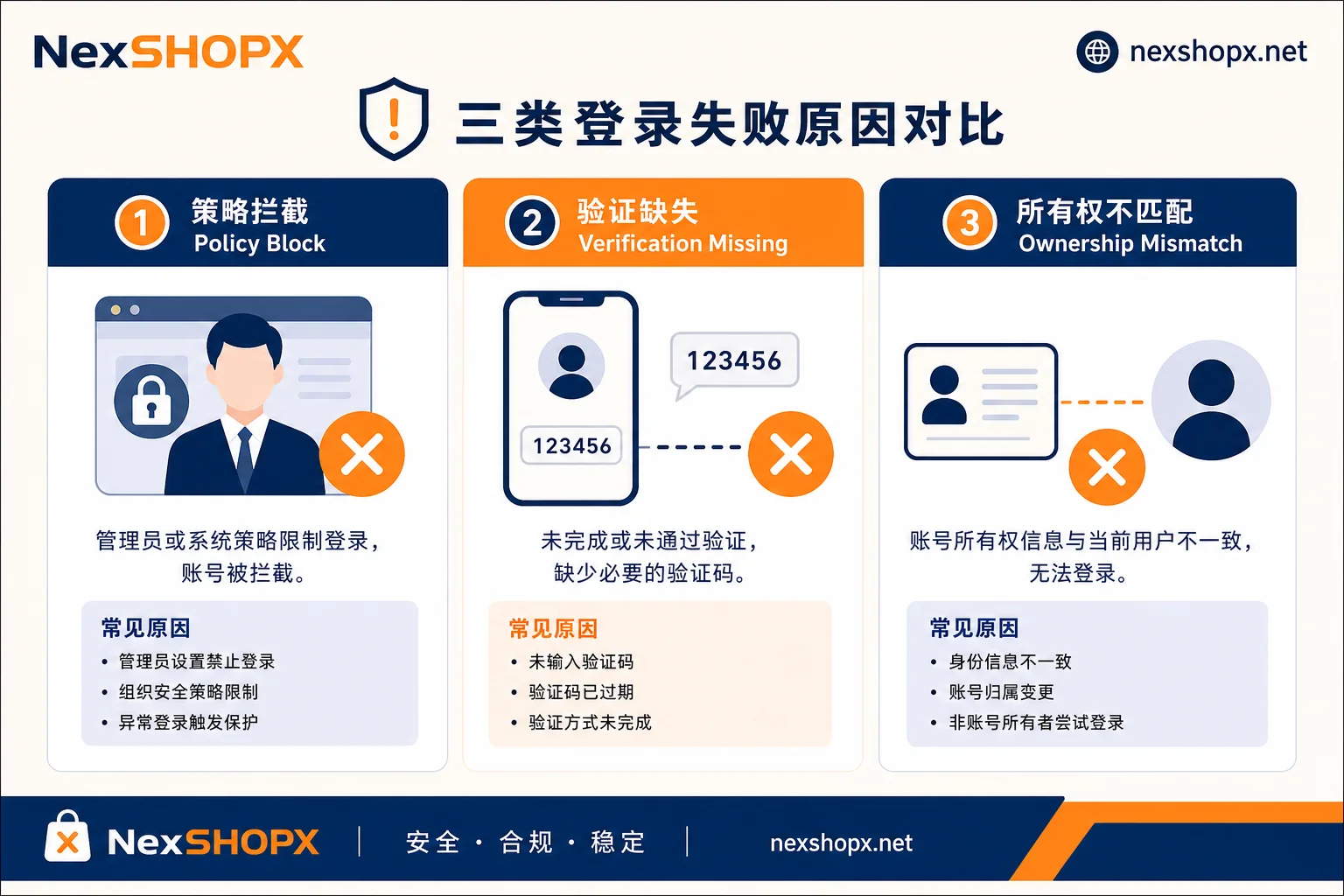
Can't Log In ≠ Banned: Three Scenarios Point to Different Policies
In practice, the inability to log in is often loosely attributed to a "ban," but different scenarios correspond to entirely different policy provisions and solutions.
The first scenario: The password is correct, but repeated login attempts fail, and the interface indicates that administrator intervention is required. This typically points to an organizational policy block. For example, in Google Workspace, if the administrator has enabled mandatory two-step verification (2SV), new users who fail to enroll within the temporary grace period will trigger a policy-level escalation block. In this case, neither web nor mobile login is possible without a super administrator issuing a backup code. This is a security policy enforcement, not a ban due to violations, so it can be resolved through internal administrative means.
The second scenario: You are forced to provide a second verification method during login, but you have no available receiving channel. This directly relates to the platform's mandatory two-step verification rules. For example, Amazon Seller Central's official help documentation clearly states that all seller accounts must enable two-step verification, and during configuration, you must bind both primary and backup verification methods (such as one authenticator app plus one SMS number, but not all of the same type). If both primary and backup channels fail, the only option is to submit a government-issued ID for manual review, which takes about 1-2 business days.
The third scenario: The account's registered entity information does not match the actual user, and once the platform triggers verification, you get stuck. This points to account ownership and transfer rules. Many buyers mistakenly believe that having login credentials gives them control, but if the legal entity, tax information, and payment details are still someone else's, they will face irreversible obstacles when withdrawing funds, appealing, or modifying sensitive information.
| Phenomenon | Possible Cause | Policy Type | Solution |
|---|---|---|---|
| Password correct but prompts admin intervention | Organizational security policy not met | Policy Enforcement | Contact super admin to reset or issue backup code |
| Forced to enter verification code but no receiving source | Missing primary/backup 2SV channels | Mandatory 2SV | Submit ID for manual account recovery review |
| Prompt when modifying info/withdrawing that subject does not match | Registered entity is not current user | Ownership & Transfer Restrictions | Generally need to re-register as new entity |
Account Ownership: What Does "Seller Accounts Generally Not Transferable" Mean?
Regarding the common question "Can Amazon seller accounts be transferred?", Amazon's official stance is clear: Seller accounts generally are not transferable. This means that when the ownership of the entity changes, the platform requires re-registration under the new entity.
This explains why buying a "whole store main account" in the market is not tenable under platform rules. If the buyer only receives a set of login credentials, but the legal company name, tax number, and receiving bank account registered in the account backend still belong to the original holder, then during routine platform checks, settlement anomalies, or secondary identity verification, the current user will be unable to provide matching legal documents, leading to account freezing or even permanent closure. This risk is not due to operational errors but from ignoring the subject consistency requirements in overseas platform account policies.
The way to determine if an account truly belongs to you is simple: check whether the legal entity, tax information, and payment details registered in the account can be independently modified by the current operator and confirmed as your own business entity. If not, the account remains legally and under platform rules someone else's.
When a Team Needs to Use the Same Store, Use Sub-Account Permissions Instead of Sharing Main Credentials
Since main accounts are difficult to legally transfer, how should multi-person collaboration be handled? The correct approach is to use the platform's permission distribution mechanism—answering the question "How to give employees sub-account permissions on Amazon?"
The compliant path is for the main account holder to create sub-operator accounts for employees or service providers under "User Permissions" settings. Grant permissions to specific modules (e.g., inventory management, advertising, customer service) based on job responsibilities, without granting rights to modify core security settings (like changing email, phone, or payment methods). When personnel change, the main account holder can simply revoke the sub-account's permissions without changing the main password, avoiding the risk of former employees accessing with old credentials.
In contrast, directly sharing main account credentials poses huge risks: anyone with the main password can modify two-step verification methods, change receiving accounts, or deactivate the account. In the event of internal disputes or malicious actions by departing employees, the difficulty of appealing is high due to the lack of independent audit logs to trace specific responsibilities.
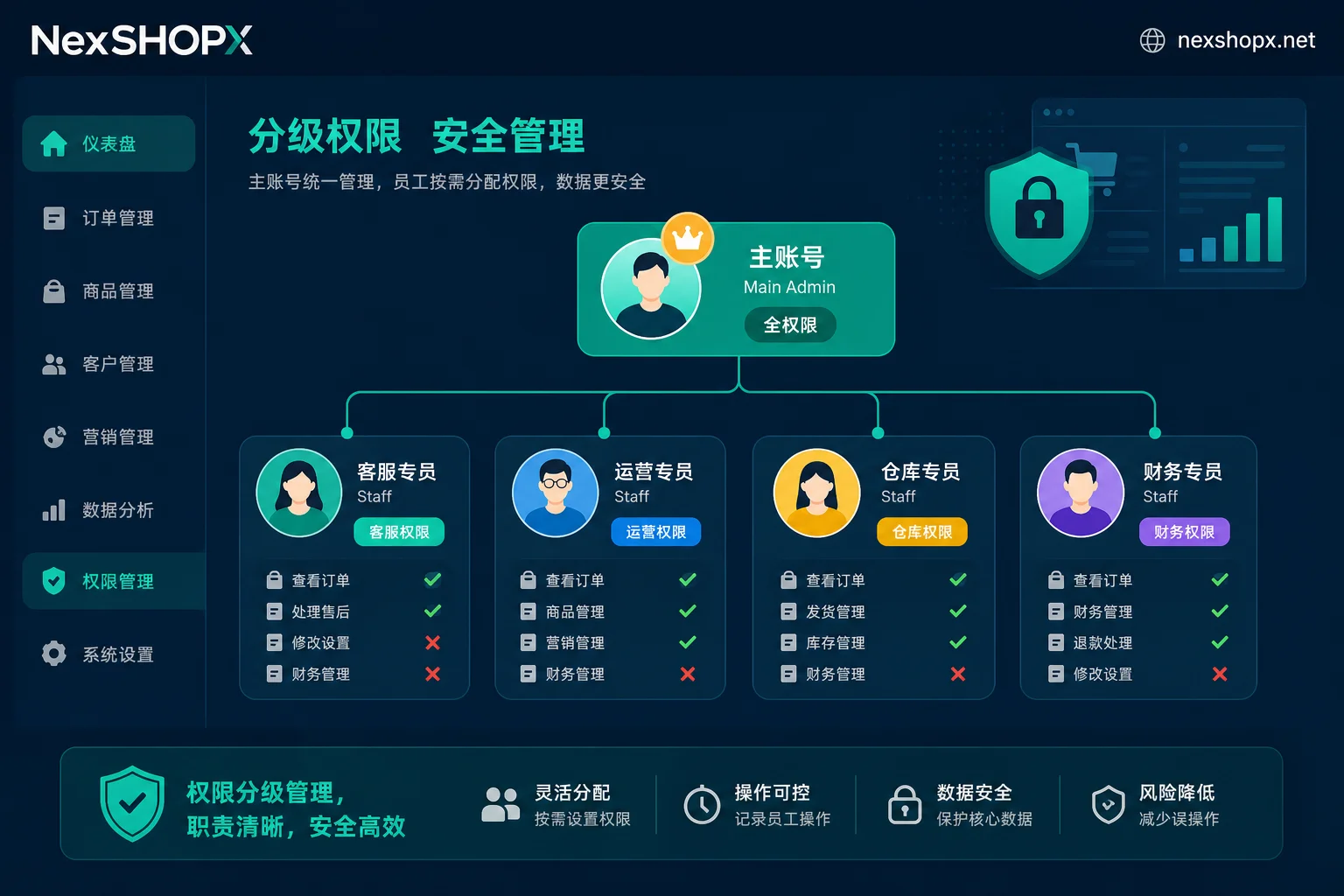
Verification Is a Hard Threshold: Primary-Backup Channels and Recovery Processes That Support Can't Waive
In Amazon Seller Central, two-step verification (2SV) is not just recommended—it's a mandatory entry barrier. Officially, Selling Partner Support cannot waive this requirement for any user. This means trying to bypass verification by "opening a case with customer service" is not realistic.
When configuring 2SV, you must register two backup receiving methods. Common combinations are "authenticator app + voice call" or "authenticator app + SMS." The key is that these two methods cannot both rely on the same physical device or the same phone number. For example, you cannot set both methods to send SMS to the same phone number, because if that SIM card is lost or intercepted, both channels will fail simultaneously.
If both primary and backup channels fail, the only recovery route is through the Two-Step Verification Account Recovery page, where you upload a government-issued ID document (such as a passport or national ID). This process involves manual review and typically takes 1-2 business days. For sellers who urgently need to stay online during promotional seasons, this waiting period can result in significant sales losses. Therefore, when taking over an account, ensure that the backup channel has been fully transferred to your control; otherwise, logging in from a new device could trigger verification and lead to a deadlock.
SMS Codes Are Phasing Out: How the Passkey Default Timeline Affects Account Handovers
As security standards evolve, traditional SMS verification codes are gradually being phased out. Microsoft has announced a timeline: starting September 1, 2026, Microsoft Entra ID will set Passkey as the default multi-factor authentication experience; more critically, starting February 1, 2027, Microsoft will fully retire its managed native SMS and voice verification channels.
This change has profound implications for account purchases and handovers. First, old accounts that rely solely on SMS verification will be forced to migrate to the new verification system in the future. Second, the technical principle of Passkey means the private key is bound to the original device's secure enclave (TPM/Secure Enclave) and cannot be exported as plaintext like a password or sent to others via email. This means that if the previous holder hasn't thoroughly removed the Passkey from their device, even if you have the password, they might still be able to log in via the paired device.
Therefore, when evaluating "when will Microsoft disable SMS verification codes" and its implications, the core concern should shift from "how to get SMS forwarding services" to "how to ensure you can independently register a new set of verification methods." For business owners or team leaders, the standard procedure for taking over an account is no longer requesting SMS code forwarding permissions, but requiring the removal of all bound device credentials before delivery, and having the receiving party regenerate a Passkey or bind a new authenticator on their own device.
Organizational Policies Can Also Lock You Out: Escalating Blocks After Mandatory 2SV Grace Period Expires
Beyond public-facing e-commerce platforms, Google Workspace used by enterprises also has strict overseas platform account policies. Administrators can enable mandatory two-step verification policies and set a temporary grace period for new users.
If an employee fails to complete 2SV binding within the grace period, the system triggers escalating blocks. Initially, it may reduce feature permissions, then completely prevent login to web-based Gmail, Drive, and other apps, and mobile devices may also fail to sync data. This phenomenon is often mistaken for a hacked account or network issue, but it's actually a policy enforcement result.
The key to identifying such issues: Does it only occur under a managed domain (e.g., @company.com)? Is the password correct but still rejected? Is there an IT administrator to contact? If so, there's no need to appeal to external platforms; instead, contact the internal super administrator to request a reset or issue temporary recovery codes. This is fundamentally different from a ban due to content policy violations—the former can be resolved quickly through internal management processes, while the latter often involves lengthy review cycles or even irreversible losses.
Reverse-Engineer Along These Two Lines: Which Accounts You Can Buy Directly, and Which You Should Self-Register and Then Assign Permissions
Based on the above analysis, we can simplify account purchase decisions into two main lines: the ownership line and the verification handover line.
For accounts with strong subject binding and many verification points, such as Amazon seller accounts and advertising accounts requiring real-name authentication, buying an existing main account directly is not advisable. The value of such accounts lies in their historical weight, but the risk lies in the impossibility of subject changes. The recommended strategy: register an account yourself under the new entity, then leverage others' experience or resources by purchasing "agency services" or "permission authorization," or only buy special qualification accounts that allow legal subject transfer (if any).
For accounts with weak subject binding and primarily login-based use, such as regular email, social media personal accounts, and membership accounts, the focus shifts to whether the verification method can be fully transferred. Before asking for a quote, clarify two key points: Who owns the backup verification channel? Can the recovery email and phone number be changed to yours? If the seller promises "after-sales support" but doesn't provide control over the recovery channel, once the platform's risk control escalates, the account is highly likely to get out of control.
| Account Type | Subject Relevance | Verification Handover Difficulty | Recommended Purchase Method | Risk Notes |
|---|---|---|---|---|
| Amazon seller main account | Very strong (legal entity) | Extremely high (re-registration required) | Not recommended to buy main account | Cannot be transferred; easily banned due to subject mismatch |
| Business email (Workspace) | Medium (org domain) | Low (admin control) | Purchase usage rights or self-build | Watch for organizational policy 2SV grace period |
| Social media personal account | Weak (mostly personal) | Medium (varies by platform) | Buyable, but need to rebind | Beware residual Passkey allowing previous owner login |
| Advertising agency account | Strong (account opener) | High (needs subject change letter) | Only purchase advertising permissions | Strictly forbid buying/selling account opener subject; only authorization |
After Recovering Login, What Else to Confirm and What Changes to Watch
After successfully recovering login or completing an account handover, the work isn't over. You need to immediately perform a series of verification actions to ensure control is solid. First, confirm that you have two independent verification methods (such as a new authenticator app and a new phone number) and test that both can independently receive codes. Second, check the "recovery email" and "recovery phone" fields in the account settings to ensure they point to your own contact information, not the seller's defaults. Third, verify that the entity information registered in the account (such as company name, address) matches the actual user; if there's a mismatch and the platform allows modifications, update immediately.
Additionally, team members should access the system via sub-account permissions rather than sharing main credentials. This requires you to add members in user permission management, assign roles, and finally remove any unnecessary shared login sessions.
Long-term, continuously monitor platform policy changes. Especially when platforms prompt for default Passkey registration, complete key pairing on your local devices early to adapt to the future retirement of SMS channels. Also, pay attention to reminders about organizational policy changes and grace periods to avoid work interruptions due to unaddressed internal security requirements.
FAQ
Can Amazon seller accounts be transferred?
No. Amazon's official policy clearly states that seller accounts are generally not transferable. Entity ownership changes require re-registration under the new entity. Buying an existing main account carries high legal and platform compliance risks; once subject verification is triggered, due to mismatch between registration info and actual operation, the account is highly likely to be permanently frozen with no appeal.
When will Microsoft disable SMS verification codes?
Microsoft plans to fully retire its managed native SMS and voice verification channels on February 1, 2027. Prior to that, starting September 1, 2026, Microsoft Entra ID will set Passkey as the default multi-factor authentication experience. Users should migrate to authenticator apps or hardware keys early to avoid login issues when channels are retired.
What happens if you don't set up mandatory two-step verification on overseas platforms?
The consequences vary by platform. On Amazon, you can't log in to Seller Central without 2SV. In Google Workspace, if the organization enables mandatory policies and you exceed the grace period, your account will be blocked progressively, preventing access to email and cloud drive until an administrator intervenes. This is not a ban but a security policy enforcement, recoverable via internal administrative processes or official document review.
How to let employees operate in the store without giving the main account password?
Create sub-operator accounts for employees in the "User Permissions" module of the main account backend. Assign specific module access based on job responsibilities (e.g., view orders only or reply to messages). Never share the main account password. This allows collaboration while ensuring you can revoke access for departing employees anytime without changing the main account security settings.
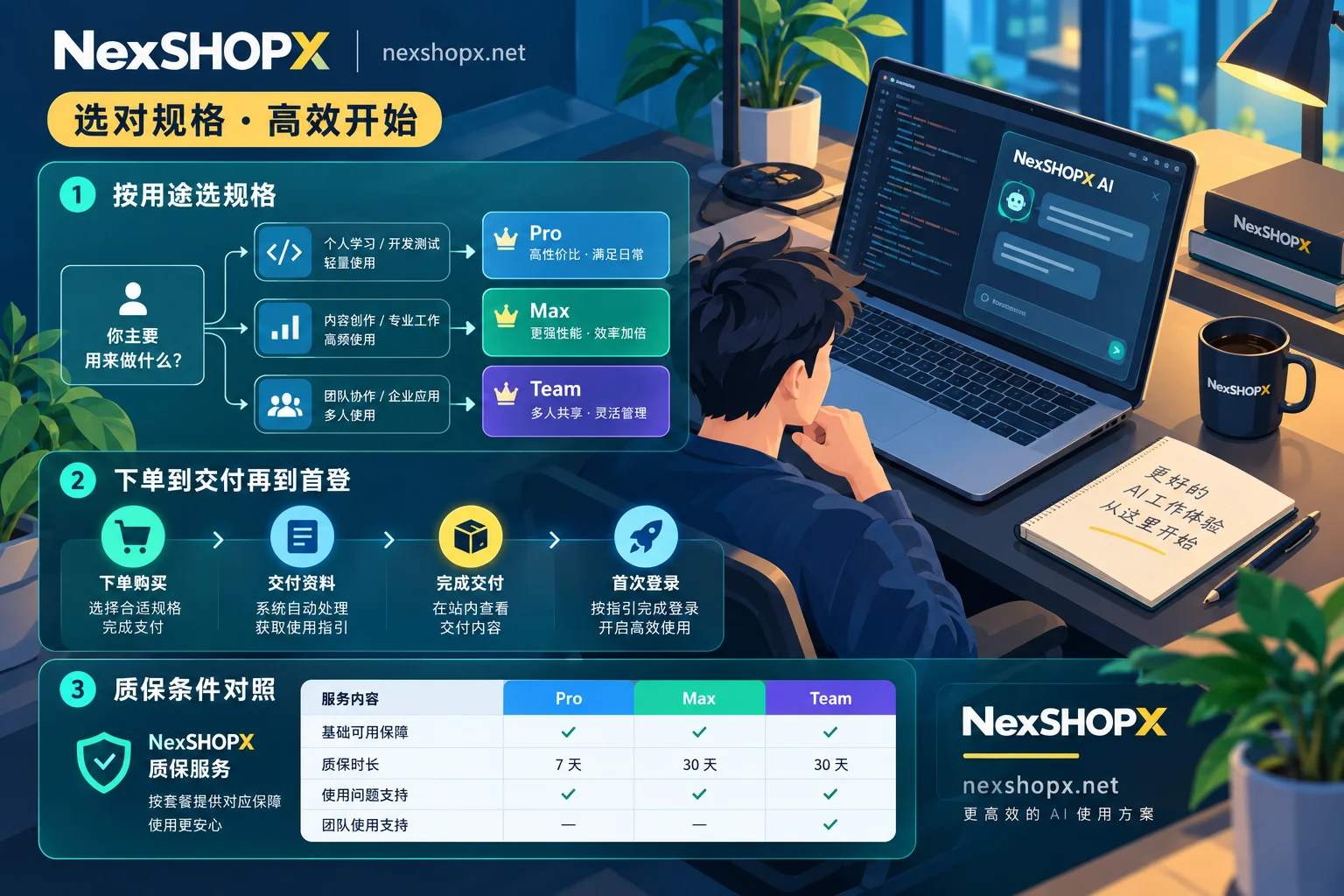
First, decide based on usage whether to self-register or purchase directly. For deliverable categories like email and platform accounts, go to https://nexshopx.net/services/ to view the corresponding category pages, and place an order via https://shop.nexshopx.net,现货自助下单自动发货、预订商品由客服确认后交付;质保时长与首登时限以商品页说明为准,交付条件与规则见 https://nexshopx.net/terms/。


Comments(0)