 NexSHOPX-官方新闻
Start with the conclusion: the difference between new and aged accounts isn't whether the account itself is good or bad, but the trust weight the platform currently assigns to it. This weight determines whether you can immediately create a homepage, post in your target community, and how many emails you can send per day. So the selection question isn't "which is better," but "can a new account handle the actions you need to take this month?"
If a new account can do the job, buying an aged account is overspending; if the job requires historical weight, a new account will stall at the first step.
The differences center on three types of thresholds
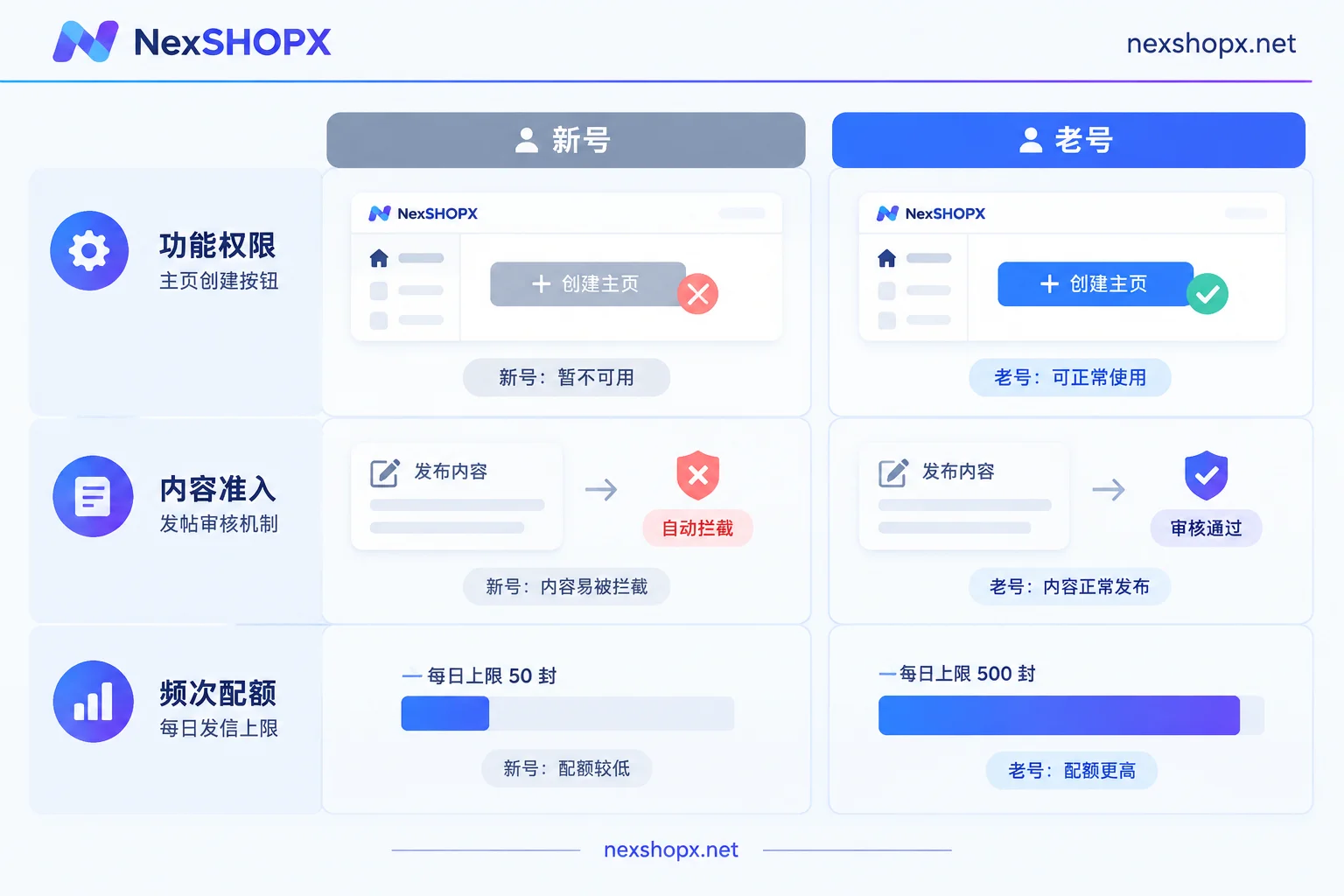
Functional permission thresholds. Meta's Help Center explicitly states that newly registered or restricted accounts may not be able to create a Facebook Page immediately; group admins can also use Admin Assist rules to automatically reject join requests from new accounts. In other words, if you use a freshly registered account to create a page or join a public industry group, the failure may have nothing to do with the completeness of the account profile—it's simply too new.
Content access thresholds. Community platforms like Reddit use posting eligibility checks and Automod rules to set posting conditions based on account age and karma. Accounts that don't meet the minimum account age will have their posts automatically blocked or removed. Such blocks often give no clear warning, and are easily mistaken for "content deleted."
Operational frequency quotas. Gmail / Google Workspace enforce stricter daily sending limits and reputation reviews for newly created or recent accounts. New accounts that trigger high-frequency operations in a short time are easily flagged as abusive and restricted; accounts that have accumulated sending reputation have more stable quotas and greater resilience to bursts.
Don't treat "how many days" as a capability promise
Terms like "30-day account" or "six-month account" cannot be directly converted into permissions. There is no publicly unified standard for the specific number of days each platform uses to transition from "new account" to trusted account; it's a dynamic weight of anti-abuse systems. Specific daily limits for follows, likes, and DMs on social platforms also change with versions—there is no long-term fixed number.
A more reliable approach is to look at the permissions themselves, not the registration year: can this account currently create a page, post in the community you need, and are advertising-related features available? The permission status stated on the product page is more informative than "account age."
Match by use case
Low-risk, one-time use → new account. Regional app store downloads, one-time registration verification, receiving platform notifications, low-frequency personal use, or as a vehicle for activating a membership. These scenarios don't rely on historical weight; a cheaper new account is enough.
Operational infrastructure that needs to start immediately → aged account. Public page or business page management, posting in communities and forums with account age thresholds, ad delivery infrastructure, and long-term enterprise multi-account collaboration. The common thread: you don't have time to warm up the account; you need action in the first week.
Existing restriction records, need to restore usability → restriction-lifted account. If your need isn't "open a new one" but "take over an account whose restrictions have been handled and can be used directly," the corresponding category is restriction-lifted accounts, not more expensive aged accounts.
Another commonly confused case: what you actually want isn't an account, but membership benefits. Membership activation on your behalf is done on your own account, preserving historical data, subscription records, and followed content. If you just want a membership for an AI tool or streaming service, choose activation, not buying another account.
Verify delivery specifications before ordering
The accompanying materials of a ready-made account determine whether you can actually control the account after receiving it. Common delivery contents include account password, recovery email, 2FA key, or Cookie / Token. You need to see which items the product page provides—only giving a password versus only giving a Cookie are completely different in terms of subsequent verification methods, whether verification can be supplemented, and whether you can hold it long-term.
NexSHOPX divides products into four groups: email and platform accounts, social media accounts (including aged and restriction-lifted accounts), AI accounts and membership activation, and memberships and streaming subscriptions. After determining your use case, go to the all categories page to find the corresponding category, then verify specifications, accompanying materials, first-login deadline, and warranty duration on the specific product page. In-stock self-service orders are automatically delivered after ordering; pre-order items are delivered after confirmation by customer service.
You can go through the checklist alongside these two articles: Account Delivery Acceptance Checklist and Account Purchase Precautions.
Three actions after receiving the account
1. Complete the first login within the first-login deadline. The product page will state the limited first-login window after ordering. If you log in after the window, warranty claims may be affected. So don't sit on the materials. For what prompts to handle during first login, refer to What to Do First When Logging into an Overseas Account.
2. Don't arbitrarily change profile information during the warranty period. Some categories prohibit changing passwords, recovery emails, or key security information during the warranty period. Rules differ by category; don't apply experience from one product to all products. Refer to the product page and Terms and Warranty Rules.
3. Apply for replacement per terms if issues arise. A common practice is replacement if disabled during the warranty period; some categories have after-sales windows of only a few days. When applying, prepare your order number, the full error text and screenshots of the failure, and a description of the environment you used to log in—without these, determining responsibility will be a back-and-forth struggle.
If the environment isn't set up properly, the advantages of an aged account are wasted
Regardless of new or aged accounts, never log into multiple accounts in the same local browser. The division of labor here is clear: multi-account anti-association is handled by an anti-detect browser (NexBrowser), verification code reception by an SMS tool (NexSMS), email aliases and identity isolation by an alias tool (NexMask), plus a clean network node.
This step deserves special emphasis because aged accounts are more sensitive to the environment: an account with decent historical weight, when first logged in from an abnormal environment, is actually more likely to trigger additional verification. In such cases, don't doubt the account quality first—first figure out which layer is blocking you—environment issues are handled as environment issues; only account issues go to after-sales.
One-sentence decision
List the specific actions your account needs to perform in the first two weeks. If the actions include creating a page, running ads, posting in communities with age thresholds, or sending emails in bulk, choose an aged or restriction-lifted account; if it's only downloading, verification, receiving emails, or carrying a membership, choose a new account. Leave the rest to the product page: if accompanying materials, first-login deadline, and warranty duration are clearly stated, you've already reduced most of the procurement risk.



Comments(0)