 NexSHOPX-官方新闻
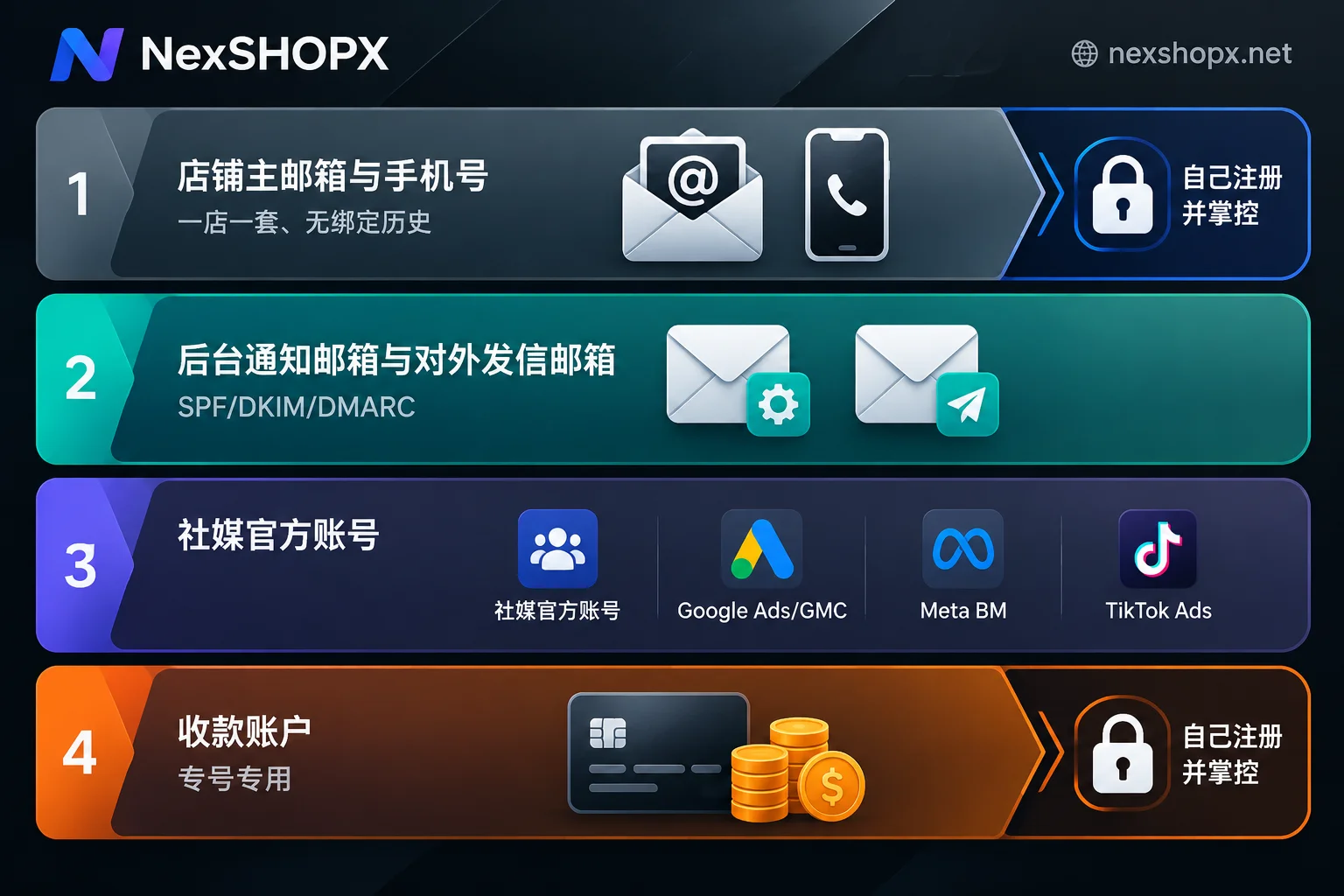
Cross-border e-commerce store accounts are usually prepared in four layers, with one set per store:
- Store operations backbone: The store's primary registration email and phone number.
- Transactions and customer communication: The backend administrator email, as well as the sender and customer service emails facing buyers.
- Marketing promotion and traffic generation: Official social media accounts and advertising platform accounts.
- Payments and compliance: Third-party cross-border payment accounts, along with the emails and phone numbers bound to each.
These four layers can be viewed in two categories. The store's primary email and payment accounts will be bound to your company entity and funds, so you should register them yourself and have full control over recovery methods. Auxiliary accounts for social media operations, ad testing, and business email can be purchased according to purpose. Below, we explain what conditions each account must meet layer by layer.
Layer 1: Store registration primary email, one per store, never bound to another store
The primary email is the core of the store's identity; the platform's security verification codes and official compliance notifications will be sent here. When preparing, note three points:
- No binding history. Both Amazon and TikTok Shop explicitly require that the email and phone number used for registration cannot be associated with or bound to other stores. When opening a second store, use a new set of email and phone number.
- Separate from personal buyer accounts. Amazon recommends that seller accounts use an independent email, not the email of the buyer account you normally use for shopping.
- Think ahead about which services you want to integrate later. If you later want to use Brand Registry, Amazon Ads, or Vendor Central on Amazon, the login credentials need to remain consistent to synchronize management permissions. Therefore, once the primary email is determined, do not change it casually.
It is recommended to use a company-owned domain email for this email, or one that you personally registered and where the auxiliary email and 2FA are in your hands. The reason is that it needs to receive verification codes long-term, and recovery permissions must be in your control.
Layer 2: Backend email and sender email, recommended to be set up separately
Taking Shopify as an example, there are two emails in the backend:
- Store email: Receives platform management notifications and reports, for internal use only.
- Sender email: Used to send order confirmations, after-sales replies, and other emails to buyers; this is the address buyers see.
The sender email should preferably use your own domain, for example [email protected]. To send emails with your own domain, you must configure three records in the domain DNS: SPF, DKIM, and DMARC. Major overseas email providers such as Google and Yahoo have authentication requirements for senders. Emails without these configurations are likely to go to spam or even be rejected, and buyers may not receive order confirmation emails.
When opening stores on other platforms, you can also follow this approach to distinguish "internal notification email" from "external communication email." Do not handle everything with the primary email.
Layer 3: Social media accounts and advertising accounts
Social media accounts. Before a TikTok Shop store officially operates, it needs to bind an Official Account or Marketing Account. After binding, the store showcase will appear on the account homepage, allowing products to be linked in short videos and live streams. The account must meet TikTok Shop's relevant rules for creator eligibility; please check the current requirements in Seller Center before binding. When running an independent site or multi-channel operation, a Facebook Page and Instagram Business account are used to display the brand and capture homepage traffic, and it is also recommended to set them up in advance.
Advertising and traffic accounts. For independent sites or platform stores that need off-site traffic, the following are commonly used:
- Google Ads and Google Merchant Center (GMC): It is recommended to place them under the same Google business account system for easy integration with GA4 and Search Console data.
- Meta Business Manager (BM): Centrally manages Facebook and Instagram ads, pages, and pixels.
- TikTok for Business / Ads Manager: Used for TikTok advertising.
The number of accounts in this layer grows the fastest. Operations teams often need additional Google accounts, business emails, or social media accounts for division of labor management and testing materials; this part can be purchased according to purpose.
Layer 4: Payment accounts, dedicated accounts for dedicated purposes
Payment accounts such as PayPal Business, Stripe, WorldFirst, and Airwallex need to be bound to independent verification emails and phone numbers. Do not share emails between payment accounts of different entities or different stores, to avoid cross-association of fund flows. Payment accounts must be opened under your own entity's real-name verification; they cannot be purchased, and you should not borrow someone else's account.
Make an account comparison table per store
Before opening a store, it is recommended to make a table for each store, clearly listing the following:
- Store primary email and phone number;
- Backend notification email and external sender email, and whether SPF, DKIM, and DMARC for the sending domain are configured;
- Bound official social media account or marketing account;
- Advertising accounts, and which Google account or BM they belong to;
- Payment accounts, and the emails and phone numbers bound to them.
When opening a second store, the emails and phone numbers in the new table must not duplicate those in the old table. In addition, US local stores, cross-border stores, and Southeast Asia local stores may have different admission requirements for local phone numbers and corporate emails. This article is organized according to general situations; please refer to the instructions on the target site's registration page for specifics.
When you need to purchase auxiliary accounts, check these items first
If social media operations, ad testing, or team division of labor require additional Google accounts, business emails, or social media accounts, pay attention to the following when choosing specifications:
- New or aged accounts: If you are just starting and only using them to receive verifications and for internal division of labor, new accounts are usually sufficient. If you are about to log into advertising or social media backends for operations, you can consider aged accounts with some registration history. For a detailed comparison, see What is the difference between new and aged finished accounts.
- Email type: When mainly used to receive verification codes, Gmail and Outlook perform differently on different platforms; refer to Should you buy Gmail or Outlook for registration code receiving.
- Included materials: Confirm whether the product includes 2FA and auxiliary email. Without these two, it will be difficult to recover later when encountering login verification. See What is the use of accounts with 2FA and auxiliary email.
At NexSHOPX, Google-related accounts are on the Google category page, and other emails and social media accounts can be accessed by purpose from All Categories. In-stock items are automatically delivered after self-service ordering in the mall, and pre-order items are delivered after confirmation by customer service. Prices and inventory are subject to the mall page.
First login and warranty after receiving the account
- Complete the first login on time. Most products require the first login to be completed within a certain time limit after ordering; the time limit is subject to the product page. For when the time limit starts counting, see When do purchased accounts need to complete the first login.
- Do not modify information during the warranty period. Some categories stipulate that information cannot be modified during the warranty period; changing it may void the warranty. The general warranty rule is that if the account is disabled during the warranty period, it can be replaced. Some categories have only a few days of after-sales period; specifics are subject to the product page. For what changes count as "modifying information," see What does it mean that information cannot be modified during the warranty period. After the warranty period, you can change the auxiliary email and 2FA as needed.
- Preserve the scene when problems occur. If login fails, first determine whether it is a problem with the account itself or caused by your network or device environment, then prepare after-sales materials; refer to How to report after-sales when you cannot log in to the account.
To summarize: the primary email and payment accounts should be self-registered and self-controlled; the sender email should have domain authentication configured; social media and advertising accounts should be purchased or self-built according to purpose. Record which store each account is used for in the comparison table, so that account mixing is less likely when opening new stores.


Comments(0)