 NexSHOPX-官方新闻
Conclusion first: Telegram's official no-password "Gift Premium" and Fragment channels natively only support three prepaid durations: 3 months, 6 months, and 12 months. There is no regular 1-month no-password gift. Therefore, many "1-month third-party top-ups" on the market must log into your account to go through in-app store purchases or @PremiumBot monthly subscriptions, which is why they ask for verification codes or even two-step verification passwords. If you don't want to hand over account control, it's recommended to directly choose a 3-month or longer no-password remote recharge solution that only requires providing @用户名.
1. Why are the top-up methods for 1 month and 3/6/12 months completely different?
Many users wonder when they first look for someone to get Premium: for the same Telegram Premium recharge, why do some shops say "just fill in @用户名, no password needed, arrives in 5 minutes," while when you want to buy 1 month to try it out, the other party sends a message saying "1 month requires logging into your account to activate, please prepare to receive the login verification code"?
This is not the merchant deliberately making things difficult, but is determined by Telegram's official billing interface:
- No-password gift channel (only 3 / 6 / 12 months): Whether through the built-in "Gift Premium" in the Telegram client, using Telegram Stars to gift, or recharging a specified account through the official Fragment platform, the system only offers three one-time prepaid gift boxes: 3 months, 6 months, and 12 months. The gifter only needs to enter the recipient's
@用户名, and the official system will directly credit the membership duration to the target account without any login action. - Monthly subscription channel (1 month usually requires operation on your own account): In most regular scenarios, a single-month membership is a "personal account auto-renewal subscription" (requires binding a payment method on your logged-in device via App Store, Google Play, or official
@PremiumBotfor monthly deduction). If a third party wants to activate 1 month for you, they can only log into your Telegram account to complete this in-app purchase or Bot payment.
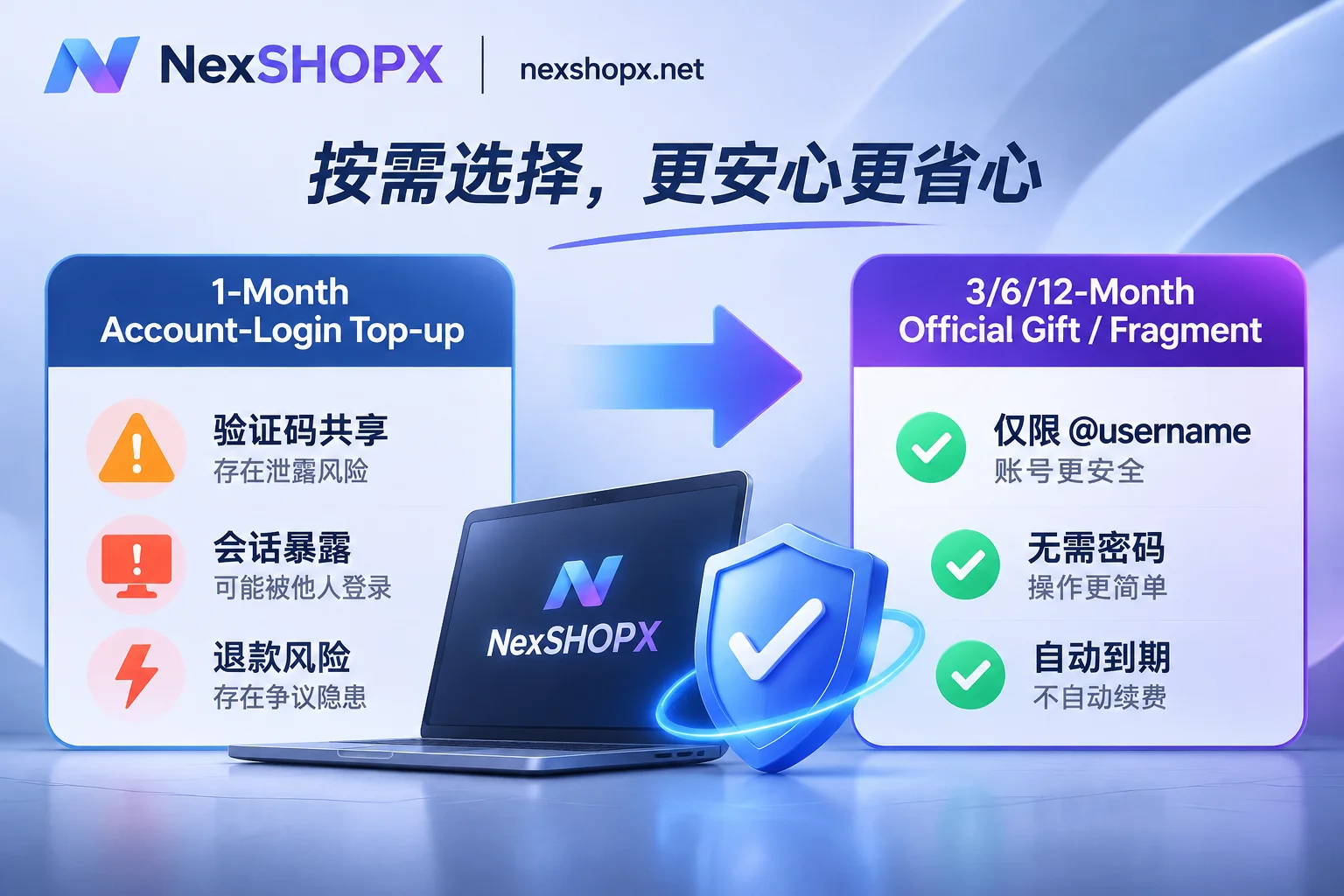
| Comparison Dimension | Username No-Password Direct Top-Up (Recommended) | Account Login Third-Party Top-Up (High Risk) |
|---|---|---|
| Common Durations | 3 months / 6 months / 12 months (one-time prepaid) | Mainly 1-month short cycle |
| What to Provide | Only @用户名 (Username) | Phone number + login verification code + 2FA password |
| Can the other party access your account? | No, no contact with device sessions or chat history throughout | Yes, can view cloud messages and contacts during login |
| Payment method after expiration | Automatically reverts to a regular account, no binding to others' bank cards | If auto-renewal is not cancelled in time, payment conflicts may occur |
| Main Risks | Entering wrong @用户名 will recharge to someone else's account | Privacy leakage, new device triggers risk control, low-price black card refund causes loss |
2. What are the 3 pitfalls of "account login third-party top-up" for cheap or short-term benefits?
Even if it's just to try for 1 month, handing over the login verification code to a third party for operation is often not worth the loss. In actual use, the following three types of problems are most likely to occur:
1. Privacy exposure and residual control
Once you give the verification code to the other party, your account will generate a complete session on their device. Even if they promise to "log out after recharge," if during the operation they modify two-step verification (2FA), bind a new login email, or add control credentials when device passkeys are supported, it will be very passive to recover the account later. For methods to revoke sessions and authorization entries, you can refer to the site's articles Can the seller still log in after buying an account? Check three channels and revoke in order and Telegram officially launches Passkey, new standards for account purchase control verification: from verification code to passkey.
2. Remote new device login triggers risk control or SMS Fee
If the merchant logs into your account using high-frequency batch operation devices or high-risk proxy IPs, it is very likely to trigger Telegram's security interception—at best, it will prompt for secondary verification via SMS or email; at worst, it will pop up a SMS Fee window for accounts using certain number segments like +86, or even temporarily restrict the account.
3. Black card fraud or store refunds cause "just activated then lost"
Some ultra-low-price "1-month account login top-ups" use credit cards of unknown origin, or make in-app purchases through Apple/Google stores and then apply for refunds (Chargeback). Once the payment channel refuses payment or refunds, Telegram will directly revoke the membership benefits, and in severe cases, it may also affect the account's reputation score and risk control level.
3. Before choosing no-password remote top-up, you must verify these 4 practical details
After deciding to avoid account login and switch to no-password top-up that only requires filling in @用户名, spend 2 minutes before ordering to do the following four checks, which can avoid 90% of non-delivery and after-sales disputes:
1. First check if you have set @用户名 (do not fill in nickname or phone number)
Many newly registered users only fill in their name (First/Last Name) and have not set a public @用户名. Sending the nickname or phone number directly to the platform will make it impossible to retrieve the target account.
- Setting path: Open Telegram → Go to "Settings" → Click "Edit Profile / Username" → Set a unique username consisting of letters and numbers (e.g.,
@yourname123). - Important reminder: When submitting the order, be sure to check the letter case and spelling, because once sent through the official gift channel, it cannot be revoked or transferred. If you fill in wrong and recharge to a stranger with the same name, it usually cannot be returned. If you mind having a public username, you can change or clear the username in settings after the membership is successfully credited; this will not affect the already effective membership duration.
2. Check if there are any uncancelled old subscriptions in the account
If you previously used a foreign Apple ID or Google Play to activate a monthly plan yourself and it is still in auto-renewal status or not fully expired, it is recommended to first cancel auto-renewal in the "Subscription Management" of your Apple/Google account and wait for the current cycle to end, then renew through the no-password gift channel. Because when different billing systems (store auto-deduction subscription vs. external prepaid gift) are mixed, some orders may be intercepted by the official system or the client's expiration time display may be delayed.
3. Figure out whether "SMS Fee" and "mutual restrictions" can be solved by third-party Premium top-up
Recently, many users search for third-party top-up to solve login fees or inability to send private messages. Here we need to distinguish by situation:
- Login stuck at SMS Fee interface: If your account is completely offline, you don't have any device online, and you have never set
@用户名before, then any no-password gift cannot be sent in. At this time, do not hand over the verification code to someone to log in just to bypass the pop-up. Instead, first check if there is a computer or old device online to receive the in-app verification code, or refer to the environment and login troubleshooting ideas in How to choose Telegram account purchase? 2026 SMS verification fee and risk control upgrade guide for tdata direct login accounts, API accounts, and multi-region old accounts. If the account originally had@用户名set and only triggered SMS fee on a new device, keep the original online device and upgrade the account to a continuous membership in advance, enable Passkey, and logging in on other devices later will be much easier. - Already have "mutual restrictions": If the account is restricted by
@SpamBotdue to frequent messaging to strangers, joining groups, or using high-risk IPs in a short period, simply activating Premium is not a get-out-of-jail-free card—violating rules by sending ads will still result in a ban. The correct approach is to first check the status with official@SpamBotand appeal as required, while reducing operation frequency.
4. Don't frequently click pay in @PremiumBot within 24 hours before ordering
Some automatic or semi-automatic direct recharge channels indicate that if the account has created an incomplete payment session in the official @PremiumBot within 24 hours, it may occasionally affect the gift box delivery status. Try to keep the account subscription status clean before operation. If you encounter pending payment records, cancel them first or contact customer service to confirm before ordering.
4. If you have already had someone "log into your account for third-party top-up," how to remedy now?
If you previously, for unknown reasons, gave the verification code to someone to activate 1-month Premium, it is recommended to immediately complete the following self-checks in order (for detailed security check order, refer to How to set up Telegram account security: 6 must-check locations and correct order):
- Go to Settings → Devices, check for active sessions of unfamiliar models or abnormal regions, and click "Terminate All Other Sessions."
- Go to Settings → Privacy and Security → Two-Step Verification, immediately change the independent login password, and ensure the recovery email is under your control.
- Check whether someone else has bound a login email or passkey in settings, and confirm that control remains entirely with you.
- It is best to stay logged in on both your commonly used computer and mobile phone to avoid being forced to go through SMS verification after a single device goes offline.
5. Don't want to deal with foreign credit cards? How to safely get no-password third-party top-up?
For individuals and cross-border operation teams who do not have overseas credit cards, foreign store payment methods, or do not want to deal with virtual cards and KYC verification, choosing a legitimate platform for no-password third-party top-up is the most worry-free approach.
Through NexSHOPX, you can get Telegram Premium third-party top-up, which uses a no-password remote recharge mode throughout: you only need to provide your Telegram @用户名, no account password, login verification code, or two-step verification password is required, fundamentally eliminating privacy leakage and device risk control risks associated with account login top-up.
Ordering and contact methods are also clear:
- Contact customer service for quotation and activation: This service is manually processed and supports multiple durations; you can directly contact Telegram customer service to specify the duration you need, confirm the latest quotation, and proceed. Alipay and USDT payments are supported (settled in CNY). Specific specifications and delivery time are subject to the official website and customer service confirmation.
- Match with stable business accounts as needed: If your main account is blocked by verification codes due to frequent use of +86 number segments in the early days, or your team needs to isolate business accounts by region, you can also contact customer service in advance in the Telegram accounts category of NexSHOPX to confirm region, specifications (such as old accounts/registered accounts with tdata desktop login files or API format), and stock reservation. For unlocking Business commercial features and more membership configuration details, you can also read How to choose Telegram Premium third-party top-up? No-password remote recharge, Business commercial feature unlocking, and Telegram account configuration guide.
- Pay attention to service and after-sales boundaries: Before ordering, it is recommended to verify
@用户名and understand the Terms of Service and Warranty Rules—unless otherwise specified, orders cannot be cancelled after successful payment; after account activation, please also use it legally and compliantly according to platform rules to avoid account restrictions caused by mass messaging or triggering anti-cheat mechanisms.