 NexSHOPX-官方新闻
Direct conclusion: You cannot change everything all at once on the day of receipt, and it's not advisable to rush to post videos or add product links right after logging in. After just completing a TikTok account purchase, the correct sequence is: first check the first-login time limit and warranty modification restrictions on the product page, complete the first login under a network and device environment matching the account's region; then spend 48–72 hours only browsing without posting for a smooth transition; after confirming stable login and not violating the warranty's prohibited modification clauses, then change the password, rebind the email, and fine-tune the profile in batches, and finally start publishing content or binding e-commerce permissions.
Many operations teams don't buy the wrong account, but act too aggressively in the first 24 hours after handover—just logged in with a new device and node, they change the password, email, avatar, nickname, and bio all at once, and casually post a video with a product link, directly pushing a normal account into a risk control observation period.
1. Why is "changing password + rebinding + posting videos" most likely to cause problems right after receipt?
Under the 2026 TikTok risk control model, the system's evaluation of newly taken-over accounts mainly hinges on two points:
- "Account transfer" behavior叠加 triggers risk control: When the account's original login device, IP exit, time zone, and language suddenly change, followed by consecutive modifications of password, email binding, and profile information within minutes, the risk control system easily judges it as abnormal takeover or account theft risk, ranging from entering a limited-flow sandbox (0 views on videos) to directly popping up additional security verification or even banning.
- Stepping on the after-sales warranty's "profile modification red line": Different channels and specifications of accounts have clear agreements on first-login time limits and whether profiles can be modified during the warranty period. If you unauthorizedly modify profiles or verification items explicitly restricted on the product page during the warranty period, once official secondary verification or suspension is triggered, you often directly lose the replacement after-sales qualification. Before ordering and receiving, it's recommended to read What does it mean that profiles cannot be modified during the warranty period? Which changes will void the warranty and When should the first login be completed for a purchased account? From which moment does the time limit start to clarify the rule boundaries before acting.
2. 72-hour safe transition and step-by-step rebinding sequence after receiving the account
To both retain account control and avoid angering the risk control system, you can split the first few days after receipt into four rhythms:
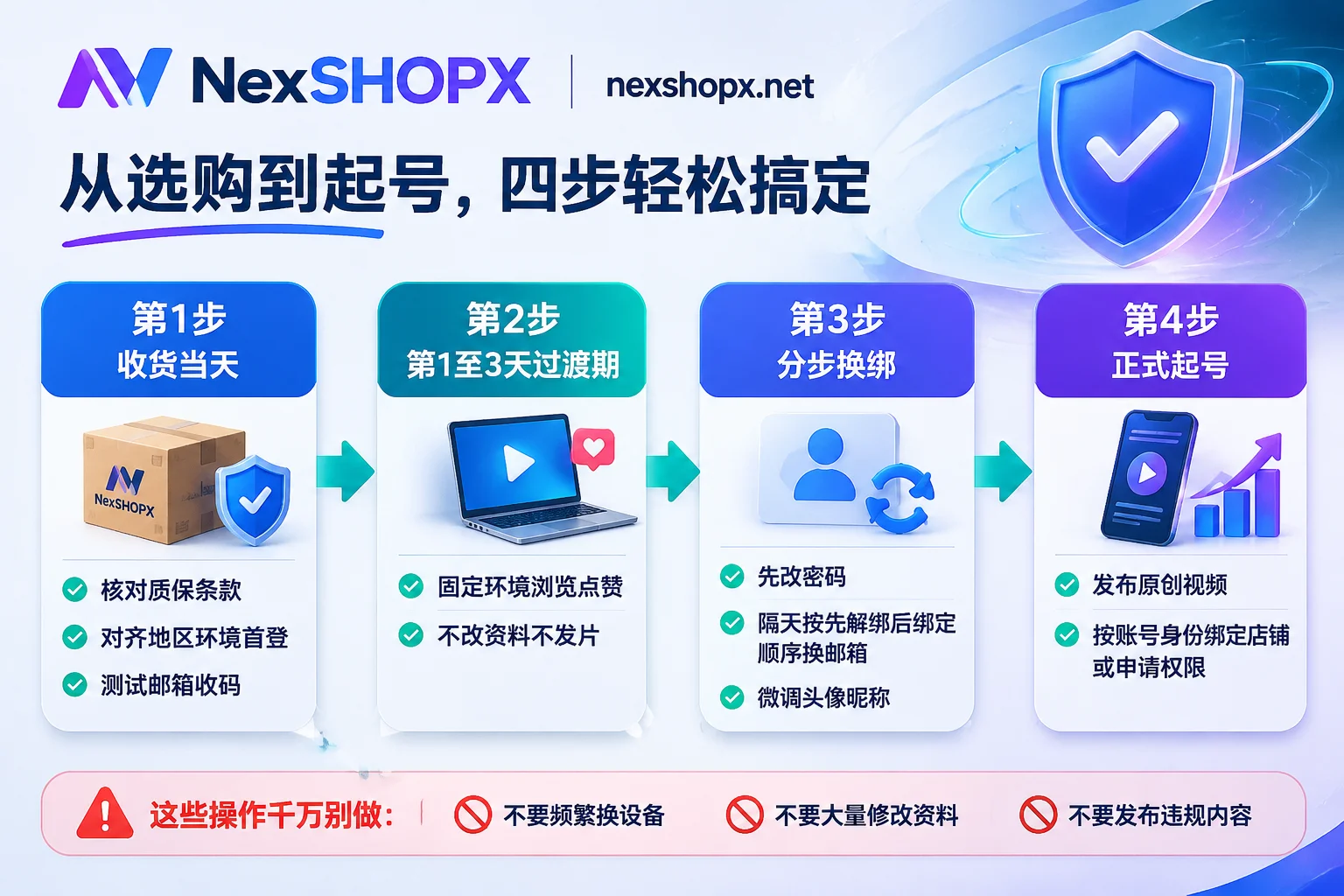
Step 1 (Day of receipt): Only do "first login as per rules + verify status"
- Align target region environment: Use a US local environment for US accounts, and corresponding stable local network exit, system language, and time zone for Southeast Asian or UK/Japan accounts, avoiding switching multiple regional accounts on the same device simultaneously.
- First login within the specified time limit: After receiving credentials, complete the first login promptly as required on the product page, and immediately test whether the accompanying email can log in and receive emails normally (whether verification codes can be received determines the initiative for subsequent rebinding).
- Check account cleanliness: Go to the backend to confirm no unhandled violation notifications, limited-flow warnings, or abnormal device sessions. For how to check Passkey and Security Checkup items on the login day, refer to After Security Checkup and Passkey, how to do TikTok account security settings on the same day for item-by-item troubleshooting.
Step 2 (Days 1–3): Stabilize environment and build trust, no profile changes or posting
- Under the same fixed device and network exit, spend 15–30 minutes daily browsing videos in your vertical like a real user, moderately completing views, liking, and leaving one or two normal comments.
- During these 2–3 days, do not modify avatar, username, Bio, and do not frequently log out and log back in.
Step 3 (After confirming stability and allowed modifications): Change password and rebind email step by step
- Change password first, handle email the next day: If the product page allows modification and the first-login observation period has passed, change the login password first; wait 24 hours before touching the bound email.
- Practical sequence for stuck/timed-out TikTok email rebinding: Many buyers encounter timeouts or code reception failures when directly clicking "Change email" in account settings. If the account supports binding a phone number and the original email receives codes normally, a more stable practical approach is to first confirm or bind a backup verification method you control, then choose "Unbind old email" (complete unbinding by receiving a code on the original email), and after successful unbinding, bind your new email; finally, if the temporary phone number is not needed, unbind it as needed.
- Slow-paced fine-tuning of profile: Do not completely overhaul avatar, nickname, and bio on the same day; replace them gradually over 2–3 days, giving the algorithm an adaptation period.
3. What to do if videos from a purchased account get "0 views"? 3 steps to distinguish cold start from real limited flow
Many users see their newly posted videos stuck at 0 or only a few dozen views, and their first reaction is "bought a dud account," then start deleting videos, posting 5 in a row, or even switching nodes and re-logging—which precisely turns a normal cold start into real limited flow.
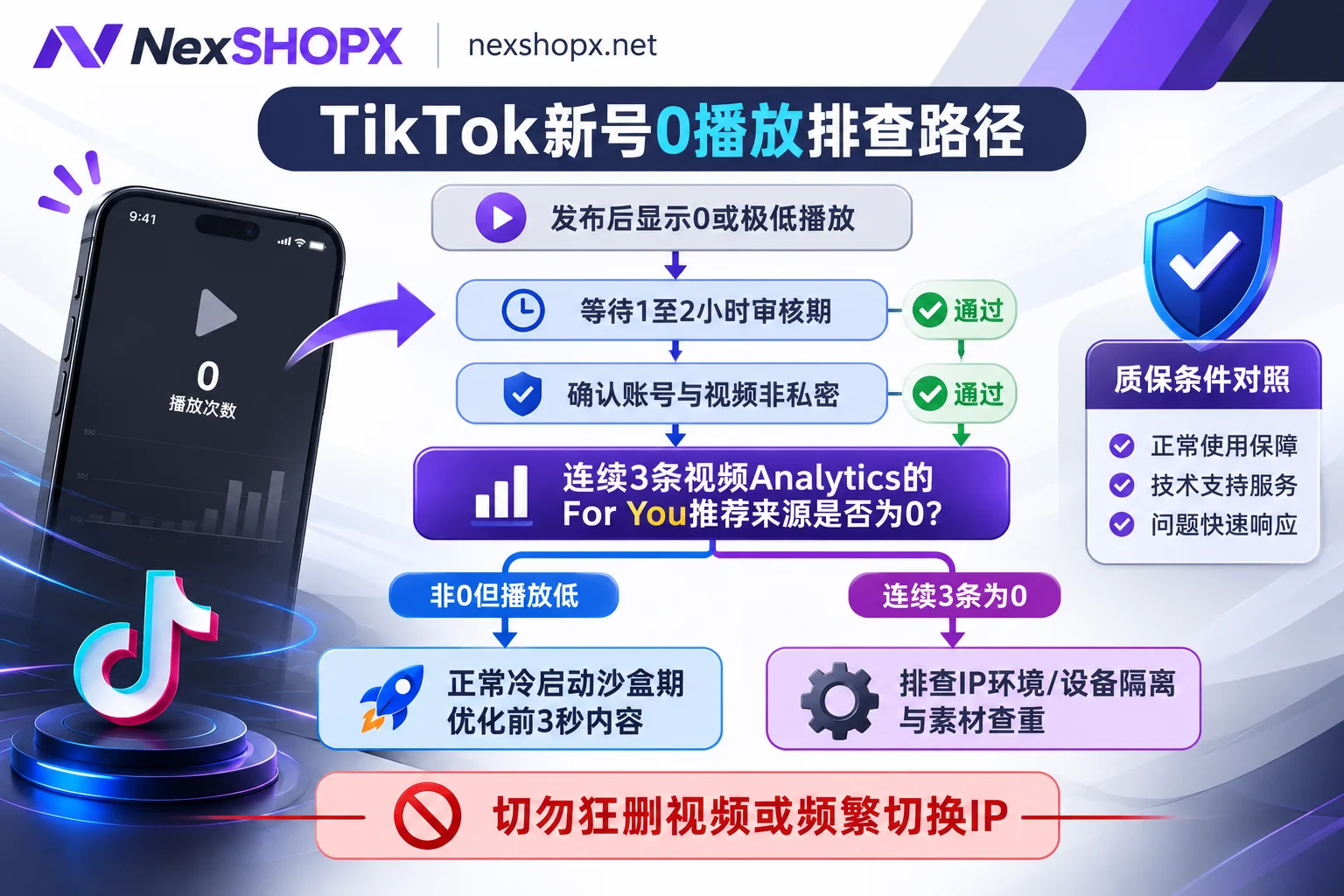
It's recommended to calmly determine the nature through the following three steps:
- Wait for review and rule out misconfigurations first: The first 1–2 hours after a video is posted may still be in transcoding or content review queue, and temporary 0 views on the front end is common; also check whether the account is mistakenly set to "Private account," or whether a single video's permission is set to "Only me."
- Use
For Youtraffic sources to determine nature: OpenCreator tools(创作者工具)→ Analytics(数据分析)→ Content, click on the video to see traffic source proportions. Newly taken-over or just-entered-new-environment accounts are in a low-trust observation period for the first 24–72 hours; as long as there are dozens to one or two hundred views and traffic sources includeFor You(For You feed), it indicates the distribution chain is working and it's a normal ramp-up, and the focus should be on optimizing the first 3-second hook and video quality; only whenFor Yourecommendation source is 0 for more than 3 consecutive videos is it more likely due to environmental anomalies, content judged as duplicate, or real limited flow. - Troubleshoot environment and material hard flaws: When recommendation flow truly drops to zero, prioritize checking whether your network exit is a data center IP, whether device location/time zone conflicts, whether videos are non-original reposts or have watermarks, rather than using "crazy deleting and reposting" to test the algorithm.
4. Don't rush hard ads or product links before launching: understand the 2026 e-commerce identity rules first
When you can add product links and start live streaming after buying an account depends not only on "whether the account is good" but also on which e-commerce path you take:
- Own store binding (official account / channel account): According to the 2026 TikTok Shop official rules, when merchants bind their own store official account (1) or channel accounts (up to 4) in the seller center to promote their own store's self-operated products, the minimum follower limit has been removed (0 followers can bind), and US official accounts and channel account binding no longer require creator personal identity verification. That is, if you have your own compliant store and only sell your own store's products, buying a regular content account or aged account with a clean regional environment to bind as a channel account is sufficient; there's no need to spend high prices on thousand-follower accounts of unknown origin.
- Independent affiliate creator selling: If you want to independently apply to become an independent affiliate creator and promote other merchants' products in the product marketplace to earn commissions, US and other sites usually still require being at least 18 years old, compliant identity verification (KYC) in the target country, and a minimum threshold of 1,000 followers; moreover, after activation, you enter at least a 30-day creator pilot program, with a daily quota limit for product-link videos (maximum 3 product-link short videos per day).
Clarifying these two sets of rules before choosing an account can save a lot of wasted money. For specific selection and qualification verification for different e-commerce scenarios, you can also read How to choose TikTok account purchase? 2026 Black Friday peak season and environment verification upgrade guide for regular content accounts, store live accounts, and multi-region selection and How to pick TikTok account purchase? Check 5 qualifications before selling.
5. If the source environment doesn't match, no amount of nurturing later will help: the convenience of purchasing on NexSHOPX
Running through the above steps has a prerequisite: the account's registration归属地 and basic environment must be clean and matching. If you buy a cheap account batch-registered with data center IP ranges and chaotic time zone/language, even if you transition carefully after first login, it's easy to get stuck when posting videos or binding stores.
If you are doing professional TikTok account purchase comparisons, consider choosing accounts with corresponding business specifications on NexSHOPX:
- Multi-region coverage and pre-delivery environment matching: NexSHOPX provides accounts for the US, UK, Japan, and popular overseas regions like Indonesia, Thailand, Vietnam, and the Philippines, with IP, time zone, language, and device model environments pre-matched according to the account's region before delivery, saving the time of building a cold-start environment from scratch.
- Layered selection by business stage: Distinguishes regular content accounts suitable for matrix account launching, content testing, and store channel binding, as well as advanced accounts for TikTok Shop and live e-commerce scenarios, avoiding "using a sledgehammer to crack a nut" or insufficient permissions.
- Transparent delivery and flexible procurement: Supports registration or guest self-service ordering on the NexSHOPX store, with Alipay and USDT (CNY settlement) accepted; in-stock items are automatically delivered after payment confirmation, and account information can be retrieved with the order number on the guest order inquiry page; for bulk customization or advanced account needs, you can also directly contact Telegram official customer service to confirm stock and negotiate prices.
Special reminder: NexSHOPX delivers TikTok ready-made accounts with region environment pre-matching itself, does not provide proxy IPs, fingerprint browser environments, or SMS verification numbers, nor does it teach illegal operations to bypass platform risk control. After receiving the account, buyers still need to run it in their own compliant, independent localized network and device environment, and strictly comply with the first-login time limit, profile modification restrictions, and terms of service and warranty rules marked on each product page, so as to both retain after-sales rights and keep the account stable for long-term output.
Action checklist: Follow these 5 sentences when ordering and after receipt
- Determine the purpose first (content launching / binding own store channel account / affiliate selling) then choose the corresponding region and specification, don't blindly buy high-priced accounts.
- Before payment, carefully check the first-login time limit and profile modification restrictions during warranty period on the product page.
- On the day of receipt, only do "first login in fixed regional environment + check email reception + check no violations," don't chain-modify profiles.
- Use 48–72 hours to simulate real-user browsing transition, then change password, unbind/rebind email step by step.
- For the first few videos with low views, check
For Yourecommendation proportion first, don't rely on deleting videos and frantically switching IPs to force it.