 NexSHOPX-官方新闻
Once you've just bought an Instagram account, don't rush to change the password, email, avatar, and username right after logging in. The safest approach is: first check the product page's warranty and profile modification restrictions, complete the first login under a stable network and isolated environment matching the account's region; after confirming login and basic functions are normal, leave it idle for at least 48 to 72 hours for observation, then follow the rhythm of "first take over the bound email and 2FA, wait a day before changing the password, and finally adjust avatar and username in batches", changing only one or two items each time. Meanwhile, under the Meta Account system that is gradually replacing the Accounts Center in 2026, check for any unfamiliar associations.
Many people who type "buy Instagram account" into the search box are stuck on this dilemma: not changing the password risks the original holder reclaiming it, but changing everything at once may trigger platform risk control in milliseconds, popping up identity verification or even suspension, and even the seller's after-sales service can't save it. Below, we thoroughly explain the delivery credentials to check before purchase, the 72-hour handover rhythm after purchase, and the Meta Account troubleshooting actions that cannot be ignored in 2026.
Why is it easy to have problems when changing profile right after logging in?
From the platform review and registration mechanisms in 2026, Instagram's tolerance for new accounts and abnormal logins has tightened significantly. On one hand, Instagram has long canceled pure email registration; new accounts generally require phone verification. Once an account is judged as abnormally disabled or enters the appeal process, it often requires providing ID or video selfie for identity verification. On the other hand, Meta's automated risk control evaluates device environment, IP location, post-login behavior rhythm, and cross-account associations simultaneously.
In this context, buyers are most likely to fall into two types of pitfalls:
- Operating too hastily and "killing" a normal account: Just logged in on a new device and network, then within 5 minutes consecutively changing password, email, username, and avatar. This combination is almost indistinguishable from "abnormal takeover" in the system's eyes, resulting in additional verification or operation restrictions at best, or direct account lock at worst.
- Rushing into operations without checking the control foundation: Some low-priced bulk accounts are delivered with only a set of account credentials, without the corresponding email login permission, without enabling 2FA (two-factor authentication), and even previously bound to someone else's Meta ecosystem. Even if you change the display profile, the underlying recovery channels and associated authorizations are still not in your hands.
If you want to first understand the differences in algorithm weight and cold start among different account types, you can read How to Choose Instagram Accounts? 2026 Algorithm and Risk Control Update Guide for New, Aged, and Follower Accounts.
4 Delivery and Warranty Items to Check Before Ordering
To have control and avoid risk control after handover, the decisive point is actually before ordering. When choosing an Instagram account purchase service, don't just look at price and follower count; prioritize confirming the following 4 items:
- Whether supporting email or phone binding information is provided: Complete delivery of email or binding credentials determines your ability to receive login verification codes and master recovery ownership.
- Whether 2FA (two-factor authentication) is included and setup guidance: Accounts already configured with an authenticator or providing clear 2FA setup instructions are much more stable than bare-password accounts during cross-device, cross-region team handovers.
- Whether region and specifications match real business needs: For example, for European/American independent stores or Southeast Asian local content, try to choose finished accounts from corresponding regions, and distinguish between new accounts (suitable for low-cost testing or matrix scaling), aged accounts (relatively more stable weight and trust, suitable for long-term operation), and follower accounts. In NexSHOPX (nexshopx.net)'s Instagram finished account category, there are options for US, Europe, Southeast Asia, and other regions, covering new, aged, and follower accounts. Basic account warming is completed before delivery, profiles and avatars are complete, and email or phone binding information and 2FA setup guidance are included.
- First login time limit and whether profile can be changed during warranty: This is the most likely cause of after-sales disputes. Legitimate product pages usually specify the first login time limit after ordering and profile modification restrictions during the warranty period. Only by reading the rules in advance can you avoid voiding the warranty right after changing the password.
For details on delivery acceptance and warranty boundaries, you can also refer to Instagram Account Purchase and Compliance Handover Guide: Risk Avoidance and Delivery Verification under New Meta Rules and What Does It Mean That Profile Cannot Be Changed During Warranty? Which Changes Void the Warranty.
How Soon After Receiving Can You Change Password and Profile? Step-by-Step Handover Timeline
If the product page does not prohibit profile changes during the warranty period (if there is a prohibition clause, be sure to complete the first login verification and follow the product page agreement), it is recommended to follow the rhythm below to complete the security transition:
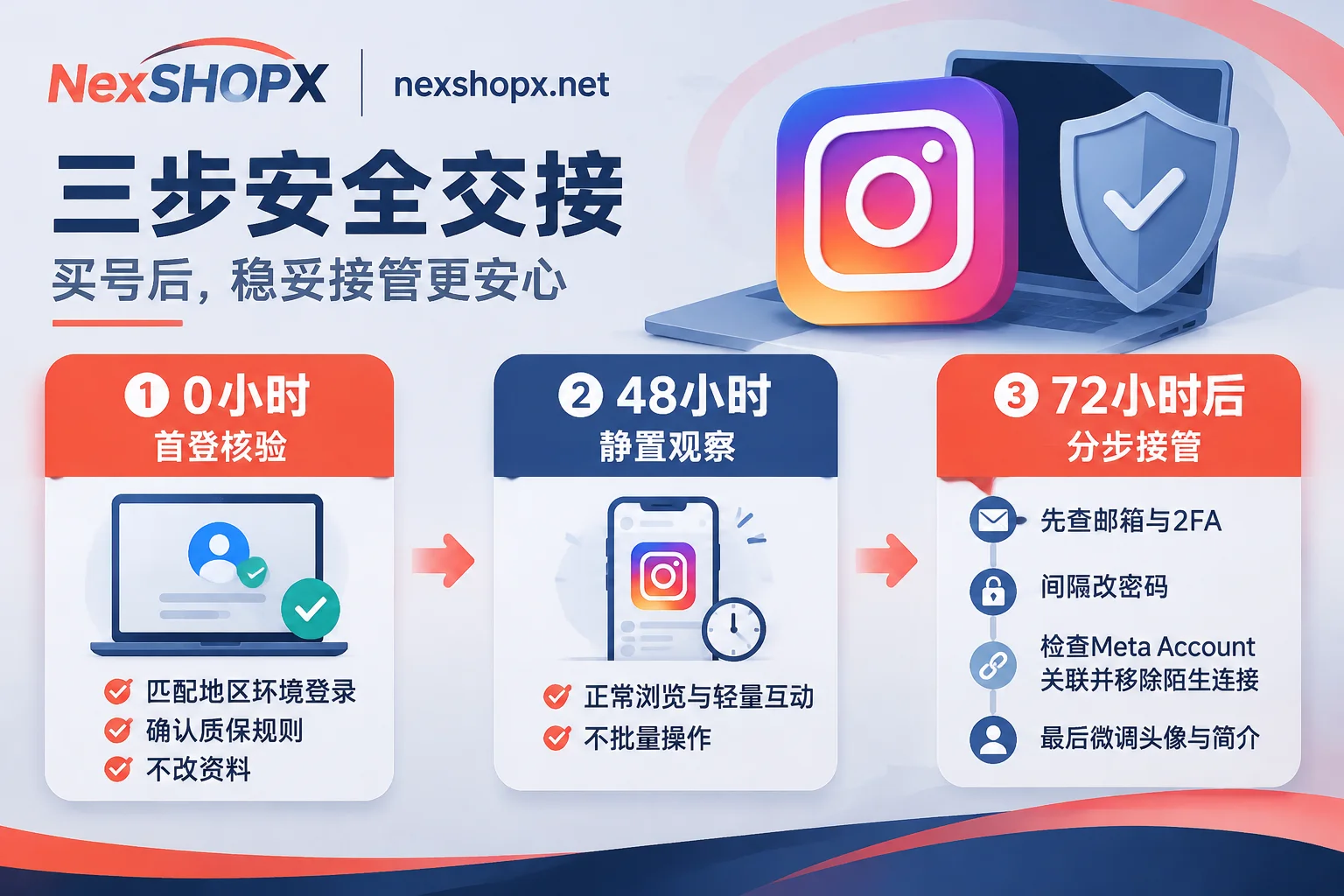
Phase 1: First Login Upon Receipt (0 hours, verify first, don't change randomly)
After receiving the account credentials, complete the first login within the first login time limit specified on the product page. Pay attention to two points:
- Environment and region should match as much as possible: For a US account, log in using a clean, stable network in the corresponding region and an independent browser or dedicated device environment. Do not use public nodes shared by multiple people, and do not switch multiple accounts simultaneously on a device or IP that has previously had bulk bans.
- Verify before changing: Confirm you can normally enter the homepage, there are no restriction notifications on the status page, and the accompanying email can normally log in and receive messages. Then stop and do not rush to modify any sensitive information. If you find credential errors or abnormal initial status at first login, immediately keep screenshots without changing the profile, and contact after-sales support first.
Phase 2: Idle and Warm Up the Environment (Days 1–2, 48-hour observation period)
Let the system first recognize that "this device and network are the account's regular usage environment". During these 48 hours, naturally browse the feed, watch a few Reels, and do very few normal likes or dwells on vertical niche posts each day. Avoid high-frequency following, bulk marketing DMs, or connecting any automation tools right away.
Phase 3: Step-by-Step Control Recovery (From Day 3, modify item by item after 72 hours)
After 48 to 72 hours of stable period with no security pop-ups, modify by priority on different days, with an interval of 24 hours between each change:
- First consolidate email and 2FA: Confirm the bound email's password and recovery method are under your control (if you need an independent backup email, you can also prepare a stable Gmail account or overseas email in advance); switch 2FA or save it to your commonly used TOTP authenticator app, and save backup recovery codes offline.
- Then change the login password: After ensuring both email and 2FA can receive codes normally, change the Instagram login password.
- Finally fine-tune the public profile: Avatar, bio, display name, and username are changed last in batches. If it's an aged or follower account, try to gradually transition along the original vertical positioning; do not reset the entire account theme overnight.
For the specific internal security settings order, you can follow Instagram Account Security Settings: 5 Must-Change Locations and Correct Order item by item.
New Variable in 2026: How to Troubleshoot Association Risks During Meta Account Transition?
In April 2026, Meta announced it will gradually replace the original Accounts Center with Meta Account, and will push upgrade notifications to users in batches from the second half of the year to the next year. This adjustment is crucial for account buyers and operators.
Under the Meta Account system, login passwords, 2FA, associated emails, personal information, and Passkeys for Facebook, Instagram, Messenger, Threads, and other apps can be centrally managed in the same Meta Account. The platform also allows users to keep separate Meta Accounts for different apps or remove an app from the original collection.
This means that if you take over an Instagram account used by someone else, besides changing email and password, after the transition stabilizes, you must also check these 4 locations:
- Meta Account / Accounts Center profile list: Check whether the current IG is bound in the same collection with unfamiliar Facebook accounts, Threads profiles, or Meta accounts. If it's a combination sharing the same set of login credentials, when someone else changes the associated password or triggers risk control on the other end, it may affect your Instagram access. After confirming no sharing is needed, remove unfamiliar associated profiles according to the settings path, or keep the current IG under an independent Meta Account (note the distinction: a Facebook Page linked to a professional account for advertising is a business function, different from the login-level account collection).
- Passkey and active sessions: In password and security settings, check for residual Passkeys from old devices and "Where you're logged in", and after confirming the current authenticator is in hand, log out unfamiliar historical sessions.
- Third-party app authorizations: Clear all unfamiliar website or app authorizations to prevent external interfaces from continuing to access the account.
- Whether supporting Threads operation is needed: If the business needs to simultaneously layout Threads, it is recommended to directly pair with a matching Threads account for coordinated configuration, avoiding temporary random binding that affects the main account's stability.
What to Do If First Login Is Abnormal or Triggers Verification? Practical Advice for NexSHOPX Purchasing and After-Sales
If you receive an abnormality prompt or cannot enter right after logging in, don't panic and repeatedly try logging in with wrong passwords—high-frequency retries often escalate temporary verification into longer lockouts. It is recommended to first refer to Is Account Login Failure a Ban or Environment Issue? Three Categories Based on Error Prompts to locate the cause: if it's network fluctuation or environment conflict, stop operating and check the current network purity; if the initial credentials or initial status do not match the description, keep the original state without modifying the profile and take complete screenshots.
If you need to purchase compliant finished accounts for cross-border stores, social media matrices, or overseas promotion, after ordering at NexSHOPX (nexshopx.net), you can hand over smoothly according to the following process:
- Ordering and pickup: The mall supports registered ordering and guest checkout without registration. Checkout supports Alipay and USDT (CNY settlement), and bulk purchases can be negotiated. In-stock items are automatically delivered after payment confirmation; you can retrieve account information through the order number on the order query page. For special regions or bulk specifications, you can also contact Telegram customer service to confirm stock and reservations.
- After-sales boundary check: Before ordering, spend a minute to read the Terms of Service and Warranty Rules and the corresponding product page description. As long as you log in for the first time within the specified time limit, do not violate profile modification restrictions without authorization, and use for legal and compliant purposes, if you encounter initial credential problems or abnormalities caused by non-human violations during the warranty period, you can contact customer service with the order number to handle according to the terms; conversely, failure to log in within the time limit, unauthorized early profile changes, multi-person sharing, or aggressive operations triggering platform anti-cheat mechanisms are usually not covered by the warranty.
FAQ
Q1: I just bought an Instagram account, and when I first log in, it asks for an email verification code. Is this normal?
Yes. When logging in for the first time on a new device or new regional network, Instagram triggering an email verification code check is a routine security protection. As long as the product includes accessible email credentials (or contact the corresponding specification's SMS/email channel), just check the verification code as prompted and you can enter smoothly. Don't mistakenly think the account is banned.
Q2: I bought several Instagram accounts. Can I log in and switch between them on the same phone directly?
Not recommended. In 2026, Meta is very sensitive to device fingerprinting and cross-account association detection. If multiple newly taken-over accounts are simultaneously active on the same device and network environment, once one is restricted due to improper operation, it can easily affect other accounts on the same device.
Q3: For long-term independent store branding or overseas traffic, should I buy new, aged, or follower accounts?
If you are just testing content directions at low cost or building a backup matrix, new accounts are cost-effective but require more patience to pass the 48-72 hour stable period and early warming stage; if you are preparing for formal advertising, linking official website URLs, or long-term main account operation, aged or follower accounts with longer registration time, complete basic profiles, and 2FA configuration usually have significantly better cold-start stability.