 NexSHOPX-官方新闻
In digital account asset management, if a person is still on the payroll and data has not been transferred, you should first suspend rather than directly delete; only when you confirm the account is abandoned and data handover is complete should you proceed to deletion. This conclusion is based on the strict boundaries for data protection defined by Google Workspace official guidelines.
An Account Actually Contains Four Asset Layers
From the perspective of digital account asset management, viewing an account merely as a pair of credentials is a dangerous oversimplification. In reality, each account carries four independent yet interrelated asset layers.
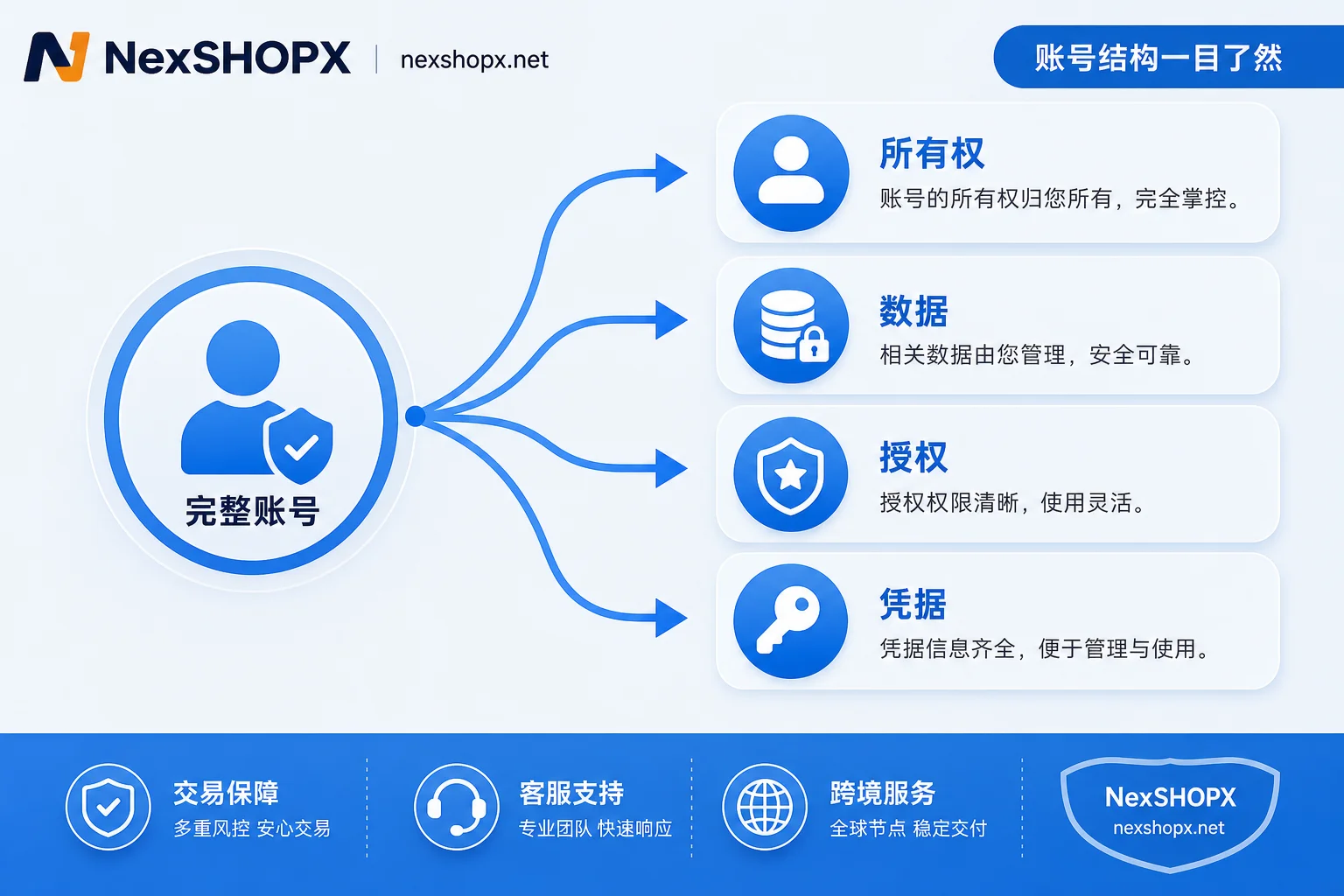
The ownership layer determines the legal ownership of the account, including recovery email, phone number, and entity authentication information. The data layer consists of the business value stored within the account, such as Drive files and email records. The authorization layer records access tokens obtained by third-party apps via OAuth, which often have long-term read/write permissions. The credential layer encompasses passwords, passkeys related to overseas account login security, and active login sessions. Suspension and deletion, the two common actions, operate on these layers in fundamentally different ways, so the order of actions directly determines the security and integrity of the assets.
Key Differences Between Suspension and Deletion
Regarding the frequent question of whether to delete a former employee's Google Workspace account, official guidelines provide a clear boundary. The standard process requires performing suspension first, rather than direct deletion. The essence of suspension is blocking new login attempts while fully retaining the data layer and account shell. In contrast, deletion erases all traces of both the data layer and the ownership layer.
Once past the deletion window, data older than 20 days faces irreversible loss. That is why the official standard order strictly says: suspension first, asset transfer in between, and authorization revocation last. Skipping the middle steps and directly deleting means voluntarily abandoning the chance to rescue data.
To better understand the difference between account suspension and deletion, let's place both actions on the same coordinate system for parameter comparison.
| Dimension | Suspended State | Deleted State |
|---|---|---|
| Login blocking | Yes, new sessions blocked | Yes, account does not exist |
| Cloud data retention | Yes, requires manual transfer | No, permanently purged after 20 days |
| OAuth token invalidation | No, requires separate revocation | Depends on official platform documentation |
| Passkey impact | None, still bound to device | Depends on official platform documentation |
| Possibility of recovery later | High, can be reactivated | Very low, only within short window |
| Seat fee occupancy | Depends on platform policy | Seat released |
The most easily overlooked aspect lies in the authorization and credential layers. Even if an account is deleted or the password is changed, third-party OAuth tokens do not automatically clear, and bound passkeys do not become invalid merely by changing the password. This means simply changing the account status does not sever all potential backdoor connections.
Separation of Data Layer and Authorization Layer Disposal
After completing suspension, two tasks must be executed independently and cannot be accomplished by account deletion in one stroke. First is data migration: administrators need to transfer Drive assets to a designated recipient. This step is time-sensitive; if performed after the deletion window, it is too late. For transferring Drive files after an employee's departure, the key lies in confirming the recipient's identity and executing an ownership change, not just copying and downloading.
Second is cleaning the authorization layer. You must forcibly revoke OAuth access tokens held by third-party apps and terminate all active sessions. Because these tokens do not expire with a password change, leaving them uncleaned means that even if the original holder has left the organization, tools they authorized can still read sensitive data. To revoke authorized third-party apps, in the admin console you need to revoke access tokens for connected third-party apps and globally end sessions; the exact location should be confirmed in the corresponding platform's official documentation. This is similar to standard overseas account permission handover procedures.

Credential Layer Exception: Changing Password Is Ineffective
The credential layer needs special review because passkeys rely on public-private key asymmetric encryption and are stored in the hardware security chip of the device. Google's official documentation clearly states that adding a passkey does not replace or remove existing verification options, and changing your overseas account password does not automatically log out or delete bound passkeys.
Users must log in to a dedicated page to view and remove authorized passkeys. For passkeys auto-generated by Android, you need to sign out of that device in the list of signed-in devices. Since private keys are protected by hardware and are not inherently copyable, they can only be removed, not transferred. The FIDO Alliance's CXP protocol aims to facilitate migration between password managers, but currently personal passkeys cannot be directly transferred between people; a buyer cannot inherit a seller's device passkeys.
Disposal Logic for Different Scenarios
Different business scenarios call for completely different disposal logic. Managing multiple overseas accounts centrally is essentially about classification decisions for these four asset layers across different lifecycle stages.
| Typical Scenario | Recommended Disposal Path | Basis and Common Pitfalls |
|---|---|---|
| Employee leaves but position remains | Suspend -> Transfer data -> Revoke authorizations | Data not yet transferred, authorizations not yet revoked; easy to miss third-party OAuth cleanup |
| Account confirmed abandoned and data already transferred | Proceed to deletion | Confirm data is backed up; note irreversibility and the 20-day limit |
| Account received from external party | Clear credentials/authorizations -> Rebuild recovery entry | Focus not on deletion but on isolating credential layer; must comply with target platform terms |
| Periodic review | Verify ownership of recovery entry -> Check active authorizations | Verify current responsible person can use independently; scan for idle API permissions |
In scenarios involving external handover, the focus is not on whether to delete the old account, but on thoroughly clearing and rebuilding the credential and authorization layers, and ensuring the recovery entry is fully under your control. This requires administrators to have a clear sense of asset layering and avoid the cognitive trap that "changing the password is sufficient."
Common Questions
Should a former employee's Google Workspace account be directly deleted?
No, it should not be directly deleted. Official guidelines clearly require first suspending the account to block login, then performing data transfer and authorization revocation. Direct deletion leads to irreversible data loss after 20 days and does not guarantee third-party app permissions are revoked.
In suspended state, can the account still be logged into and is the data still there?
In suspended state, new login requests are blocked, but data in the account such as Drive files and emails remains fully intact. This provides administrators with a sufficient time window to perform asset transfer and compliance audits, avoiding the risk of accidental deletion.
How to transfer Drive files to a successor after an employee leaves?
You need to complete ownership transfer before the deletion window closes. Although official guidelines do not specify a minute-level deadline, they clearly warn that data older than 20 days will be irreversibly lost. Be sure to transfer Drive files to the designated administrator via the admin console before the account is permanently deleted.
Password has been changed, but third-party tools can still read data. Why?
Because OAuth access tokens do not expire when the password is changed. You must revoke access tokens for connected third-party apps in the admin console and globally end sessions to fully disconnect; the exact location should be confirmed in the corresponding platform's official documentation.
When purchasing an account externally, how to confirm the ownership of the recovery entry and third-party authorization status before ordering?
In the procurement process of digital account asset management, it is recommended to use NexSHOPX's category search and delivery verification features to confirm the recovery email ownership and that there are no lingering OAuth authorizations before ordering. On the day of receipt, immediately remove passkeys bound by the previous owner. We do not promise the account will be usable forever; please comply with platform real-name requirements.
Action advice: First, build an asset ledger based on the four layers. Second, decide whether to suspend or delete based on data transfer progress. If you are purchasing or receiving accounts externally, be sure to include the recovery entry and authorization status in pre-order checks and confirm on the day of receipt. NexSHOPX can serve as a reference tool for such verification.



Comments(0)