 NexSHOPX-官方新闻
When taking over an overseas account, you need to do four things: revoke third-party app and API authorizations, clear sub-users and service provider roles, switch verification methods to credentials you control, and finally log out globally and remove trusted devices—changing the password only covers one of these. Many people think that changing the password and updating the two-factor verification code completes the handover, but in reality, the password only cuts off one channel—if you've taken over an Amazon store, corporate email, or ad backend, there are at least three other types of authorization channels that remain independently active, allowing the previous holder or third-party tools to continue accessing data. So, an effective handover must manage "credentials" and "authorization relationships" separately. Amazon's and Microsoft's official changes in 2026 provide a clear time window for this governance.
Conclusion First: Four Types of Channels for Permission Handover, Password Only Cuts Off One
The core of overseas account permission handover is not changing the password, but systematically closing the four independent channels attached to the account: first, the credentials themselves (password, two-factor verification codes); second, third-party app and API authorizations; third, sub-users and service provider roles; and fourth, trusted devices and active sessions. Only the first type becomes invalid when you change your password; the other three survive independently.
Amazon retired the old service provider invitation channel in August 2026, replacing it with SPN direct authorization and independent authorization links, and introduced Passkey login. In September, it required sellers to uniformly re-verify and reset all service provider and sub-user authorization roles—this shows the platform itself is treating "authorization relationships" as governance objects independent of passwords. Therefore, when taking over an account, you should at least check the following four channels one by one.
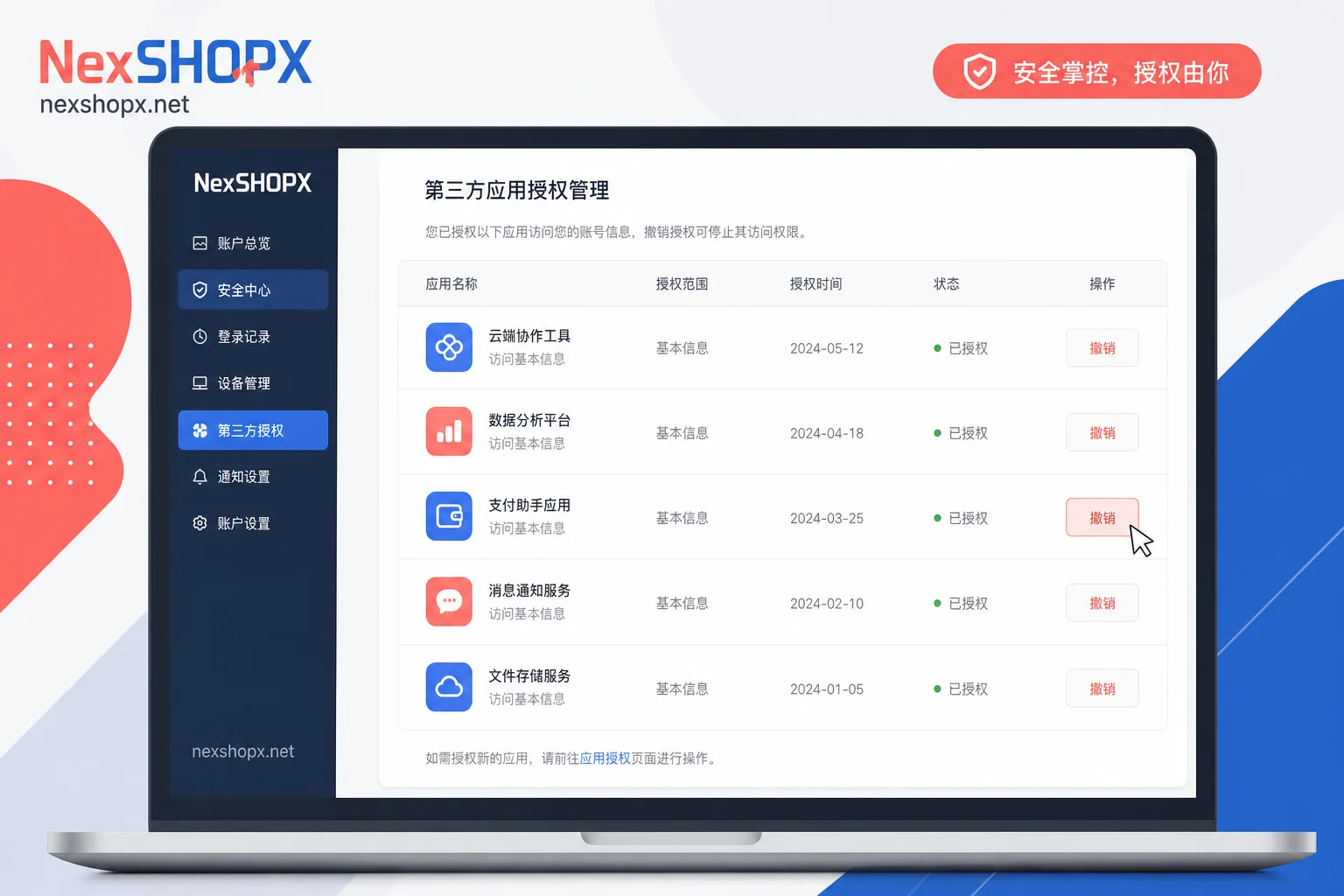
Channel 1: Third-Party App and API Authorizations, Why They Don't Expire with Password Change
Third-party app and API authorizations are based on tokens, not passwords. Once granted, a token is independent of the password, so even if you change the password, previously authorized ERP, product research tools, financial reconciliation software, and auto-reply bots can still read and write your store data.
After Amazon changed the service provider invitation channel to SPN direct authorization and independent authorization links in August 2026, the authorization entry point shifted from "invitation relationship" to "explicit authorization object," and the checklist you need to verify during handover also changes. You need to log into each platform's backend and check the "Connected Apps" or "Authorized Apps" list to verify each item: which are still in use and which are obsolete. I won't detail the specific menu paths for each platform here, as the interface may change with updates, but the functional description remains the same: go to the "App Authorizations" or "Connected Apps" page and revoke any authorizations you no longer use.
Completion Criteria: The list is empty, or only contains tools you are currently using. If there are tools bound by the previous holder that you can't confirm the purpose of, revoke them all first, and reauthorize if needed.
Channel 2: Sub-Users and Service Provider Roles, the Easiest Layer to Miss During Handover
The easiest layer to miss during overseas account permission handover is sub-users and service provider roles. Sub-users have independent login credentials, so changing the main account password has no effect on them. Service provider roles may also hold operational permissions as an organizational entity. Many sellers change the main account password one by one during handover but forget that the sub-user list still contains the former employee's email, or that a service provider still holds an "admin"-level role.
Amazon's September requirement to uniformly re-verify and reset all service provider and sub-user authorization roles is the perfect opportunity to ask the original holder to cooperate in cleaning up. If sub-user permissions are not removed completely, the consequences are layered: at best, data leakage (former employees can see orders and customer information); at worst, erroneous operations (someone changes prices or delists products). More troubling, if the account later violates rules, the attribution evidence becomes murky, and these accounts' operation logs could interfere with accountability or appeals.
Completion Criteria: The sub-user list only contains your own members; service provider roles are either removed or downgraded to read-only with a clear purpose. Only when you see these two lists in order can you truly close the loop. For team-level role classification and permission recovery rhythm, refer to Cross-Border Team Account Management.
Channel 3: Verification Method Sovereignty, How Passkey Default Changes Handover Order
Control over the verification method is closer to "account ownership" than the password—whoever holds the usable second factor can initiate account recovery. Microsoft has announced that starting September 1, 2026, Entra ID will set Passkey (passkey) as the default verification method and automatically enable registration guidance for users who previously used SMS/voice. Additionally, Microsoft's native SMS text and voice call MFA will be completely discontinued on February 1, 2027. This means relying on "phone number SMS verification" as the sole handover credential is becoming obsolete.
Amazon Seller Central has also integrated Passkey login. Therefore, the handover must include the sequence of "register a new Passkey on your own controlled device first, then revoke the original verification method"—first add, then remove. It's important to note that Passkey isn't absolutely secure: if the login environment has local malware or session hijacking, the synced key may be exported. Therefore, Passkey should be combined with device isolation and trusted device cleanup.
Completion Criteria: In the verification method list, the previous holder's phone number or device is removed; you have registered a Passkey on your own device and safely stored recovery codes.
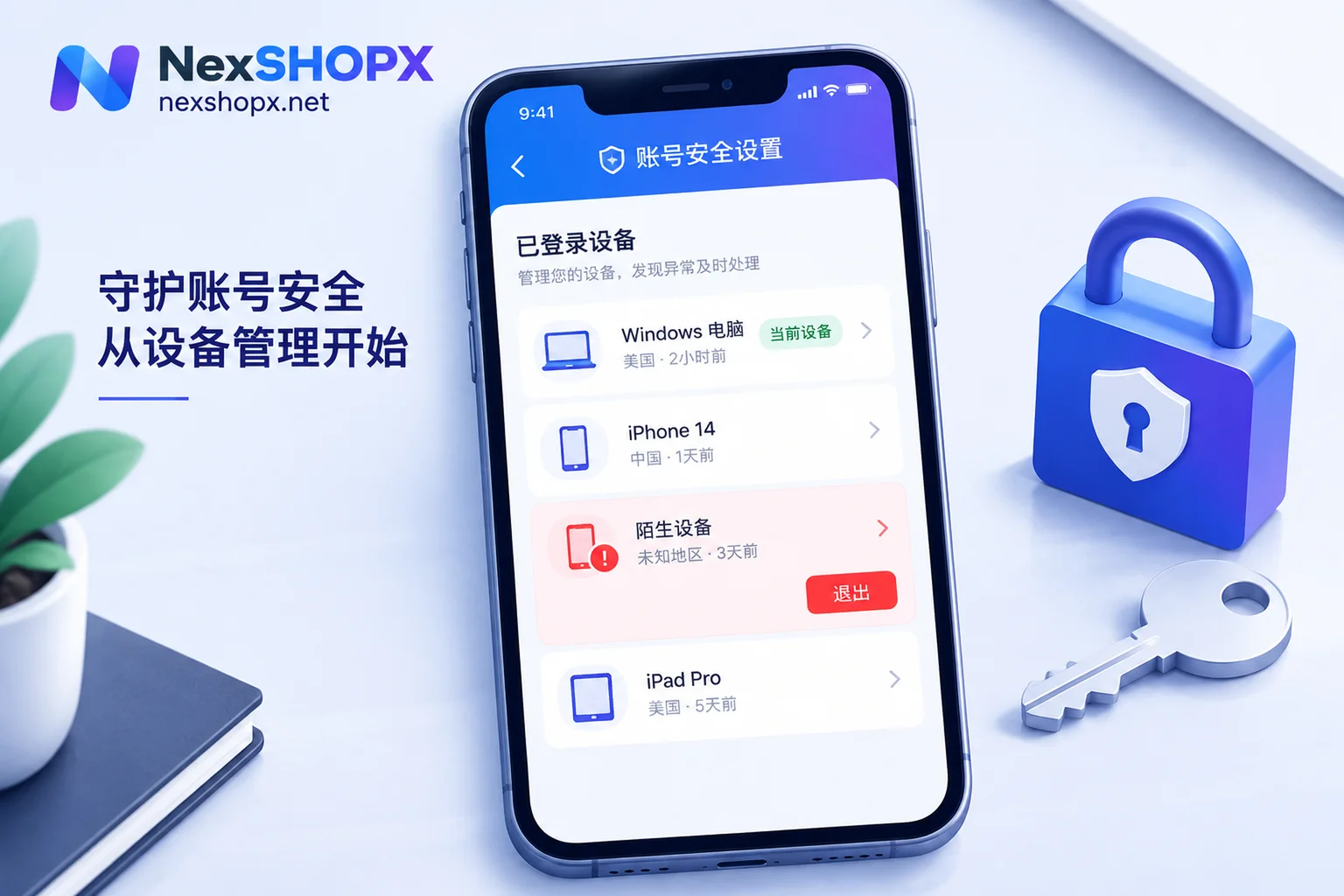
Channel 4: Trusted Devices and Active Sessions, Why Cleanup Should Be Last
Logged-in sessions and trusted devices can maintain access without re-entering the password, and some may even bypass certain two-factor verification prompts. If you globally log out before you have registered your new verification method, you might lock yourself out.
Therefore, the cleanup order must be: first establish your own usable credentials (Passkey, recovery codes) and recovery path, then globally log out and remove trusted devices. After logging out, it's recommended to continuously monitor the activity log for 24-48 hours to confirm there are no login attempts from unfamiliar regions or devices.
Completion Criteria: The trusted device list is empty or only contains your own devices; the activity log no longer shows the previous holder's login locations or device models.
Five-Step Handover Sequence and Completion Criteria for Each Step
Here's the overseas account permission handover broken down into five steps, executed in order, each with verifiable completion criteria:
- Inventory and Screenshot Evidence: Log into the backend and take screenshots of the existing sub-user list, service provider roles, connected apps, and verification methods. These screenshots are the foundation for future tracking and evidence. Criteria: Screenshots are complete, covering all relevant pages.
- Register Verification Methods You Control and Save Recovery Codes: Register a new Passkey (or at least bind your own long-term phone number) on your own device, and export recovery codes for offline storage. Criteria: You can successfully log in using the new Passkey or recovery code.
- Revoke Third-Party App and API Authorizations One by One: As described in Channel 1, revoke all authorizations you no longer use. Criteria: The connected apps list is empty or only contains your own tools.
- Remove or Rebuild Sub-Users and Service Provider Roles: Delete the previous holder's sub-accounts and reset service provider roles. Criteria: The sub-user list only contains your own members, and service provider roles have been cleaned up.
- Change Password, Global Logout, Remove Trusted Devices, and Review: As the final step, change the main password, perform a global logout, remove all trusted devices, then log back in and continue monitoring. Criteria: No abnormal activity in the 24-48 hours after logout.
Note: Don't change settings too frequently to avoid triggering the platform's risk control mechanisms.
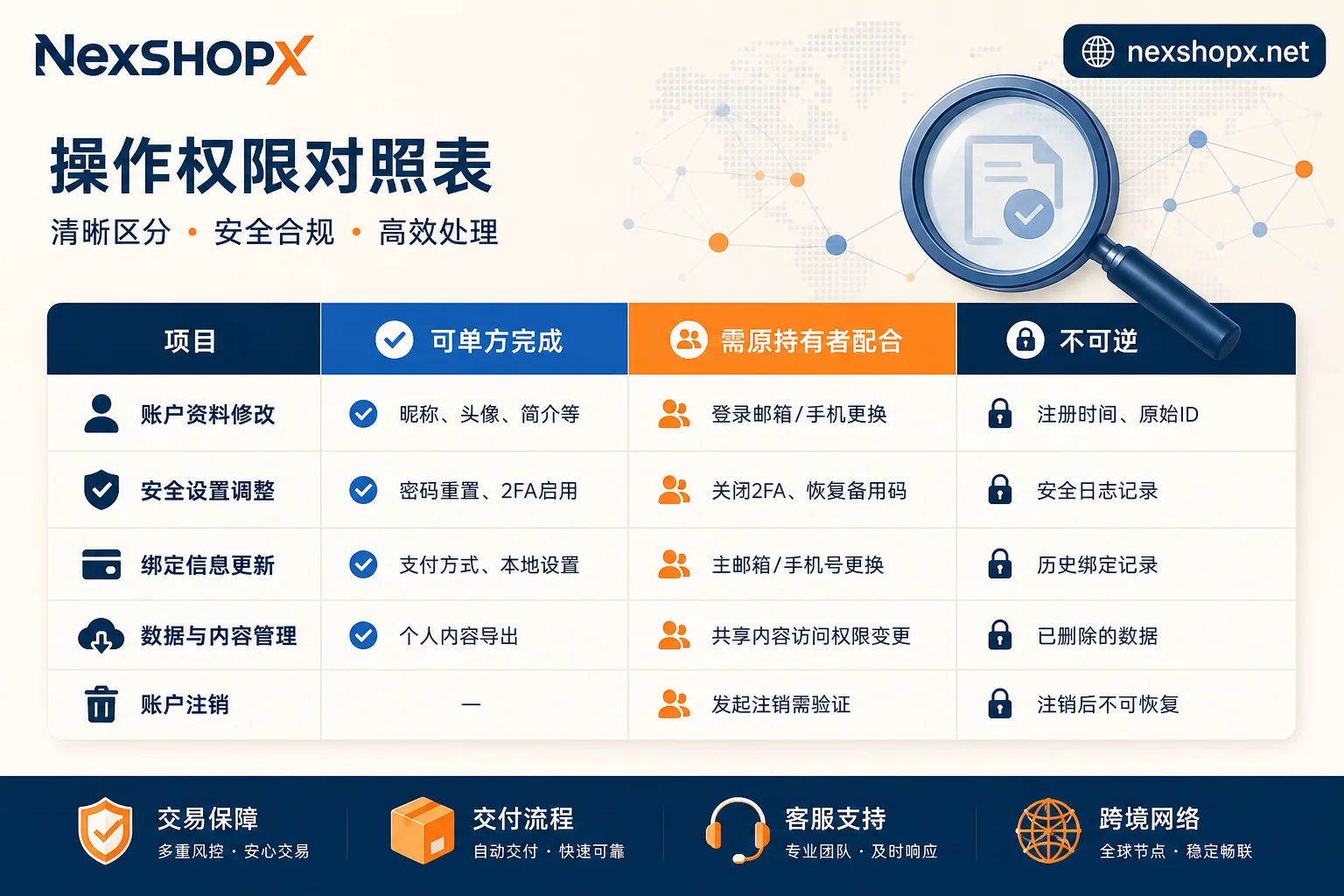
Comparison Table: What You Can Do Alone, What Requires the Original Holder's Cooperation, and What Is Irreversible
The table below helps you define responsibilities before handover to avoid future disputes:
| Action Type | Specific Item | Description |
|---|---|---|
| Can be done unilaterally | Revoke third-party app authorizations | Usually done in the "Connected Apps" page without the original holder's consent |
| Can be done unilaterally | Remove sub-users | Main account can delete sub-users, but confirm if they have independent admin permissions |
| Can be done unilaterally | Global logout and remove trusted devices | Main account can perform these, but ensure you have a working verification method |
| Requires original holder's cooperation | Unbind original verification method | Some platforms require verification of the original second factor, otherwise cannot unbind |
| Requires original holder's cooperation | Change recovery email | If the recovery email still points to the original holder, their cooperation is needed for confirmation |
| Requires original holder's cooperation | Corporate entity information association | For accounts with corporate certification, the original entity must provide documentation |
| Irreversible or triggers risk control | Delete entity binding | May affect account ownership and is irreversible |
| Irreversible or triggers risk control | Batch change verification methods in a short time | May trigger platform risk control, causing temporary lockout |
| Irreversible or triggers risk control | Frequent logins across regions | May trigger security verification; proceed with caution |
Here, you can combine Overseas Account Password Modification and Overseas Account Two-Factor Verification articles to understand the basic operations.
Procurement Scenario: What to Ask Before Ordering, How NexSHOPX Can Help
If you're acquiring an account through purchase or internal transfer, you should front-load the handover checklist before placing an order. Through NexSHOPX's category search, you can confirm the account category and the scope of deliverable information, but you need to proactively ask three key questions: "Are there any sub-users?" "Is a third-party tool authorized?" "What is the current form of verification method?" On the delivery day, verify each item according to the following checklist:
- Has the sub-user list been cleared?
- Have third-party app authorizations been revoked?
- Has the verification method been transferred to a Passkey or phone number you control?
- Have trusted devices been removed?
Include these as acceptance criteria, and only sign off after confirming everything. If the first login fails, you can submit evidence within the after-sales window, and NexSHOPX's 24/7 Telegram support will assist. But note: NexSHOPX cannot revoke authorizations in the target platform's backend for you, nor can it guarantee that the account complies with third-party platform terms.
We recommend you create your own handover checklist (sub-users, third-party authorizations, verification methods) before ordering, and confirm each item on delivery day. If you're unsure about the scope of deliverable information for a category, confirm it on the category page before deciding to order. For delivery process, refer to the Overseas Account Delivery Process article.
FAQ
I changed the password but third-party tools can still access my account. What should I do?
First, don't panic; this is normal. Third-party app authorizations are based on tokens, independent of the password. You need to log into the platform backend, go to "Connected Apps" or "Authorized Apps," and revoke these authorizations one by one. Focus on ERP, product research tools, customer service bots, etc. After revoking, you can ask the tool provider for a "disconnected" confirmation screenshot as proof.
How do I revoke third-party app authorizations after taking over an overseas account?
Find the "App Authorizations" or "Connected Apps" page in the platform backend (menu names may vary, but the functionality is the same), and click "Revoke Access" or "Disconnect." It's recommended to take a screenshot backup first, then revoke one by one to avoid accidental deletion. If unsure about the purpose, deactivate it temporarily, observe, and delete only after confirming no impact.
How do I re-bind Amazon service provider authorization?
Amazon has clarified that it will retire the old invitation channel in August 2026, replacing it with SPN direct authorization and independent authorization links, and require sellers to uniformly re-verify and reset all service provider and sub-user authorization roles in September. For specific authorization status indicators and operation entry points, refer to the current Seller Central interface.
How do I reclaim overseas account permissions after an employee leaves?
First, immediately remove the employee's account from the "Sub-Users" list, remove any Passkey credentials registered under that employee's name, and unbind their phone number or other verification methods. Then, check "Connected Apps" and "Trusted Devices" and remove any associations. Finally, change the main password and log out globally. If the employee was an admin, check other admin accounts to ensure no leftover permissions.
How do I confirm the previous holder has no access whatsoever?
After completing the above cleanup, go to "Login Activity" or "Security Events" page and check the login records from the last 24-48 hours to ensure there are no unfamiliar regions or devices. Additionally, you can try logging in with the previous holder's old credentials (if known) and it should fail. Also, observe if there are any third-party access logs (some platforms offer an "Access Audit" feature).
What if sub-user permissions are not removed completely?
The most direct risk is data leakage—former employees or service providers may see orders and customer information. Next is erroneous operations, such as price changes or product delisting. More troublesome, if the account later violates rules, these operation logs can interfere with your appeal and even make you bear unnecessary responsibility. Therefore, it's vital to check the sub-user list thoroughly during handover.
Compliance Reminder
Overseas account handover and use must comply with the target platform's terms of service, local laws, and KYC requirements. The compliant real-name entity is the fundamental basis of account ownership, and no operation can bypass the platform's identity review. This article is based solely on official public documents from Microsoft and Amazon; specific backend menu paths may vary with updates, so refer to the platform's current interface.


Comments(0)